Free YouTube script generator for long-form video content

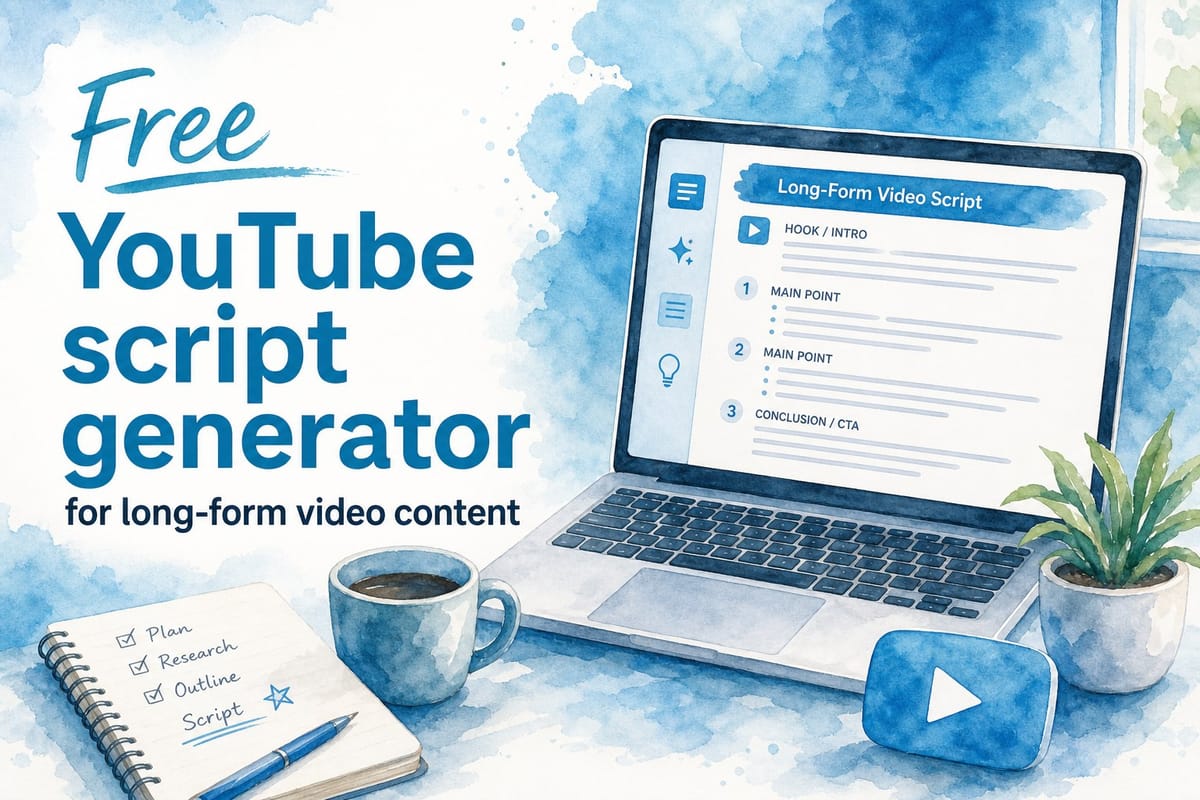
Table of contents
1. What a youtube script generator actually does for long-form content
2. How to get the most out of a free script generator for long-form videos
3. Why Kliptory goes beyond a standard youtube script generator
Writing a script for a long-form YouTube video is one of the hardest parts of being a creator. You have to research the topic, organize your ideas, write in a way that sounds natural when spoken aloud, and keep viewers watching for 10, 20, or even 40 minutes. That is a lot of work before you even think about recording or editing. A good youtube script generator can cut that process down from days to hours. In this article, I will walk you through what makes a great script generator for long-form content, what to look for in a free tool, and how Kliptory takes things a step further by turning your script into a fully produced video automatically.
What a youtube script generator actually does for long-form content
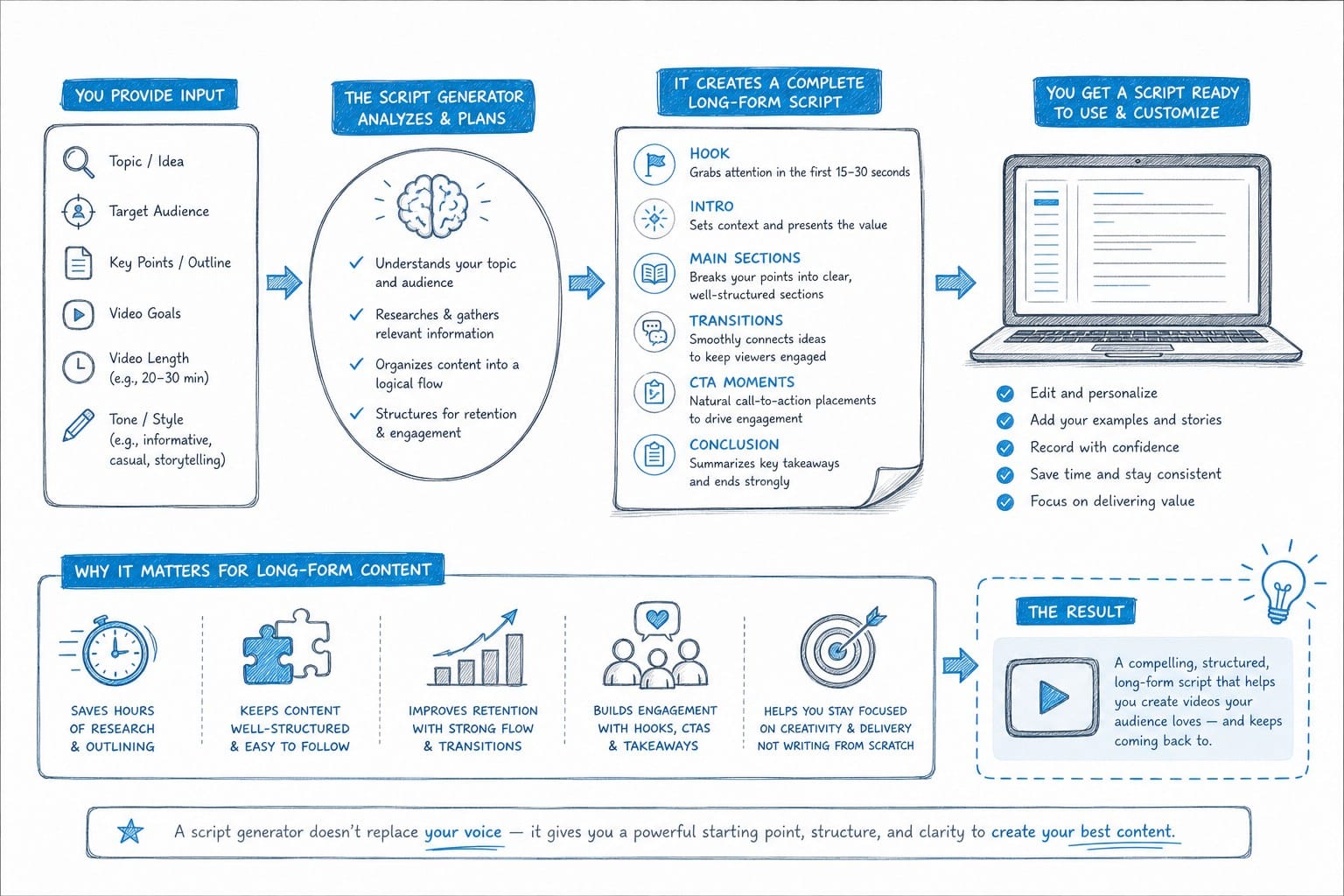
A script generator is not just an AI that spits out a few bullet points. For long-form YouTube videos, a real script generator needs to do several things well, and understanding those things helps you pick the right tool instead of wasting time on one that falls short.
Structure comes first. A 20-minute documentary-style video needs an opening hook, a clear narrative arc, natural transitions between sections, and a strong ending that either calls viewers to action or leaves them feeling satisfied. That structure is fundamentally different from what you need for a 60-second short or a quick product review. A script that lacks structure forces viewers to do the work of following along, and most will not bother. They will click away.
The narrative arc matters more than most creators realize. Think of a well-made documentary about the Space Race. It does not open with a list of dates. It opens with a moment of tension, pulls you into a story, and then walks you through the history in a way that feels like it is building toward something. A script generator built for long-form content should help you replicate that kind of structure, even on topics that seem dry on the surface.
Spoken language is different from written language. Most general-purpose AI writing tools produce text that reads fine on a page but sounds robotic when someone reads it aloud. Sentences are too long. Transitions are too formal. The rhythm is off. Long-form YouTube content lives or dies by how engaging the narration feels. Viewers will click away in the first 30 seconds if the voiceover sounds like it was written for a textbook.
A script generator designed for YouTube should produce sentences that are short enough to say in one breath, use contractions the way a real person does, and vary the sentence length so the pacing feels dynamic rather than monotonous. That is a specific skill, and not every tool has it.
Pacing is a structural problem, not just a writing problem. A good script generator for YouTube understands that different sections of a video move at different speeds. Background context can be covered quickly. A key turning point in a story deserves more time and space. A dramatic moment needs a beat of silence before the narration moves on. When the script does not account for pacing, the video feels flat even if the information is solid.
For faceless channel creators, this is especially important. You are not on camera holding the viewer's attention with facial expressions or energy. The script and the visuals have to do all of that work together. A weak script means a weak video, no matter how good your B-roll looks.
Here is what to look for in a free youtube script generator.
Topic depth is the first thing to evaluate. The tool should let you input a specific topic and generate a script that goes well beyond surface-level facts. For video essays, explainers, and documentary-style content, depth is what separates a 10-minute watch from a 30-minute one. If the generator keeps producing generic overviews, it will not serve you well for serious long-form work.
Length control is the second feature that matters. A script for a five-minute video looks very different from one built for 25 minutes. The pacing, the number of sections, the amount of detail per section, all of that changes based on target length. Good generators let you specify this upfront so you are not trying to stretch a thin script or cut down an overlong one.
Tone and style settings are the third thing worth checking. Some channels are serious and documentary-like. Others are conversational and high-energy. A useful script generator lets you specify the tone so the output matches your channel's voice instead of sounding like every other AI-generated video on the platform.
Section headers and timestamps are a practical feature that saves real time. Long-form scripts benefit from clear chapter breaks. When the generator includes these automatically, it makes editing much easier and gives you a ready-made framework for planning your B-roll and visuals.
Editable output is non-negotiable. No AI gets everything right on the first pass. Dates get wrong. Statistics appear without sources. Transitions feel abrupt. You need to be able to go into the generated script and adjust facts, change phrasing, or restructure sections without starting over from scratch. If the tool locks you out of editing or makes revision difficult, it will slow you down more than it helps.
The gap between a script and a finished video is where most creators get stuck.
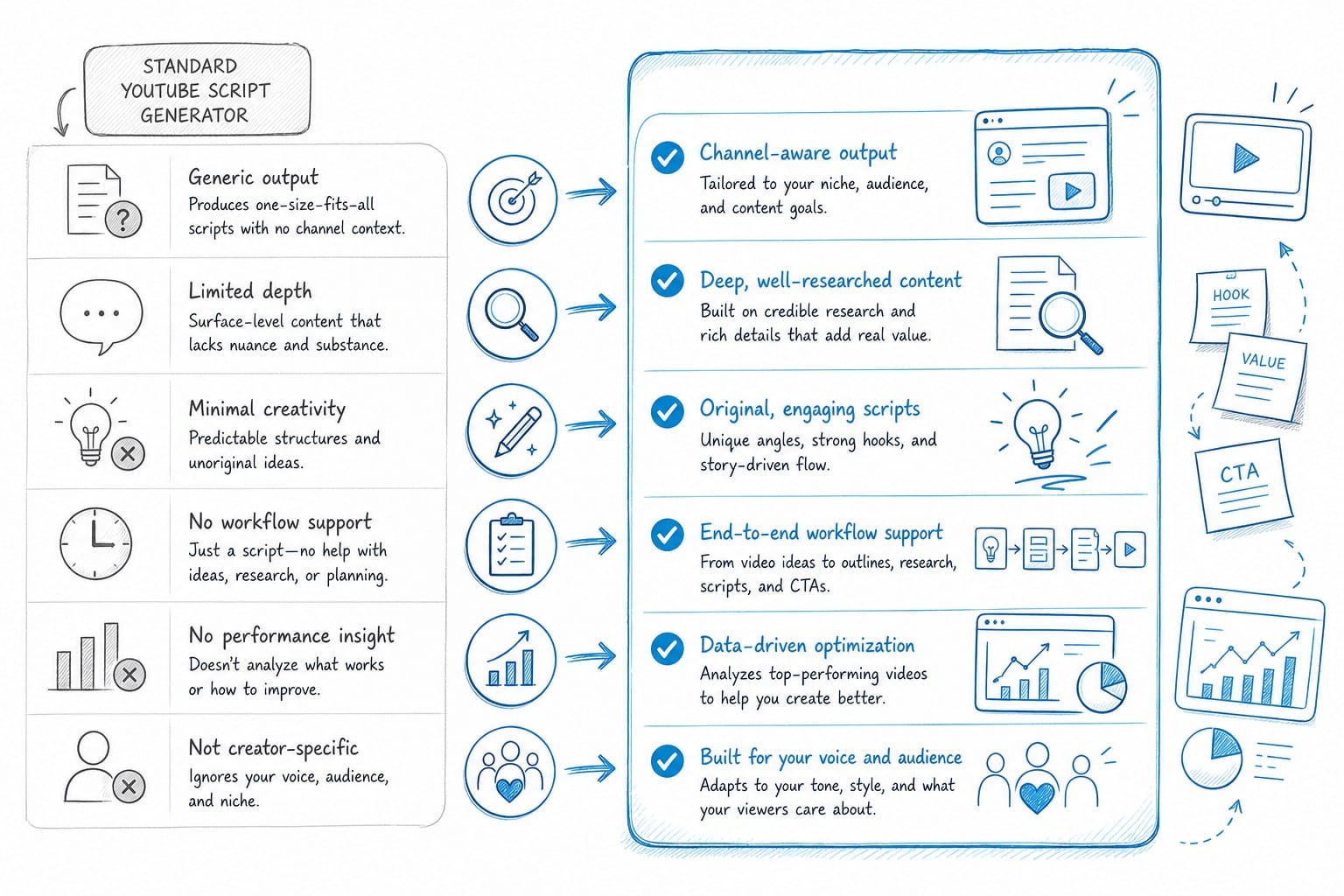
Most free tools offer some version of the features listed above, but they hit a ceiling. They give you a script and then leave you to figure out everything else on your own.
Think about what comes after the script. You need to source B-roll footage that matches each section of the video. You need to record or generate a voiceover. You need to sync the audio and video in a timeline editor. You need to add captions. You need to export a file that meets YouTube's technical requirements. If you are producing documentary-style content, you may also need charts, maps, or timelines to visualize data or historical events.
A creator who spends two hours generating a solid script can easily spend another two weeks finishing the video. The script is just the beginning of the production process, and for high-volume channels, that bottleneck compounds quickly.
For creators who are just starting out or testing a new niche, a free script generator is still a smart first step. It lets you validate ideas quickly, see how a topic could be structured as a video, and decide whether a concept is worth producing before you invest significant time or money. The key is going in with accurate expectations. A free youtube script generator gives you words. A full production platform gives you a finished video. Depending on where you are in your creator journey, you may need one or the other, or eventually both.
How to get the most out of a free script generator for long-form videos
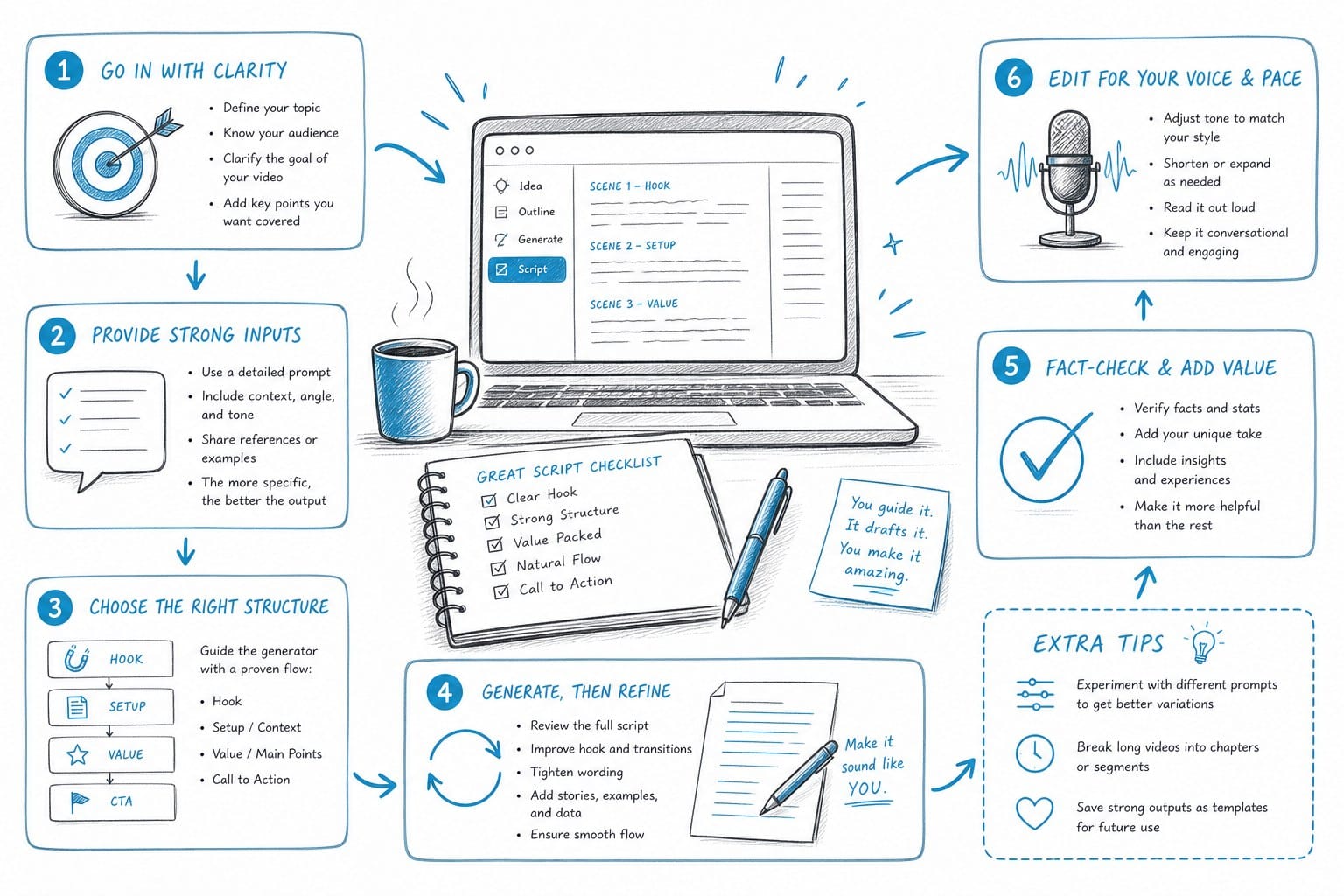
If you are going to use a free tool to generate scripts, there are practical strategies that will make a significant difference in the quality of what you get out. Most creators underuse these tools because they treat them like a search engine. You type a topic and expect something great. The reality is that AI script generators respond to how you prompt them, and a little extra effort upfront saves a lot of editing time later.
Start with a detailed prompt. Most free script generators work on a simple text input. The more specific you are, the better the output. Instead of typing "history of the Roman Empire," try something like: "a 22-minute documentary-style video about the fall of the Western Roman Empire, written for a general adult audience with no prior knowledge of Roman history, using a serious and authoritative tone, with clear chapter breaks every four to five minutes and a narrative structure that builds toward the final collapse in 476 AD." That level of detail gives the AI a clear target. Vague prompts produce vague scripts.
Ask for an outline first. Before you generate a full script, ask the tool to produce a chapter outline or a section-by-section structure. Review that structure and adjust it before the full script is generated. This saves a significant amount of editing time because you are fixing the architecture of the video before the writing begins, not after. If the outline puts a section in the wrong order or skips an important event, it is much easier to fix a five-line outline than a 5,000-word script.
For example, if you are writing a video about the 2008 financial crisis, your outline might reveal that the AI planned to start with mortgage-backed securities before explaining what they are. That is a pacing problem you can catch in 30 seconds at the outline stage. At the full script stage, it means reorganizing and rewriting multiple sections.
Generate in sections. Many free tools have token or character limits. For a 30-minute video script, you probably cannot generate everything in one go. Break your video into logical segments, generate each one separately, and then combine them. This also gives you more control over the pacing and depth of each section. If one segment feels too thin, you can prompt the tool to expand it without regenerating the entire script.
Write your hook manually. The opening 30 to 60 seconds of a long-form video are critical. This is the moment when viewers decide whether to keep watching or click away. Generic AI openings rarely nail this. They tend to start with something like "Throughout history, humans have been fascinated by..." which signals to the viewer that nothing interesting is about to happen.
Write the hook yourself, or heavily edit whatever the AI produces. A strong hook for a long-form video is usually specific, slightly surprising, and drops the viewer into the middle of something interesting before zooming out to explain what the video is about. If you are making a video about the Mongol Empire, do not open by explaining who Genghis Khan was. Open with a specific moment. The siege of a city. A messenger delivering news of an army three times larger than anyone expected. Then pull back.
Read the script out loud before you record anything. This sounds obvious, but many creators skip it. Reading a script out loud immediately reveals sentences that are too long to say in one breath, transitions that feel abrupt, and sections where the pacing drags. It also reveals places where the language is too formal and will sound stiff in the final video. Fix those issues in the script before you move to production. Fixing them in the editing room costs you far more time.
Check your facts. AI script generators do not always get facts right. Dates, statistics, names, and cause-and-effect relationships can all come out wrong, especially for topics where training data is incomplete or contradictory. For documentary-style content, accuracy is the foundation of your credibility. Always verify the key claims in your generated script against reliable sources before you publish. This is not optional if you care about your channel's reputation.
Add visual cues as you edit. A long-form script is not just dialogue. As you review the generated text, add notes to yourself about what visuals should appear on screen during each section. Something like [show map of Western Europe circa 400 AD] or [cut to footage of urban ruins] helps you plan your B-roll sourcing before you get to the editing stage. These notes also help if you are working with an editor or using an automated production platform that needs context about what visuals fit each section.
Match the script length to your monetization goals. YouTube's ad revenue structure rewards videos that are long enough to support mid-roll ads, which generally means at least eight minutes, and ideally longer. If you are targeting 15 to 20 minutes of watch time, your script should be built for that length from the start, not padded out afterward. A 2,000-word script reads at roughly 15 minutes at a natural narration pace. A 3,000-word script runs closer to 22 minutes. Use those rough benchmarks to guide how much content you ask the generator to produce.
Here is where the ceiling becomes visible.
If you are producing long-form videos at any consistent volume, say two or more per month, the process described above becomes time-consuming even with a script generator doing the heavy lifting on word count. You still have to source visuals, record or generate voiceover, edit the timeline, add captions, and handle all the technical output requirements. Each of those steps takes real time, and they stack.
For a creator doing one video per month as a hobby, that time investment is manageable. For a creator trying to build a faceless channel into a sustainable source of income, it becomes a bottleneck that limits output and slows growth.
Scripting is roughly 15 to 20 percent of the total work involved in producing a long-form YouTube video. A free script generator helps with that slice. Everything else still has to get done, and how you handle that other 80 percent determines whether your channel can actually scale.
How AI makes long-form YouTube videos faster to produce goes into detail on where the real time savings come from when you automate the full production stack, not just the scripting phase. If you are weighing whether to invest in a more complete tool, that breakdown is worth reading before you decide.
Why Kliptory goes beyond a standard youtube script generator
Kliptory is not a script generator in the traditional sense. It is a full production platform for faceless YouTube channels, and scripting is one part of a much larger automated workflow. Understanding how that workflow operates helps clarify why the tool exists and who benefits most from using it.
Here is how the process works from start to finish.
You begin with a topic. Kliptory uses AI to research that subject, build a structured script for a video that can run anywhere from 5 to 40 minutes, and write it in a style built for spoken narration in documentary and explainer formats. The scripting is calibrated for long-form content from the ground up, not repurposed from a general-purpose writing tool designed for blog posts or social media captions.
Once the script is generated, the platform moves into production automatically. It generates a voiceover from the script using AI narration. It sources B-roll footage that matches the content of each script section, so the visuals on screen are relevant to what the narrator is saying rather than generic stock footage that could belong to any video. It builds data visualizations, including animated maps, timelines, and charts, where the topic calls for them. It adds captions. It edits everything into a timeline.
What you end up with is a complete, export-ready video file. Not a script. Not a rough assembly that still needs hours of work in a timeline editor. A finished video ready to upload.
The data visualization capability deserves specific attention because it is not something you find in most AI video tools, and it makes a meaningful difference in production quality for certain types of content.
For documentary-style videos covering history, geography, geopolitics, economics, or science, the ability to automatically generate an animated map showing territory changes over time, or a timeline visualizing a sequence of events, or a chart illustrating a trend, adds a level of visual depth that viewers notice and respond to. It is the difference between a video that looks like a narrated slideshow and one that looks like a real documentary. That quality gap affects watch time, and watch time affects everything else: revenue, algorithm distribution, subscriber growth.
Consider a video about the expansion of the Roman Empire. A standard faceless video might show stock footage of ruins and archival illustrations. A Kliptory-produced video can include an animated map showing the empire's borders expanding and contracting across centuries, synchronized with the narration. That single visual element elevates the production in a way that a script generator alone could never provide.
For creators targeting international audiences, Kliptory supports multiple language outputs. This matters because the majority of YouTube viewers are not English speakers, and channels that can produce content in Spanish, Portuguese, Hindi, Arabic, or other major languages have access to enormous audiences that most English-language creators never reach. AI video generator with multiple language support for YouTube creators covers how this works and why it is worth factoring into your channel strategy if growth is your goal.
Who benefits most from this kind of platform?
The answer is specific. Kliptory is built for solo creators and small teams trying to produce high-volume long-form content without a post-production department. If you are running a faceless channel in a research-heavy niche, you already know that doing everything manually creates a hard ceiling on how many videos you can produce per month. You either cap your output, burn out trying to do everything yourself, or hire researchers and editors, which increases your costs significantly before your channel revenue can support those expenses.
Kliptory sits in the space between doing everything manually and building out a full production team. It handles the technical and time-intensive parts of production so you can focus on topics, channel strategy, and audience growth rather than spending the majority of your working hours on tasks that do not require your judgment or creativity.
For faceless channels focused on topics like history, geography, science, finance, true crime, or world events, this shift in how production works is significant. A video that might take two to three weeks with a traditional workflow, including research, scripting, voiceover recording, B-roll sourcing, timeline editing, captioning, and export, can be produced in a matter of hours.
It is also worth being honest about what Kliptory is not. It is not a tool for short-form content, TikTok-style videos, or on-camera YouTube formats where the creator's face and personality are the central element. It is purpose-built for long-form faceless content. That focus is why every feature in the platform, from the scripting style to the visual sourcing to the data visualization engine, is calibrated for that specific format rather than being a general-purpose tool trying to serve every kind of creator.
If your channel is built around 10 to 40 minute videos on topics that benefit from research-heavy, documentary-style treatment, the platform is designed for what you are trying to build. If you are making on-camera vlogs or short-form content, it is not the right fit.
If you are comparing options in this space, Produce.so alternative for AI-powered YouTube video creation breaks down how Kliptory compares to other platforms and where it fits for different types of creators and production goals. That comparison is useful if you have already looked at other tools and are trying to understand where Kliptory is different rather than just marketed as different.
Here is the honest version of the decision most creators face.
For creators still testing the waters with long-form content, starting with a free youtube script generator makes complete sense. It costs nothing, helps you validate topic ideas quickly, and gives you a feel for how long-form scripts are structured before you invest in a more complete solution. There is no reason to pay for a full production platform if you are not yet sure whether long-form faceless content is the right format for your channel.
But if you find yourself consistently stuck between having a good script and having a finished video, if the production work after the script is generated is eating days or weeks of your time, that is a clear signal that you need more than a script generator. The problem is not the writing. The problem is everything that comes after the writing.
Production is where most creators lose time. Time is the one resource you cannot get back. The faster you can move from idea to published video, the faster you can learn what resonates with your audience, the faster you can grow your channel, and the faster you can build the kind of consistent output volume that YouTube's algorithm rewards with distribution.
A 30-minute documentary-style video that took you three weeks to produce is not more valuable to your channel than one that took you three hours, assuming both are high quality. Output frequency matters. Channels that publish consistently outperform channels that publish sporadically, even when the sporadic videos are better in isolation. The economics of YouTube favor creators who can show up regularly, and anything that helps you do that without sacrificing quality is worth taking seriously.
A script is the foundation. A finished video is what gets uploaded, watched, shared, and monetized. The goal is not to have a great script sitting in a Google Doc. The goal is to have a published video accumulating views while you are already working on the next one.
Ready to take the next step?
Ready to move from script to finished video without weeks of production work in between? Kliptory automates the entire long-form video creation process, from research and scripting to voiceover, B-roll sourcing, data visualizations, captions, and final editing. Visit kliptory.com to see how it works and start producing documentary-style YouTube videos in hours instead of weeks.