How to scale a YouTube channel without hiring editors

Table of contents
1. Why the traditional editing model slows you down
2. How to build an automated production pipeline from script to finished video
3. Consistency and volume: the real drivers of channel growth
I want to tell you something that took me a long time to accept: hiring editors is not the only way to scale a YouTube channel. For years, the standard advice was simple. Want more videos? Hire more people. Want longer videos? Pay a bigger team. That model works, but it also puts a ceiling on how fast you can move and how much money you can keep. Today, creators are finding real ways to scale a YouTube channel without editors by using smarter systems and AI-powered tools that handle the heavy lifting. This guide breaks down exactly how to do that, step by step, without burning out or breaking your budget.
Why the traditional editing model slows you down
Most creators who want to grow faster think the answer is obvious: hire a video editor. And on the surface, that makes sense. An editor takes raw footage or a script off your plate and turns it into a finished video. But the reality of working with editors is messier than it sounds.
First, there is the hiring process itself. Finding a good editor takes time. You post the job, review applications, do test projects, negotiate rates, and onboard someone new. Even if everything goes smoothly, you might spend two to three weeks before a single new video gets made.
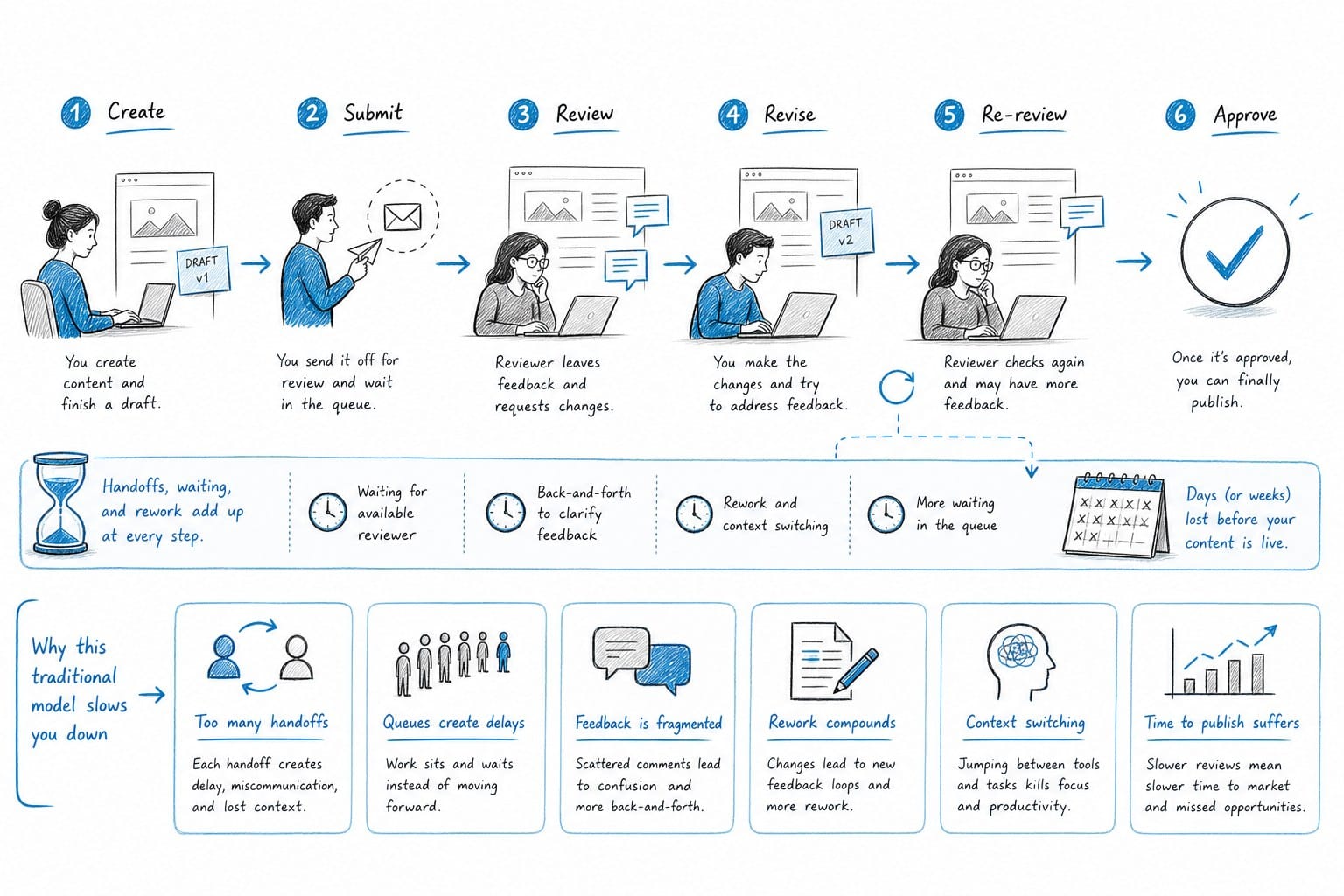
Then there is the feedback loop. You send a draft. The editor sends back a cut. You leave notes. They revise. You approve. That back-and-forth can stretch a single video across five to ten days, even with a fast editor. If you are running a faceless channel and trying to publish three or four videos a month, that timeline kills your momentum.
There is also the cost. A solid freelance editor for long-form documentary-style content might charge anywhere from $300 to $800 per video depending on length and complexity. At four videos a month, you are looking at $1,200 to $3,200 in editing costs alone before you have made a single dollar from the channel. For creators just getting started or running lean operations, that is a serious financial risk.
And here is the part nobody talks about enough: editors do not fix weak systems. If your scripting process is slow, your B-roll sourcing is disorganized, or your voiceover workflow is clunky, adding an editor just adds one more person into a broken pipeline. You still end up with delays. You still end up frustrated.
The smarter move is to build a production system that does not depend on a person being available, responsive, and affordable every single week. That is what automation-focused creators are doing right now, and it is why some solo operators are publishing more content than full teams.
I am not saying editors are bad or that you should never work with one. But if your goal is to scale a YouTube channel without editors, you need to stop thinking in terms of people and start thinking in terms of systems. The rest of this article is about building those systems.
How to build an automated production pipeline from script to finished video
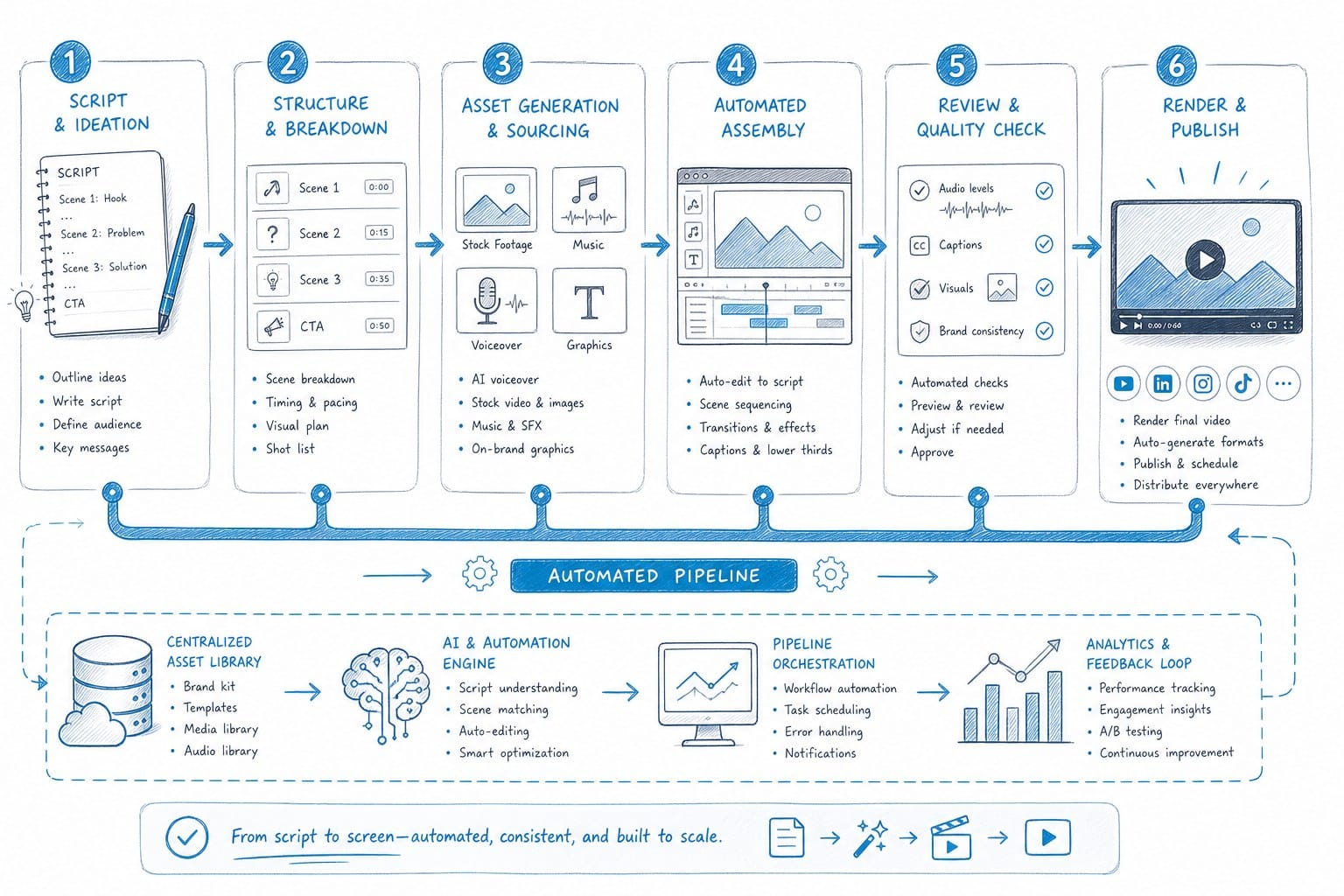
The key to scaling without editors is treating your video production like a factory floor, not a creative sprint. Every part of the process needs a defined step, a reliable tool, and as little manual intervention as possible. Let me walk you through each stage.
Step 1: Nail your niche and content format first
Before you automate anything, you need to know exactly what kind of videos you are making. Automation works best when your format is consistent. If you are jumping between talking-head vlogs, documentary essays, and reaction videos every week, no system will save you. Pick a lane.
For faceless channels, the most automation-friendly formats are listicles, explainer videos, video essays, and documentary-style content. These formats follow predictable structures. They rely on voiceover, B-roll, text overlays, and data visuals rather than on-camera personality. That predictability is what makes them so easy to systematize.
Step 2: Automate your scripting
Scripting is where most creators spend a disproportionate amount of time. Research, drafting, rewriting, structuring. It can eat up an entire day for a single video.
AI writing tools have gotten good enough to dramatically speed up this process. You still need to guide the direction, fact-check the output, and add your own angle. But the days of staring at a blank page for hours are over if you use the right tools.
For documentary-style videos specifically, a good script structure follows a consistent pattern: hook, context, main body with clear sections, and a strong close. Once you have that template locked in, you can produce a solid first draft of an 8 to 12 minute script in under an hour.
Platforms built specifically for faceless YouTube content, like Kliptory, go even further by integrating scripting directly with the rest of the production pipeline, so the script you write immediately becomes the foundation for voiceover, visuals, and editing without any manual hand-off.
Step 3: Automate your voiceover
Voiceover is one of the biggest bottlenecks for faceless channels. If you are recording your own voice, you deal with background noise, retakes, inconsistent audio, and the simple reality that recording takes time. If you are hiring voice talent, you are back to waiting on another person.
AI voiceover has reached a quality level where most viewers cannot tell the difference from a human narrator, especially when the delivery is clean and the pacing is right. There are several strong options available, and I cover the landscape in detail in this guide to AI voiceover for YouTube videos: best tools for faceless channels.
The short version: pick a consistent voice, dial in your preferred pacing and tone settings, and use the same voice across your channel. Consistency builds trust with viewers over time, and it makes your production workflow faster because you are not making new decisions every time.
With AI voiceover, a 15-minute narration script that might take two hours to record and clean up yourself can be generated in under five minutes. That time savings compounds dramatically when you are producing multiple videos per month.
Step 4: Automate your B-roll sourcing
For most faceless channels, finding and syncing B-roll footage to a script is the most tedious part of the entire process. You watch the script line by line, search stock libraries for relevant clips, download them, sort them, and then place them in your timeline. Manually. For every single sentence.
On a 20-minute documentary-style video, that process can take four to six hours even for an experienced editor. For someone without editing experience, it can take a full day or more.
AI-powered B-roll sourcing tools change this completely. They analyze your script, identify the key topics and visual concepts in each section, and automatically match relevant footage to each part of the script. The result is a rough visual cut that already has the right footage in roughly the right places.
I explain exactly how this works in this breakdown of AI B-roll sourcing for YouTube: automatically match visuals to your script. The key insight is that automated B-roll sourcing is not just a time-saver. It also removes one of the main reasons creators feel like they need an editor in the first place.
Kliptory handles B-roll sourcing as part of its full production pipeline, pulling relevant footage and placing it against the voiceover automatically. For documentary-style channels covering topics like history, geography, science, or finance, this is a massive unlock.
Step 5: Add data visualizations without a motion graphics team
One thing that separates good documentary-style content from great documentary-style content is the use of maps, timelines, charts, and other data visuals. These elements make complex information easier to follow and give your videos a more professional look.
Traditionally, creating these visuals required either expensive motion graphics software, a specialized designer, or both. That put them out of reach for most solo creators.
Today, platforms designed for faceless channel production can generate these visuals automatically based on your script content. When your script mentions a historical timeline, a geographic comparison, or statistical data, the system can produce a matching visual without you needing to open After Effects or hire anyone.
For channels in niches like history, geopolitics, economics, or science, this capability alone can dramatically raise the production value of your content and set you apart from competitors who are still using basic stock footage montages.
Step 6: Auto-generate captions
Captions are no longer optional on YouTube. They improve watch time, support accessibility, and help viewers who watch without sound. But manually transcribing and timing captions for a 20-minute video is brutal work.
Auto-captioning tools have been reliable for a few years now. Most AI production platforms include caption generation as a built-in step. Make sure whatever workflow you build includes automatic captions synced to your voiceover. It should cost you zero extra time.
Step 7: Final assembly and quality check
With all of the above automated, your final step before publishing is a quality review. Watch through the video at 1.5x speed. Check that B-roll matches the narration. Confirm captions are accurate. Make sure the pacing feels right and that data visuals appear at the correct moments.
This review step still requires your eyes and judgment. But it takes 20 to 40 minutes for most videos, not three to five hours of active editing work. That is the difference between a system that scales and one that burns you out.
When you stack all of these steps together using the right tools, it becomes genuinely possible to take a video from topic idea to finished, publishable file in a single day. For long-form documentary content that used to take a week or more, that is a fundamental shift in what one person can produce.
Consistency and volume: the real drivers of channel growth
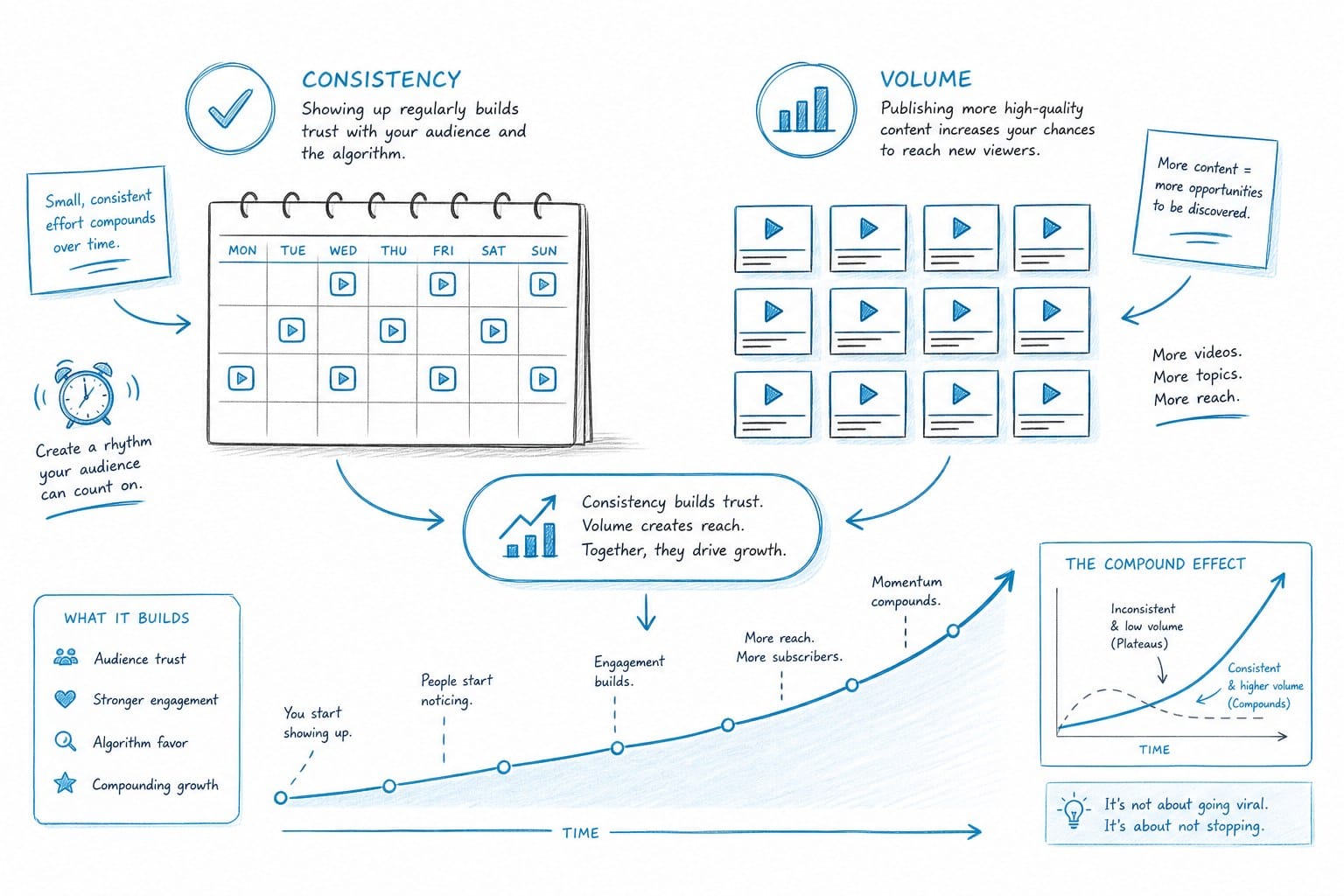
Building a fast production system is only half the equation. The other half is understanding why consistency and volume matter so much on YouTube, and how your new system makes both achievable.
YouTube's algorithm rewards channels that publish regularly. Not because the platform is punishing inconsistency for its own sake, but because consistent publishing gives the algorithm more data. More videos mean more chances to find the right audience. More publishing dates mean your channel stays active in subscriber feeds. More content means more entry points for new viewers to discover you through search.
A channel that publishes one video per week for a year outperforms a channel that publishes ten videos in a burst and then goes quiet for months. Steady output over time is how faceless channels build genuine momentum.
Here is where your automated pipeline becomes a competitive advantage: you can maintain a publishing schedule that most channels cannot match without a full team.
Let me put some real numbers on this. If you are producing a 15-minute documentary-style video using a traditional workflow with a hired editor, a realistic timeline might look like this:
- Research and scripting: 6 to 10 hours - Voiceover recording and cleanup: 2 to 3 hours - Editor turnaround time: 5 to 7 days - Review and revision cycles: 2 to 4 hours - Total clock time: 7 to 10 days per video
At that pace, you might publish four videos per month if everything goes smoothly. And you are paying an editor the whole time.
With an automated pipeline, those same steps might look like this:
- Research and scripting (with AI assistance): 1 to 2 hours - AI voiceover generation: 5 to 10 minutes - Automated B-roll sourcing and assembly: handled by the platform - Data visualization generation: handled by the platform - Captions: automated - Quality review and final adjustments: 30 to 45 minutes - Total active time: 2 to 4 hours per video
At that pace, publishing eight to twelve videos per month as a solo creator is realistic. That is two to three times the output, at a fraction of the cost, with no one on your payroll.
Volume matters more than perfection at the start
Early in a channel's life, a common mistake is spending too much time perfecting each video before publishing it. I understand the impulse. You want your work to look good. But the data on YouTube growth consistently shows that quantity drives discovery in the early stages more than quality alone.
This does not mean publishing garbage content. It means accepting that an 8-out-of-10 video published this week beats a 9-out-of-10 video published in three weeks. The sooner you have more videos in the world, the sooner the algorithm has something to work with.
An automated production system makes it easier to maintain high standards while still moving quickly, because the repetitive and time-consuming tasks are handled for you. Your energy goes into the creative decisions that actually differentiate your content: the topic angle, the story structure, the level of insight you bring.
Choosing tools that work together
One mistake I see creators make when trying to automate their workflow is stitching together too many separate tools that do not communicate well with each other. You end up with a scripting tool that exports to a format your voiceover tool cannot read, which exports audio that your editing tool handles differently, which requires manual re-syncing every time. That friction kills the time savings.
The most efficient approach is to use a platform that handles the full pipeline in one place. For faceless YouTube channels specifically, this means looking for a tool that covers scripting, voiceover, B-roll sourcing, data visuals, captions, and editing under a single roof.
Kliptory is built specifically for this use case. It handles the entire production process for long-form faceless content, including documentary-style videos from 5 to 40 minutes, without requiring you to switch between multiple tools or manually transfer files between steps. If you want to see how it stacks up against other tools in the space, this comparison of Pictory AI vs InVideo: which tool wins for long-form YouTube videos gives you a useful benchmark for understanding what different platforms actually offer for long-form content.
Reinvesting the time you save
Here is a strategic point that often gets overlooked. When you stop spending 30 or 40 hours a month on video production and editing, you do not just save time. You free up bandwidth to work on the things that actually grow a channel in the long run.
You can spend more time on topic research and finding angles that have real search demand. You can engage with your community in the comments. You can study your analytics and understand which video formats and topics are performing best. You can build out a second channel. You can pitch sponsorship deals.
These are the high-leverage activities that compound over time. They are also the first things to get cut when you are buried in production work. An automated system gives you back the space to do the work that only you can do.
Keeping quality high as you scale
Scaling volume without letting quality slip is a real concern, and it is worth addressing directly. The risk is that automation starts to produce generic-looking content that feels interchangeable with every other faceless channel in your niche.
The antidote is to put your creative fingerprint into the parts of the process that matter most. Your topic selection, your research depth, your scripting voice, and your story structure are what make your content distinctive. Automation handles the production mechanics. You still control the ideas.
A useful practice is to develop a content brief template for each video before you start production. The brief should cover the specific angle you are taking, the key argument or narrative thread, the target audience mindset, and two or three things this video will do better than existing videos on the same topic. When you have that clarity before production starts, the automated tools are executing a clear vision, not just generating generic content.
Consistency in visual style also helps. Use the same caption style, the same text overlay formatting, and the same color treatment across all your videos. Viewers start to recognize your aesthetic, which builds brand identity even on a faceless channel.
What to do when you are ready to grow further
At some point, your automated system will be running smoothly, your channel will be gaining traction, and you will be thinking about the next level. That might mean launching a second channel in a related niche. It might mean producing longer videos in a more complex documentary format. It might mean covering more topics per week.
The good news is that a well-built automated pipeline scales with you. Adding a second channel does not mean doubling your workload the way it would if you were doing everything manually. It means replicating a system that already works.
If you do eventually bring on help, the right hire at that stage is not an editor. It is a researcher or a topic strategist, someone who helps you find better angles and deeper source material. The production work stays automated. The human contribution goes into the creative and strategic layer, which is where the real value lives anyway.
Ready to take the next step?
If you are ready to stop waiting on editors and start scaling your faceless YouTube channel on your own terms, Kliptory is built exactly for this. It handles scripting, voiceover, B-roll, data visualizations, captions, and editing in a single pipeline, so you can produce long-form documentary-style videos in hours instead of weeks. Visit kliptory.com to see how it works and start building a production system that actually scales.