Best YouTube analytics tools for tracking growth and revenue

Table of contents
1. What to look for in a YouTube analytics tool
2. The best YouTube analytics tools and what they do well
3. How to actually use analytics data to grow your channel faster
If you run a YouTube channel, you already know that posting videos is only half the battle. The other half is understanding what is actually working. That is where analytics tools come in. The best YouTube analytics tools help you track watch time, revenue, subscriber growth, click-through rates, and a dozen other numbers that tell you whether your channel is moving in the right direction. I put together this guide to walk you through the most useful tools available right now, what each one does well, and how to pick the right combination for your goals. Whether you are running a faceless documentary channel, a video essay series, or a listicle channel on the side, the right data can be the difference between guessing and growing.
What to look for in a YouTube analytics tool
Before diving into specific tools, it helps to know what you actually need. Not every analytics platform is built for the same creator. A small solo channel has different needs than a team publishing ten videos a month. Here are the core things worth evaluating before you sign up for anything.
Watch time and audience retention data
Watch time is one of the most important signals YouTube uses to decide how widely to distribute your videos. A good analytics tool does not just show you total watch time. It shows you where viewers are dropping off, which segments are rewatched, and how retention compares across different video lengths or formats. For creators making long-form content in the 10 to 40 minute range, this data is especially valuable because even a five percent improvement in average view duration can meaningfully change how YouTube distributes a video.
Revenue tracking and monetization insights
If your channel is monetized, you want more than just a monthly AdSense total. Useful revenue tracking breaks down CPM (cost per thousand impressions), RPM (revenue per thousand views), which videos are earning the most, and how earnings shift across different months or niches. Some tools also track revenue from channel memberships, Super Chats, and affiliate links, which matters if you have multiple income streams connected to your channel.
Keyword and search performance data
YouTube is the second largest search engine in the world. Knowing which search terms are driving people to your videos, and which ones you are not ranking for yet, gives you a concrete direction for future content. Look for tools that show you keyword volume, competition level, and how your videos are ranking for specific terms over time.
Competitor and niche benchmarking
Some of the best YouTube analytics tools let you look beyond your own channel. You can see how channels in your niche are growing, what topics are trending, and where there are gaps you could fill. This kind of external data is hard to get from YouTube Studio alone, which only shows your own channel's numbers.
Ease of use and reporting
A tool that surfaces great data but buries it in confusing dashboards is not actually helpful. Think about how you plan to use the data. Do you need weekly reports? Do you want to share data with a collaborator or client? Look for clean dashboards, export options, and clear visualizations that make the numbers easy to act on.
With those criteria in mind, here is a look at the tools most worth your time.
The best YouTube analytics tools and what they do well
There is no single tool that does everything perfectly. Most serious creators use a combination of two or three platforms depending on what they need. I will break down the major options here, focusing on what each one genuinely does well.
YouTube Studio (free, built-in)
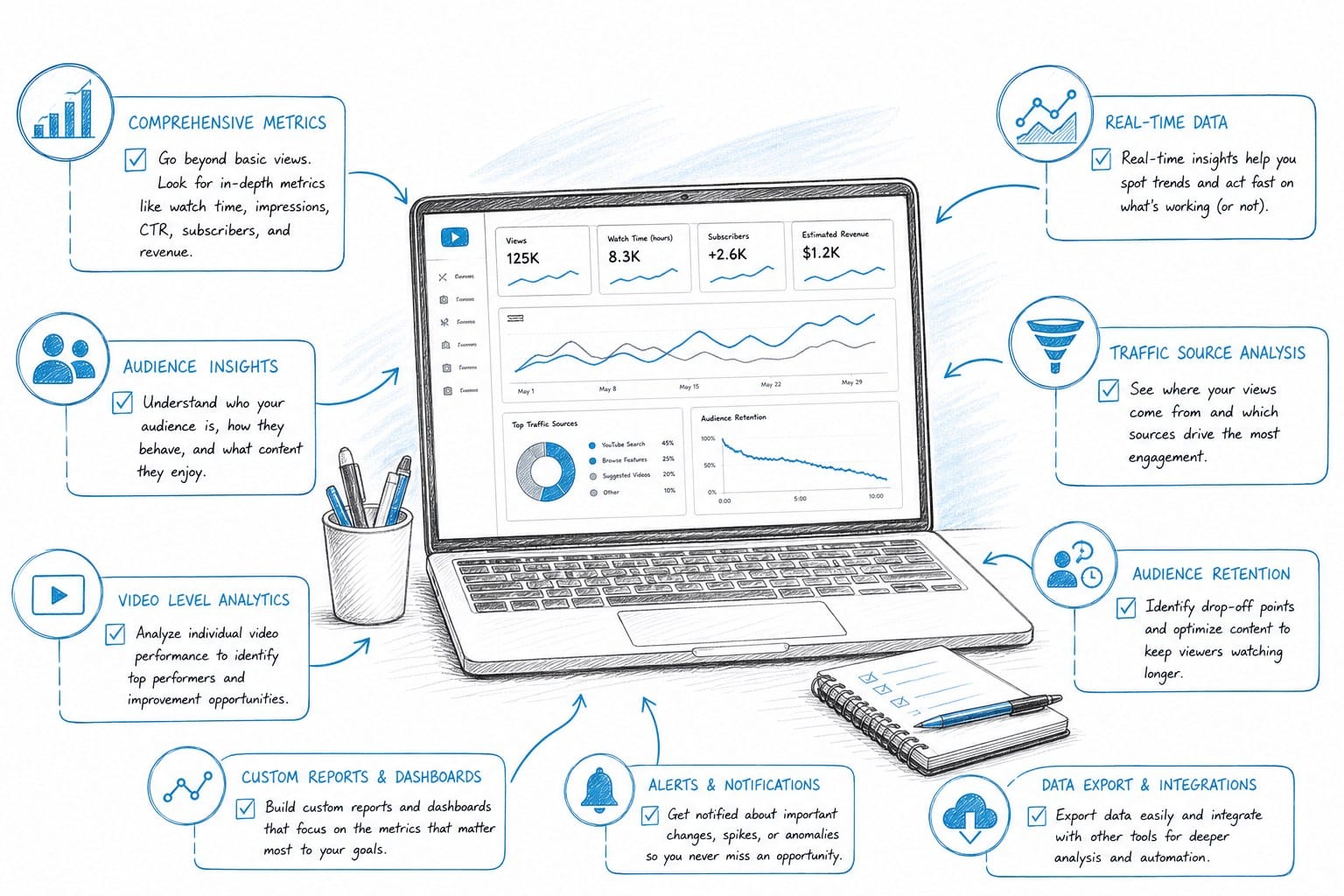
YouTube Studio is the starting point for every creator. It is free, it is built directly into the platform, and it gives you access to more data than most people realize. From YouTube Studio, you can track:
- Watch time and average view duration per video - Impressions and click-through rate (CTR) - Traffic sources, including search, suggested videos, and external referrals - Audience demographics including age, gender, and geography - Revenue data if your channel is in the YouTube Partner Program - Real-time views in the first 48 hours after a video goes live
The advanced mode inside YouTube Studio lets you compare date ranges, filter by specific videos or content types, and build custom reports. Many creators underestimate how much is available here before reaching for a paid tool.
The limitation is that YouTube Studio only shows your own channel. It does not tell you how competitors are performing, what keywords are trending in your niche, or how your CTR compares to similar channels. For that, you need third-party tools.
TubeBuddy
TubeBuddy is a browser extension that overlays analytics and optimization features directly on top of YouTube. It is one of the most widely used tools in the creator space, and for good reason. Its keyword explorer shows you search volume estimates, competition scores, and related terms you might not have thought of. It also shows you how well a given keyword matches your channel's authority, which helps smaller channels target terms they can realistically rank for.
TubeBuddy's A/B testing feature is particularly useful. You can test two different thumbnails or titles and let it automatically determine which one drives a higher CTR. Over time, this kind of systematic testing compounds into real growth. It also has a bulk processing tool that lets you update tags, descriptions, or end screens across multiple videos at once, which saves a lot of time if you have a large back catalog.
For faceless channel operators or creators focused on scaling content production, TubeBuddy fits well into a workflow built around efficiency. If you want to explore how TubeBuddy compares to other options for that kind of channel, I have a more detailed breakdown in this post about a TubeBuddy alternative for faceless YouTube creators.
VidIQ
VidIQ is TubeBuddy's closest competitor, and the two tools overlap significantly. Both offer keyword research, competitor tracking, and optimization scores. VidIQ tends to stand out in a few specific areas.
Its daily ideas feature surfaces trending topics in your niche each day based on what is performing well across YouTube right now. For creators who publish frequently and need a steady pipeline of ideas, this is genuinely useful. It also has a views-per-hour tracker that shows how quickly a video is gaining traction in the first few hours after publishing, which can tell you early on whether a video has legs or whether you might want to tweak the title or thumbnail.
VidIQ's competitor analysis is solid. You can track specific channels and get notified when they publish new videos, see their estimated views and engagement rates, and spot patterns in what is working for them. If you are in a crowded niche, that kind of intelligence is worth having.
One note: VidIQ's free tier is fairly limited. The most useful features like the keyword research tool and competitor tracking require a paid plan. Pricing varies, so it is worth checking their current options before committing.
Social Blade
Social Blade is a free tool that tracks public channel statistics across YouTube, Twitch, Instagram, and other platforms. It shows historical subscriber counts, estimated monthly views, and estimated earnings ranges for any public channel. The earnings estimates are famously wide ranges (they account for the variation in CPM across niches and regions) but they give you a rough sense of what a channel at a certain view count might be earning.
Where Social Blade really shines is in benchmarking. You can look up any channel in your niche and see exactly how their subscriber and view counts have changed over time. This helps you spot when a channel had a breakout video, when they went through a dry spell, and how fast they are growing relative to you. It is a useful free resource even if you use other tools for your primary analytics.
Channellytics and similar niche tools
Beyond the major players, there are smaller and more specialized analytics platforms worth knowing about. Some focus specifically on revenue tracking and AdSense data with more detail than YouTube Studio provides. Others specialize in audience overlap analysis or deep-dive content audits.
If you are running a monetized channel at scale, tools that connect directly to your AdSense account and break down revenue by video, by day, and by ad type can give you a clearer picture of which content is actually driving income. This matters a lot if you are deciding where to invest your production time and resources.
Google Analytics and UTM tracking
If your YouTube channel drives traffic to an external website, newsletter, or product, Google Analytics becomes an important piece of the puzzle. By adding UTM parameters to links in your video descriptions, you can track exactly how many website visitors are coming from specific videos, what they do when they get there, and whether they convert into customers or subscribers.
This is especially relevant for digital entrepreneurs and side-hustlers using YouTube as a top-of-funnel channel. The data from Google Analytics helps you connect YouTube performance to actual business outcomes, not just views and watch time.
Notion, Airtable, or spreadsheet-based tracking
Some creators find that the most useful analytics layer is one they build themselves. A simple spreadsheet that logs each video's views, watch time, CTR, revenue, and ranking for its target keyword over time gives you a longitudinal view that none of the third-party tools quite replicate. You can spot trends specific to your channel, track experiments you run, and build a knowledge base about what works in your particular niche.
This is not glamorous, but it is effective. Pairing a custom tracking sheet with one or two of the tools above covers most of what a growing channel needs.
Picking the right combination
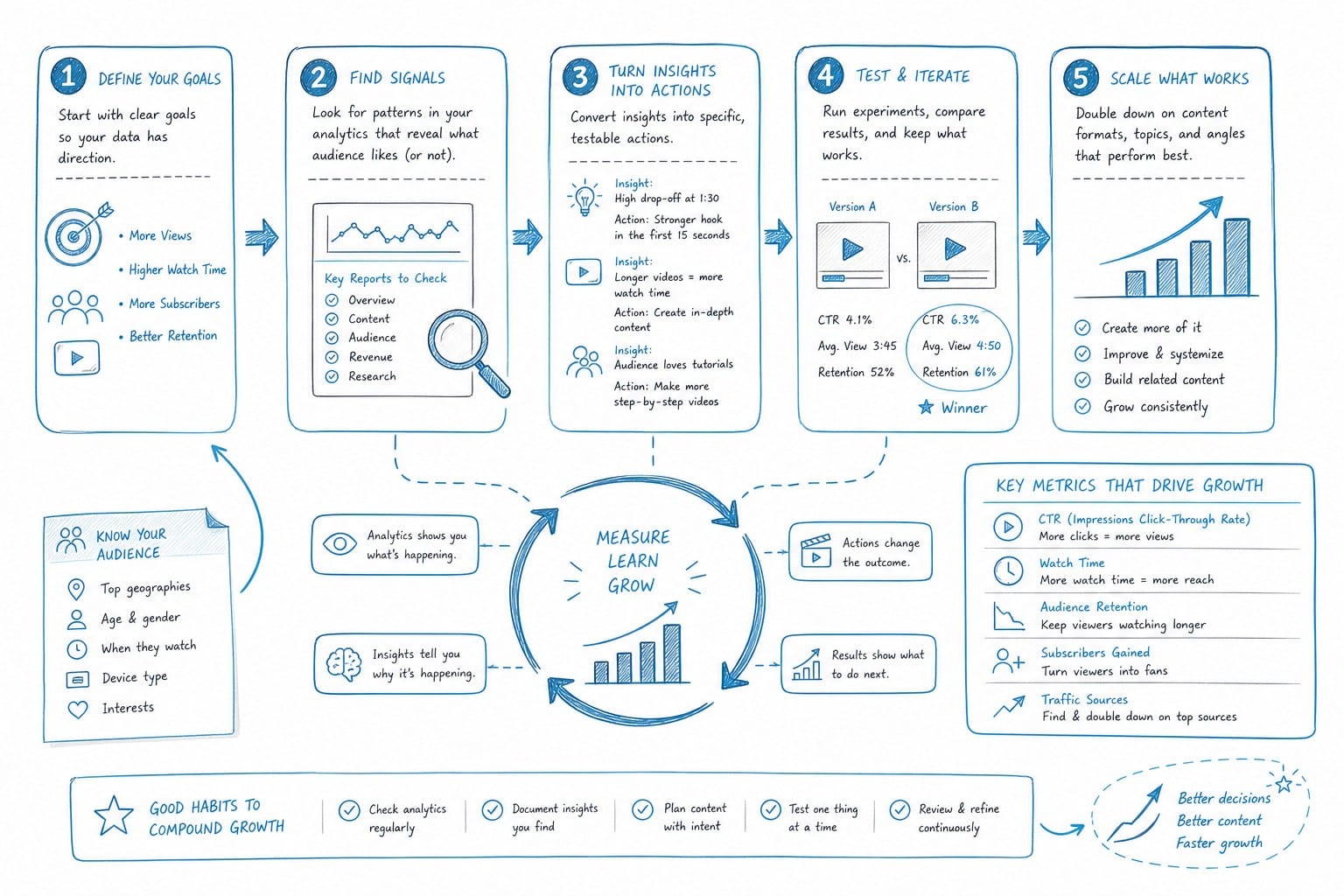
For most solo creators or small teams, a practical setup looks something like this:
- YouTube Studio for your primary day-to-day data - TubeBuddy or VidIQ for keyword research and optimization - Social Blade for competitor benchmarking - A simple spreadsheet for long-term trend tracking
If you are monetized and earning meaningful revenue, adding a more detailed AdSense tracking tool or connecting YouTube Studio's revenue data to your own reporting system is worth the extra step.
The goal is not to have the most tools. It is to have the right data in front of you when you are making decisions about what to create, how to optimize it, and whether your channel is on the right trajectory.
How to actually use analytics data to grow your channel faster
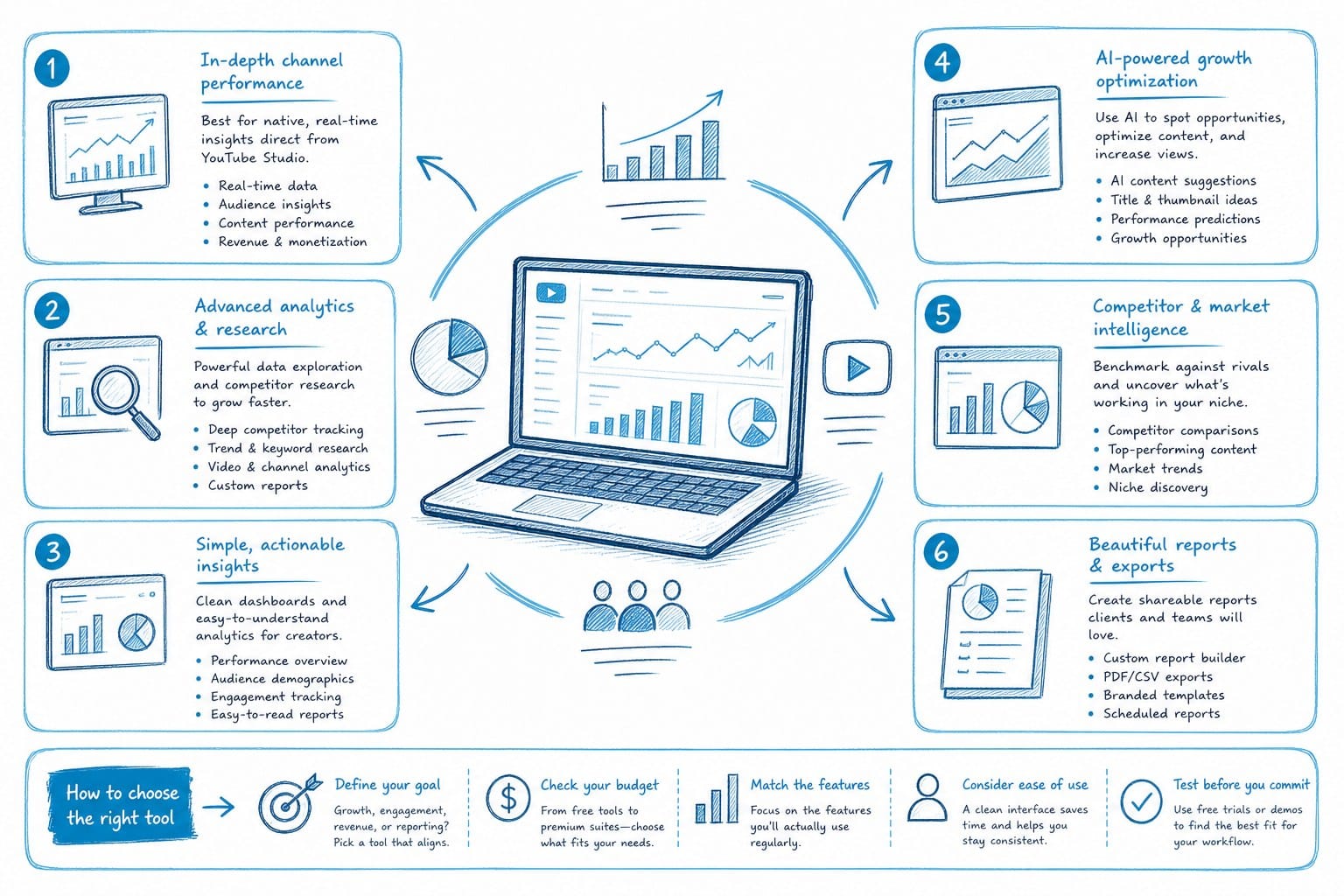
Having access to good data is only useful if you act on it. A lot of creators collect analytics without a clear system for turning numbers into decisions. Here is a practical framework for using the best YouTube analytics tools in a way that actually moves your channel forward.
Start with your click-through rate and retention curve
Every video tells you two things right away: how compelling the thumbnail and title are (CTR) and how well the content delivers on that promise (retention). These two numbers together are a diagnostic for almost any video that underperforms.
If your CTR is low (below 3 to 4 percent for most niches), the problem is usually the thumbnail, the title, or both. People are seeing your video but not clicking on it. This is a marketing problem, not a content problem.
If your CTR is healthy but your retention drops sharply in the first two minutes, the problem is usually the hook. Viewers clicked expecting one thing and got something different, or the opening was too slow to hold their attention.
If retention drops at a consistent point deeper in the video, that spot is worth rewatching. There is usually a pacing issue, an awkward transition, or a section that goes on longer than it needs to.
For long-form content creators making documentary-style videos, retention curves have a specific shape to aim for. A small drop in the first 30 seconds is normal. The curve should stabilize and stay relatively flat through the middle of the video, with a natural decline toward the end. If your curve looks like a steep slide from the beginning, that is a sign the structure of your video needs rethinking.
Track keyword rankings over time
One of the most underused features in tools like TubeBuddy and VidIQ is the ability to track how your videos rank for specific search terms over time. When you publish a video targeting a specific keyword, you should note where it ranks in week one, month one, and month three. YouTube's algorithm takes time to understand and distribute content, so a video that ranks poorly at first can climb significantly over several months if it has strong engagement signals.
Keeping a log of this data helps you understand the lag between publishing and ranking in your niche. It also tells you which types of titles, thumbnails, and content formats are most effective at earning long-term search traffic in your specific topic area.
Use revenue data to prioritize content topics
If your channel is monetized, CPM and RPM data by video is one of the most actionable signals available to you. Different topics attract different advertisers and different audience demographics, which means CPM varies widely even within the same channel.
For example, a video about personal finance or business software will typically attract higher CPM than a video about entertainment or lifestyle topics, because advertisers in those categories are willing to pay more to reach those audiences. If you notice that certain topics in your catalog consistently earn higher RPM, that is a signal worth paying attention to when you plan future content.
This does not mean you should only make high-CPM content if it does not fit your channel's identity. But if you are choosing between two equally strong video ideas and one is in a significantly higher-paying niche, the data makes that decision easier.
Run thumbnail and title tests systematically
TubeBuddy's A/B testing feature, which I mentioned earlier, is one of the more concrete ways to use analytics tools to improve performance. Rather than guessing which thumbnail will perform better, you test both and let viewer behavior tell you the answer.
A disciplined approach to testing looks like this: form a specific hypothesis before the test (for example, "a thumbnail with a face performs better than one without in this niche"), run the test for a meaningful sample of impressions, record the result, and apply the learning to future videos. Over time, this builds a real knowledge base about what works for your specific audience.
Watch your traffic source breakdown
YouTube Studio's traffic source data shows you where your views are coming from: YouTube search, suggested videos, browse features (the home page and subscription feed), external sources, and direct links. Each source tells you something different.
Search traffic means your video is ranking for terms people are actively looking for. This is generally stable and durable over time. Suggested traffic means YouTube is recommending your video to people watching related content, which can generate large spikes but is harder to predict or engineer. Browse traffic means your channel has built enough of an audience that YouTube is surfacing your videos to subscribers and interested viewers on the home page.
If almost all of your traffic comes from one source, you are more vulnerable to changes in YouTube's algorithm. A healthy channel typically has traffic coming from multiple sources, which creates more stability. Analytics tools help you spot when your traffic mix is shifting, so you can adjust your strategy accordingly.
Connect production quality to performance data
This is a point that often gets skipped: the best analytics insights are only as valuable as your ability to act on them quickly. If improving a video requires weeks of production time or a full editing team, you cannot iterate fast enough to use data effectively.
This is one of the reasons I think AI-powered production tools are becoming so important for faceless channel creators specifically. When you can produce a polished long-form video in hours rather than weeks, you can actually run experiments, test new formats, and respond to what the data is telling you. If a certain topic or structure is performing well, you can double down on it in days, not months.
For creators who are building that kind of high-output, data-driven workflow, the scripting side of production is often the biggest bottleneck. A well-structured script is the foundation of a high-retention video. If you want to speed up that step, I go into more detail on the options available in this post about a free YouTube script generator for long-form video content.
And if you are thinking about expanding beyond a single language to reach larger audiences, which can have a significant effect on both view counts and revenue, there are AI tools built specifically for that. I cover that topic in this post on an AI video generator with multiple language support for YouTube creators.
Set a regular review cadence
The creators who get the most value from analytics tools are the ones who review their data on a consistent schedule rather than checking numbers randomly or only when a video does unusually well or poorly.
A simple cadence that works for many solo creators looks like this:
- Weekly: check views, watch time, and CTR on recent videos; note anything unusual - Monthly: review revenue, top-performing videos, keyword rankings, and subscriber growth trends - Quarterly: do a deeper audit of traffic sources, retention curves across your catalog, and competitor benchmarking
This kind of regular review keeps you from making reactive decisions based on one good or bad week, and it helps you spot longer-term trends before they become problems or missed opportunities.
Do not let analytics paralysis slow you down
One last point worth making: data is a tool for making better decisions, not a replacement for publishing. Some creators spend so much time analyzing performance that they slow down their output. The algorithm rewards consistency. A channel that publishes regularly, reviews data thoughtfully, and applies what it learns will outperform a channel that publishes rarely but agonizes over every metric.
The best YouTube analytics tools are useful precisely because they help you make faster, smarter decisions, not because they give you more things to worry about. Use them to answer specific questions, take action on what you learn, and keep publishing.
Ready to take the next step?
If you are building a faceless YouTube channel and want to produce long-form documentary-style videos faster without hiring a full production team, Kliptory is built for exactly that workflow. From scripting and voiceover to B-roll sourcing, data visualizations, captions, and editing, the platform handles the heavy lifting so you can focus on strategy and growth. Visit kliptory.com to see how it works and start your first project.