Best AI tool for making YouTube listicle videos faster

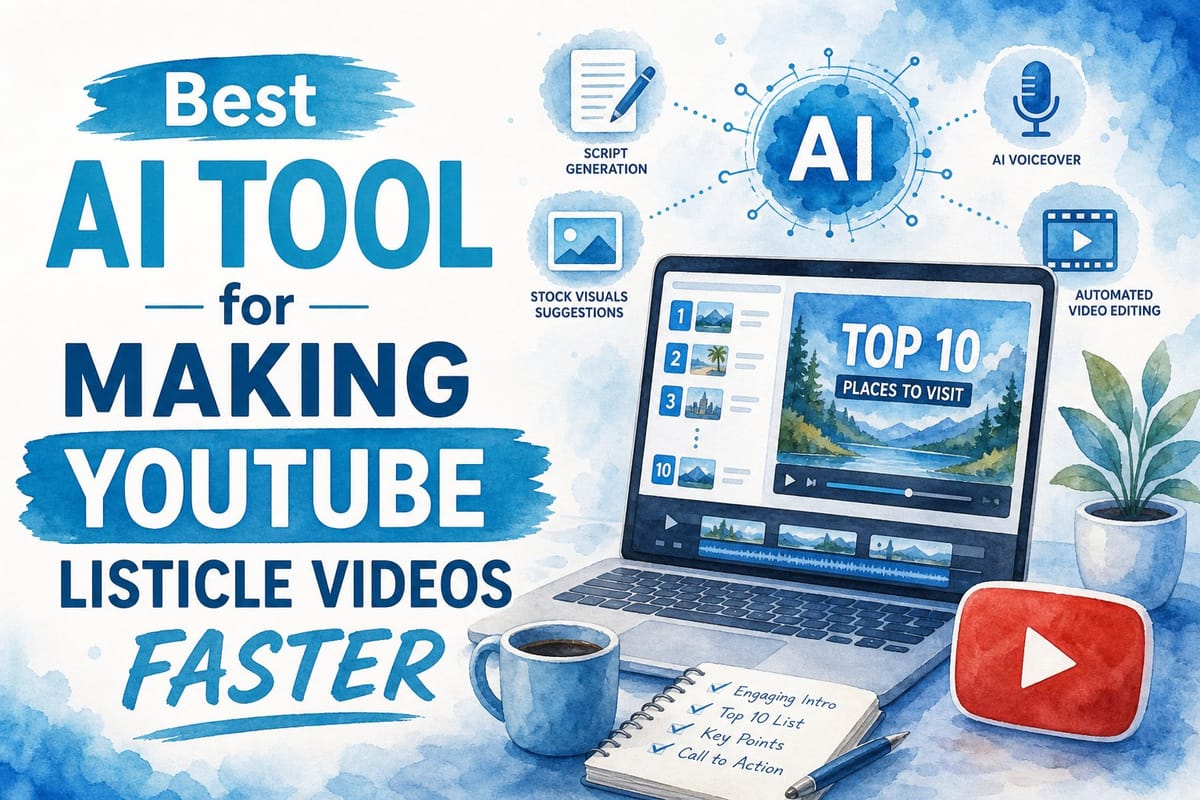
Table of contents
1. Why listicle videos are harder to produce than they look
2. What to look for in an AI tool built for listicle-style YouTube content
3. How Kliptory speeds up listicle video production from start to finish
If you run a faceless YouTube channel, you already know how much time a single listicle video can eat up. Scripting, voiceover, finding B-roll, editing, captions — a 10-minute "Top 10" video can easily take 20 or 30 hours to finish. That is a serious problem when you need to post consistently to grow. The good news is that the right AI tool for YouTube listicle videos can cut that timeline down to a few hours, not a few days. In this article, I want to walk you through exactly what makes a listicle video time-consuming, what features actually matter in an AI production tool, and why Kliptory stands out as the platform built specifically for this type of content.
Why listicle videos are harder to produce than they look
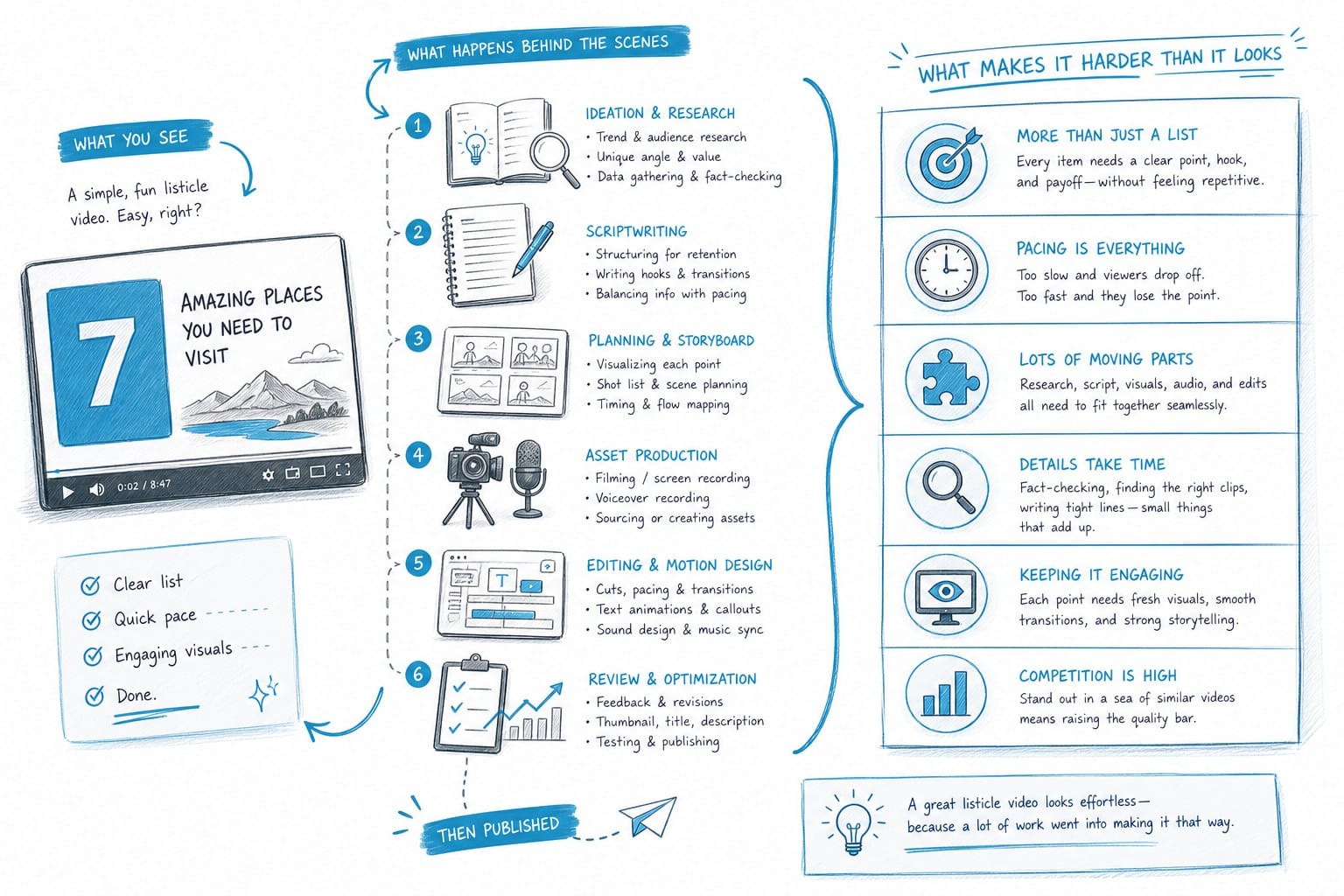
Listicle videos look simple from the outside. You have a title like "Top 15 Abandoned Cities in the World" or "10 Fastest Animals on Earth," and you go through each item one by one. Viewers love this format because it is easy to follow and gives them a clear sense of progress as they watch. But from a production standpoint, listicles are actually one of the most labor-intensive formats on YouTube — and the gap between how simple they look and how long they take to build is where a lot of creators get stuck.
Here is what a typical listicle production process looks like without any automation.
Writing the script
For a 10-minute video, you need roughly 1,400 to 1,600 words of tightly written copy. That means an engaging hook, a short intro that tells the viewer exactly what they are about to see, and then 10 to 15 individual segments, each with its own facts, context, and a smooth handoff to the next item. You are not just writing a list. You are writing 10 to 15 mini-stories that each need to hold attention on their own while also fitting into a larger whole.
If you are researching as you write — which most creators do — that process takes three to five hours at minimum. If you are covering a topic you are not already deep on, like ancient engineering or deep-sea biology, you can add another two or three hours of research on top of that.
Recording or generating a voiceover
Faceless channels almost always use a text-to-speech solution rather than recording their own voice. That sounds fast, but it is not as simple as pasting text and clicking a button. You are adjusting pronunciation on unusual words, tweaking pacing between sentences, exporting audio segments, and then bringing all of those files into your editor in the right order. A 10-minute narration with 12 list items might mean 12 separate audio exports to manage.
Sourcing B-roll for every single list item
This is where listicle videos get genuinely painful. Every item on your list needs visual support. For a "Top 10 Abandoned Cities" video, you need footage or images for 10 different locations — ideally footage that actually shows each city, not a generic urban decay clip that could be anywhere. You are hunting through stock libraries, downloading files, checking licensing terms, renaming clips so you can find them later, and then importing everything into your editing timeline.
For a 10-item listicle, that search-and-download process easily takes four to eight hours. For a 15-item listicle with geographic diversity — say, locations spread across six continents — you can push past 10 hours just on B-roll. Some of the footage you find will not look right next to the narration, so you go back and search again. It compounds quickly.
Editing the full video
Once you have your script, audio, and footage, you still have to assemble everything. That means aligning each audio segment with the right visuals, cutting dead space between sentences, adding background music and balancing it under the narration, writing and styling captions, adding any graphics or lower-thirds you want for each list item, and then exporting a final file at the right specs for YouTube. A 10-minute listicle typically takes another three to five hours in the editing phase, even for someone who is fast in their editor.
Add all of that up and you are looking at 15 to 25 hours of work per video, sometimes more depending on the topic and your niche. If you want to post twice a week — which most growth-focused channels aim for — that is essentially a full-time job on top of whatever else you have going on.
Why this creates a production ceiling
This is the wall that stops most faceless channel creators from growing. They start with real energy and a clear content strategy. They produce a few videos, see some early traction, and want to accelerate. But the production grind does not speed up just because your motivation goes up. It takes the same 20 hours whether you are at 100 subscribers or 10,000.
So they post less frequently. The channel loses momentum. The algorithm deprioritizes content that does not come out on a consistent schedule. Growth slows or stalls, and the creator either burns out or starts looking for shortcuts.
The shortcuts that actually work are not about cutting corners on quality. They are about removing the repetitive, mechanical steps that do not require a creative decision. Writing a script requires creative judgment. Deciding which list items to include, what angle to take, and how to open the video — those are human decisions. But hunting through a stock library for footage of the Danube River is not a creative decision. It is a time tax.
That is exactly where an AI tool for YouTube listicle videos delivers real value. The best tools handle the mechanical parts of production automatically: building a structured script, generating a voiceover, sourcing visuals for each list item, and assembling everything into a finished video. You still guide the creative direction. You still decide the topic, review the script, and approve the final output. But you stop spending eight hours on tasks that software can handle in minutes.
If you want to understand the full scope of what automation can look like across an entire channel workflow, this breakdown of how to automate YouTube video production end-to-end with AI is worth reading before you commit to any tool.
What to look for in an AI tool built for listicle-style YouTube content
Not every AI video tool is designed with listicle creators in mind. Some are built for short-form clips. Others convert blog posts into slideshow-style videos with a handful of stock images and a text overlay. Those tools have their place, but they are not going to help you produce a 10- to 20-minute listicle that holds viewer attention for the full runtime and competes in a niche with established channels.
When evaluating what actually matters for listicle production, there are five areas worth examining closely. Most tools fail in at least two or three of them.
Script generation that understands list structure
A good listicle script is not a list of facts separated by line breaks. Each entry needs its own mini-arc: a hook for that specific item, the core information, one or two supporting details that add texture, and a transition that leads naturally into the next item. The tone needs to stay consistent across all 10 or 15 entries, which is harder than it sounds when you are working with AI-generated text.
An AI tool that produces a generic article-style draft and calls it a script is not going to serve you well in practice. What you need is a tool that generates video-native scripts — content written for ears, not eyes. That means shorter sentences, natural spoken rhythm, pacing that maps to a viewer who is listening while looking at footage, and a structure that tells the audience where they are in the list at all times.
You also want the script to come out with a clear format: an opening hook, a brief statement of what the list covers, numbered entries with consistent framing for each one, and a closing that gives the video a sense of resolution. If you have to restructure a blob of AI text into that format yourself, you have lost a significant chunk of the time you were trying to save.
Voiceover quality that holds attention across a long video
Faceless channels live or die on their voiceover quality. Viewers will leave within the first 30 to 60 seconds if the narration sounds robotic or flat. The AI voice needs to sound like a real person reading with intention and energy — not a text-to-speech engine from a decade ago.
There is also a durability issue specific to listicle content. A voice that sounds acceptable for the first two minutes of a video might become fatiguing by the 12-minute mark. Long-form content puts more stress on the voiceover than a 60-second clip does, so you want to evaluate AI voices against the actual runtime of your videos, not just the first few sentences.
Beyond sound quality, the voiceover system should sync automatically with your script. If you are manually exporting audio files for each list item and dragging them into a timeline, the tool has not actually saved you that much time. The audio-to-video alignment should happen inside the platform.
Automated B-roll sourcing matched to each list item
This is the single biggest time saver for listicle creators, and it is also the feature that separates the capable tools from the mediocre ones. If a platform can automatically find and assign relevant footage or images to each item on your list, you eliminate the most painful part of the manual workflow.
For a video about the world's most dangerous roads, that means finding footage of each specific road — not just generic driving footage. For a video about ancient wonders, it means sourcing imagery that corresponds to each location with at least reasonable accuracy. The tool needs to understand the context of each individual list item, not just the topic of the video as a whole, and it needs to match visuals to that context item by item.
This is harder than it sounds technically, and it is why most general-purpose AI video tools fall short here. They can match visuals to a broad topic, but they struggle with the granularity that listicle content demands. A tool that searches "ancient wonders" and returns seven clips of the same pyramid is not going to work for a 10-item list.
Data visualization built for list-based content
Many listicle videos include data: population figures, speeds, distances, temperatures, historical dates, economic rankings. Displaying those numbers as plain white text overlaid on stock footage is functional but boring. Charts, maps, and timeline graphics make the content more engaging and help viewers absorb information more quickly because they are seeing and hearing the same information at once.
For geographic listicles, a map that highlights each location as the narrator mentions it is a significant visual upgrade over cutting between stock clips with no spatial context. For ranking-based videos, a chart that updates as the list progresses gives the viewer a visual anchor for the information.
A strong AI production tool for listicle content should be able to generate these visualizations automatically, based on the data in your script, without requiring you to open a design application and build them from scratch. If you have to manually create 10 charts for a 10-item video, the tool has not actually simplified your workflow.
End-to-end assembly, not just asset generation
The last and most important criterion is whether the tool actually produces a finished video or just a pile of assets. Some platforms are excellent at generating scripts, voiceovers, and visual suggestions but then hand everything off to you for assembly. That is useful, but it is not end-to-end.
What you want is a platform that takes your script, generates the voiceover, sources and assigns the visuals, adds background music at an appropriate level, styles and positions captions, and exports a file you can upload directly to YouTube. The fewer steps that require you to open a separate application, the more time you actually save.
Caption quality matters here too. Poorly styled captions that are hard to read or that run over the wrong parts of the video make the finished product look amateur. A platform that handles caption generation, styling, and timing automatically as part of the export process saves you a meaningful amount of cleanup work.
These same criteria apply if you produce other long-form formats alongside listicles. If you run a channel that mixes listicle content with video essays or documentary-style deep dives, you want a platform that handles all of those formats rather than forcing you to use different tools for different content types. For a sense of what that looks like in practice, this overview of an AI video essay maker for faceless YouTube channels covers the essay side of the equation.
When you stack these five criteria against the tools currently on the market, most fall short in at least two areas. They handle scripting but not visual sourcing. They cover short-form content but cap out at three or four minutes. They generate assets but stop short of full assembly. Finding a platform that addresses the entire pipeline — from topic to upload-ready file — is genuinely rare, and it is why Kliptory is worth a serious look for anyone building a listicle-heavy channel.
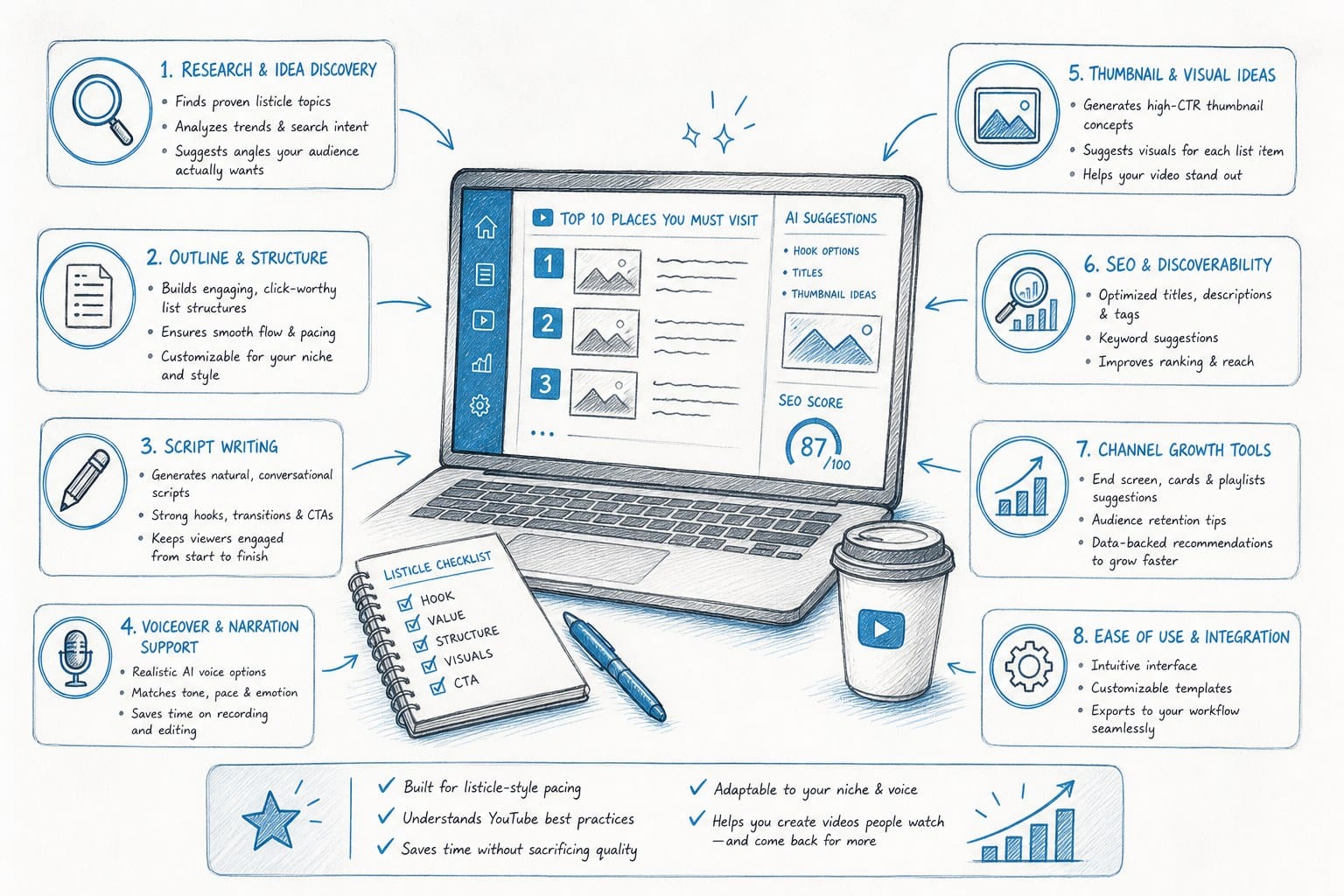
How Kliptory speeds up listicle video production from start to finish
Kliptory is an AI-powered production platform built specifically for faceless YouTube channels that produce long-form content. Listicles, video essays, explainers, documentary-style deep dives — these are the formats the platform is designed around, not an afterthought. I want to walk through how Kliptory handles each stage of listicle production and why that matters practically for a creator trying to scale output without adding hours to their week.
Scripting that structures itself around your list
When you start a new project in Kliptory, you give it a topic and select a format. For a listicle, it generates a full script built around the structure the format actually requires: an opening hook designed to capture attention in the first 15 seconds, a brief intro that frames what the list is and why it is worth watching, numbered entries with individual mini-narratives for each item, and a closing section that wraps up the video with a clear sense of completion.
Each entry in the script follows a consistent internal format. There is an opening statement for that specific item, the core information, one or two supporting details that add depth or context, and a transition that moves naturally into the next entry. That consistency is important because it is what keeps a 15-item listicle from feeling scattered or uneven by the time you get to item nine.
The script is written for spoken delivery, not for reading on a page. That distinction matters more than it might seem. Written prose and spoken narration have different rhythm requirements. Written text can carry longer sentences, embedded clauses, and denser information. Spoken narration needs shorter sentences, more explicit signposting, and natural pause points where the listener can absorb what they just heard. Kliptory's scripts are built for ears — which means less editing required before the voiceover stage.
You can edit the script directly inside the platform before anything else is generated. If you want to swap out a list item, adjust the tone for your specific audience, add a detail you know from experience in your niche, or rewrite the hook entirely, you have full control over the text before it becomes audio or video. The AI gives you a strong starting point; you make it yours.
Voiceover generation matched to the format
Once your script is ready, Kliptory generates a voiceover automatically. The voice quality is built to hold up across the full runtime of a long-form video, which is a meaningful distinction. A voice that sounds fine for two minutes but becomes grating by minute 12 is not going to serve a 15-minute listicle well.
The platform syncs the audio to the script structure so that each segment of the voiceover corresponds to the right portion of the video timeline. You are not manually cutting audio files, naming them, importing them into an editor, and placing each one in sequence. The alignment happens inside Kliptory as part of the generation process, so by the time you are reviewing visuals, the audio is already locked to the right parts of the script.
For creators who have spent hours managing audio files across a 10-item listicle, this alone is a significant reduction in friction.
B-roll sourcing matched to each individual list item
This is where Kliptory does something most tools genuinely cannot do. For each item in your list, the platform automatically sources relevant visuals from its library of licensed stock footage and images. It reads the context of each list item specifically — not just the topic of the video as a whole — and assigns footage that corresponds to the subject, location, or concept being described in that entry.
For a listicle about the world's longest rivers, it finds footage of each river, not just generic water footage. For a video about the richest empires in history, it sources imagery that fits the specific era and civilization you are covering in each segment. The matching is context-aware at the item level, which is the granularity that listicle production actually demands.
The matching is not flawless on every item every time — no automated system is — and you can swap out any clip you do not like before the final assembly. But the starting point it gives you is close enough that you are making a handful of targeted substitutions rather than building the entire visual layer from scratch. That difference in starting point is where the hours actually come back to you.
For a typical 10-item listicle, the manual B-roll process takes four to eight hours. With Kliptory handling the initial sourcing and matching, that compresses to 20 to 40 minutes of review and swaps. Do that math across a month of content and it represents a substantial reclaim of time.
Maps, timelines, and data charts from your script
Kliptory can generate data visualizations directly from information in your script. If your listicle covers geographic subjects — countries, cities, rivers, mountain ranges, historical sites — it can produce a map that highlights each location as the narrator mentions it, giving viewers spatial context that makes the content more memorable.
If you are covering a historical list with a chronological dimension, it generates a timeline graphic that moves through the entries in sequence. For ranking-based videos that include numerical data — GDP figures, population counts, speed measurements, distances — it can produce chart graphics that display those numbers clearly and update as the list progresses.
These visualizations appear in the video automatically as part of the assembly process. You do not need to open a design tool, build each graphic manually, export it as a transparent PNG, import it into your editor, and position it over the right clip. That entire chain of steps is handled inside the platform.
The visual impact of this is real. Listicle videos that mix narrated footage with data graphics retain viewer attention better than videos that are purely stock footage from start to finish. The graphics give the viewer something concrete to focus on when the narration is delivering information-dense content, and they signal that the channel invests in its production quality — which builds trust with the audience over time.
Full video assembly and export
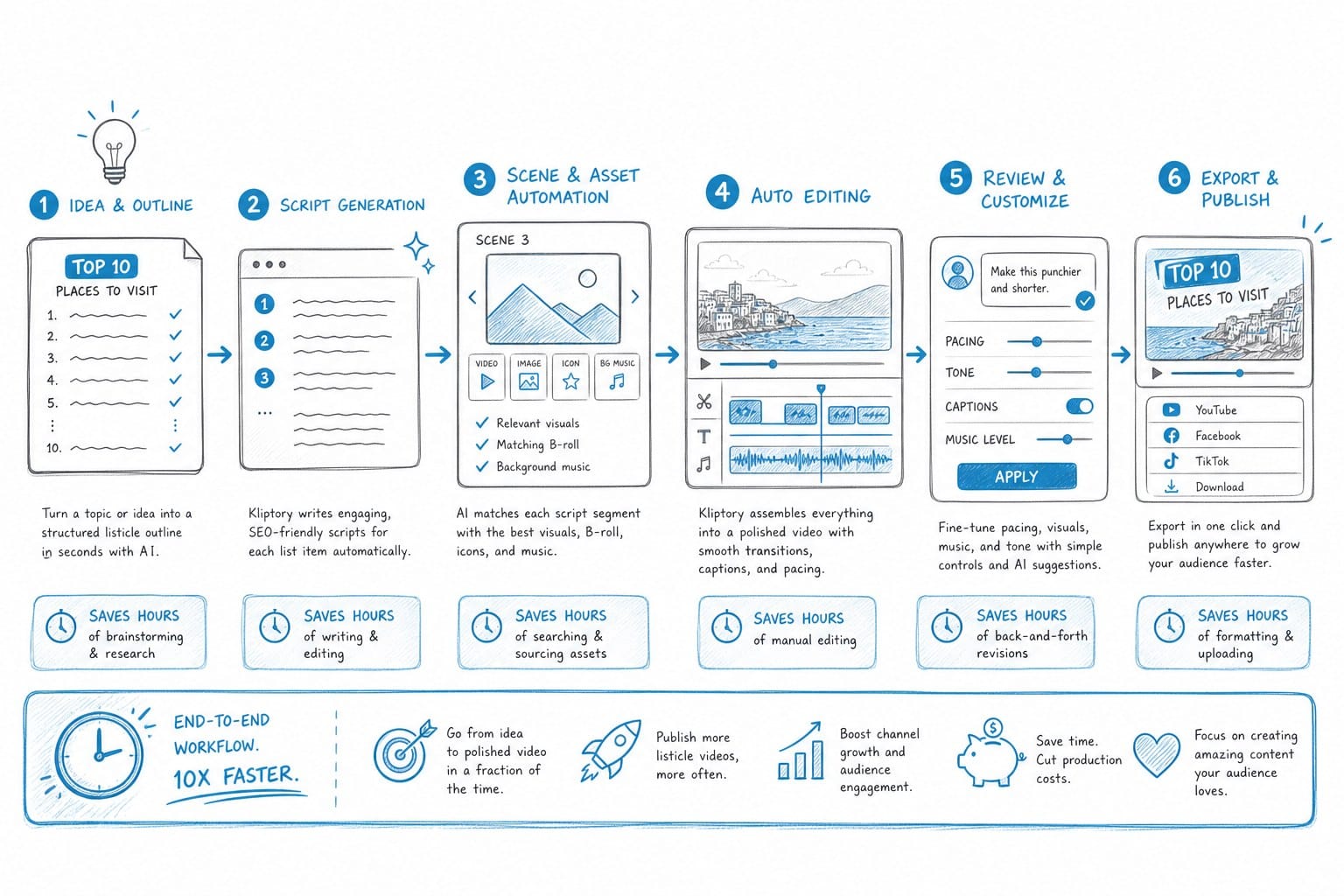
After the script, voiceover, and visuals are in place, Kliptory assembles the full video. It aligns each audio segment with the corresponding visual material, adds background music at a level that supports the narration without competing with it, generates and styles captions, and produces a final file ready for upload to YouTube.
The captions are not just a raw transcript pasted as subtitles. They are timed to the narration, styled for readability, and positioned correctly so they do not cover important visual content. For channels that rely on captions for accessibility or for viewers watching without sound, this matters both for viewer experience and for the perception of production quality.
For a creator who used to spend five hours editing a listicle, the new workflow looks like this: 20 to 30 minutes reviewing and refining the script, 10 minutes reviewing and swapping any B-roll clips you want to change, and another 10 to 15 minutes doing a final pass on the assembled video before export. The production time for a full listicle drops to roughly two to three hours total, including the time it takes to do your initial topic research before you even open Kliptory.
What this actually changes for a solo creator
For creators running faceless channels without a production team, the production bottleneck is usually the single biggest obstacle to sustained growth. You might have a clear niche, a deep understanding of what your audience wants, and genuine ideas for dozens of videos. But if it takes 20 hours to produce one video, you can not post consistently enough to build the algorithmic momentum that drives subscriber growth.
YouTube's algorithm rewards channels that publish on a reliable schedule. Viewers build habits around channels that show up consistently. Both of those dynamics compound over time — but only if you can actually maintain the schedule. When production takes 20 hours per video, consistency requires working on content full time. When production takes three hours, posting twice a week becomes realistic for a solo creator who has other things going on.
Kliptory changes the math of what is possible for a single person or a small team. You do not give up creative control — you still choose your topics, shape your scripts, and review the output before anything goes live. But you stop paying the time tax on every mechanical step in the process, which is most of the process.
For channels that cover topics requiring documentary depth alongside listicle content, the same platform handles that too. If you have ever wondered how creators produce documentary-length YouTube videos without filming anything themselves, this walkthrough on how to make a YouTube documentary without filming anything explains the approach in practical terms.
The compounding effect on channel growth
Consistency is the single most controllable driver of YouTube channel growth outside of video quality itself. Channels that post on a reliable schedule build stronger audience habits, receive more favorable treatment from the recommendation algorithm, and compound their subscriber growth faster than channels that post sporadically. This is not a theory — it is observable across channels in virtually every niche.
When production takes 20 hours per video, consistency is nearly impossible to maintain unless you work on content full time or have a team behind you. When production takes three hours, posting two or three times per week becomes realistic even for a creator with a full-time job or other serious obligations.
That shift in cadence — from one video every two weeks to two videos per week — is not a 4x improvement in output. It is exponentially better for channel growth because it compounds. More videos means more entry points for new viewers. More consistent publishing means higher algorithmic priority. Higher algorithmic priority means more impressions, more clicks, more watch time, and more subscribers. Each of those feeds the next cycle.
Kliptory is not a magic button that removes all creative work from the equation. The best-performing faceless channels still have clear positioning, strong topic research, and scripts that genuinely inform or entertain. What Kliptory does is remove the production ceiling that keeps talented creators from posting as often as their ideas and audience could actually support.
For channels in niches like history, geography, science, true crime, finance, or technology — where listicle content performs consistently well and the production demand is high — having an AI tool that handles the mechanical execution of that format is a meaningful competitive advantage. Other creators in your niche are either spending 20 hours per video or hiring help. If you can produce the same quality output in three hours, you can publish more, iterate faster, and build your channel at a pace that compounds.
Ready to take the next step?
If you are serious about scaling your faceless YouTube channel without burning out on production, Kliptory is built for exactly that. You can explore what the platform does and start your first project at kliptory.com. The faster you can produce quality listicle videos, the sooner your channel starts compounding.