Why faceless channels win without an AI video avatar

Table of contents
1. What people get wrong about the AI video avatar approach
2. What actually drives growth on faceless channels
3. How to build a faceless channel workflow that actually scales
A lot of creators spend weeks debating whether to show their face on YouTube. Then they discover the AI video avatar route and assume that solves everything. It usually does not. The most successful faceless channels are not built around a digital talking head. They are built around a content system that keeps viewers watching and algorithms pushing. This article breaks down why that is, what actually drives growth on faceless channels, and how to build a production workflow that scales without burning you out.
What people get wrong about the AI video avatar approach
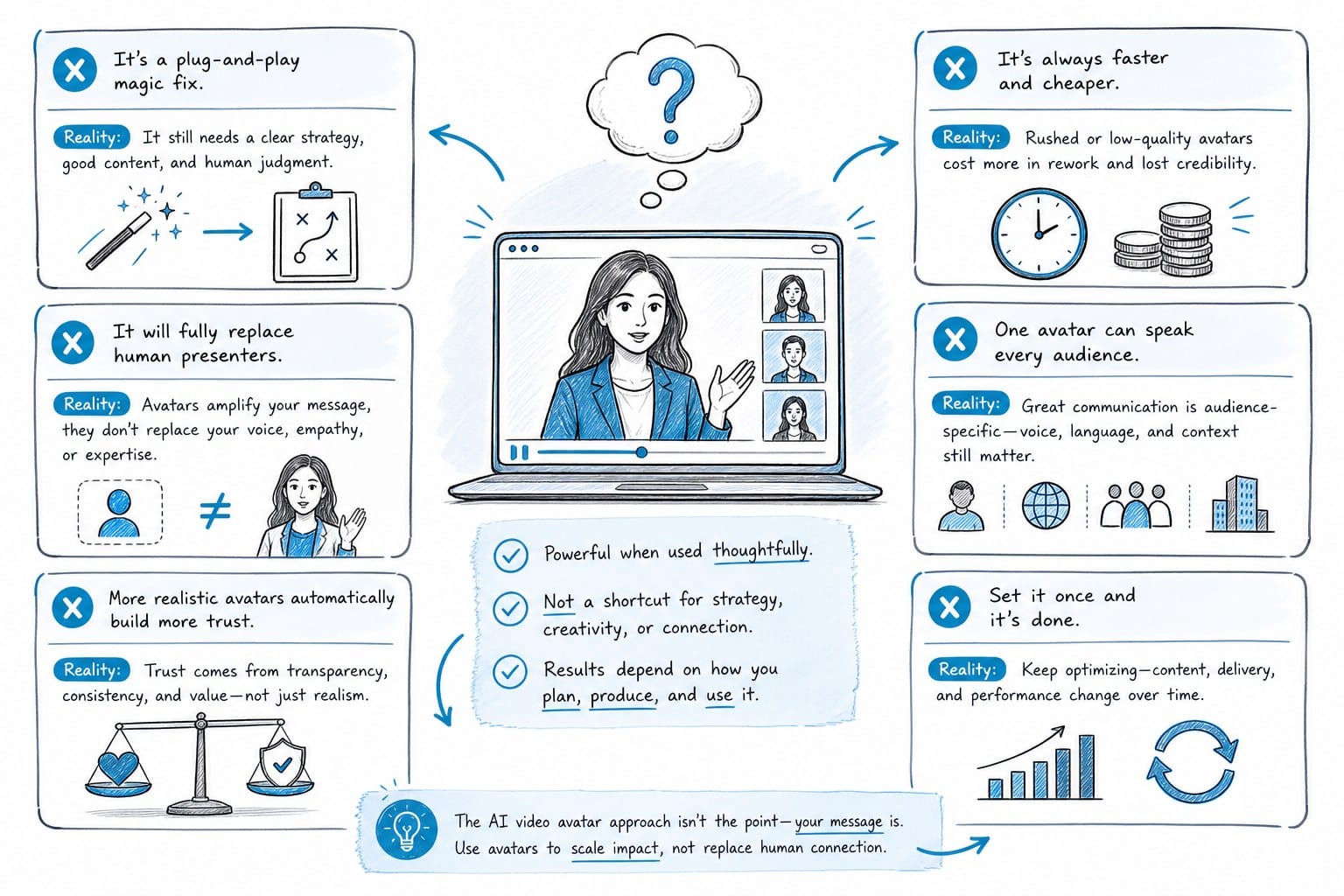
The idea of dropping a polished AI video avatar into your videos sounds like a clean solution to the whole "I do not want to be on camera" problem. You generate a digital presenter, position it in front of a stock background, and call it a faceless channel. But that is not really a faceless channel strategy. That is just replacing one face with another.
Faceless YouTube content works because it removes the creator's identity from the equation entirely. The viewer is not watching because of who you are. They are watching because of the story, the information, or the visual journey you are taking them on. When you put an AI video avatar front and center, you are actually working against that mechanic. You are asking the viewer to form a connection with a synthetic presenter, which most audiences still find a little uncanny. The uncanny valley problem is real, and it hits harder when the avatar is on screen for 20 or 30 minutes straight.
Look at the channels pulling millions of views in niches like history, geography, true crime, and finance. Almost none of them lead with a digital avatar talking at the camera. They lead with narration over compelling visuals. Think maps animating across continents, timelines showing how events unfolded, B-roll of real places, and data charts that make abstract numbers concrete. That is the format viewers click on and stick with. The voice guides the experience. The visuals carry it.
There is also a practical problem with the avatar-first approach. Most AI video avatar tools are optimized for short clips: explainer snippets, product demos, social posts. They are not built for the 10, 20, or 30-minute documentary-style videos that tend to perform best for watch time and ad revenue. You can technically stretch an avatar video to that length, but the result often feels like a slideshow with a talking head glued to the corner. The visuals do not evolve. The pacing does not breathe. Viewers notice, and they leave.
Creators who went all-in on the avatar route and then quietly pivoted six months later share a consistent story: their click-through rate was fine, but their average view duration was terrible. YouTube's algorithm rewards watch time above almost everything else. If viewers are bailing at the two-minute mark, no amount of thumbnail optimization or title testing is going to rescue your channel growth. The algorithm reads retention as a signal that the content is worth distributing. Poor retention tells it the opposite.
There is also a trust dimension here that does not get discussed enough. Faceless channels in high-value niches like personal finance, health, and technology succeed in part because the format signals objectivity. The viewer is not being sold a personality. They are receiving information. An AI avatar complicates that signal. It draws attention to the synthetic nature of the production in a way that narration-over-visuals simply does not. The viewer watching a narrated history documentary is focused on the Battle of Thermopylae. The viewer watching an AI avatar discuss investment strategies is, at least partly, thinking about whether that avatar is trustworthy.
If you want a deeper look at why this approach tends to fall short for faceless creators specifically, this breakdown on why AI avatar videos may not be what faceless creators actually need is worth reading before you invest in any avatar tool.
The bottom line is this: the AI video avatar is solving the wrong problem. The real challenge for faceless creators is not how to add a presenter. It is how to make visually engaging long-form content at scale without a production team. Those are very different questions, and they need very different tools. Creators who answer the second question build channels that grow. Creators who answer the first one often spend months producing content that underperforms and then have to start over with a different approach.
The format that works for faceless channels in almost every niche is narration-driven video with visuals that actively support and advance the story. That means the visuals are not decoration. They are part of the argument. A video about how the 2008 financial crisis unfolded is more compelling when it shows a timeline of key events, a chart of housing prices collapsing, and maps of where foreclosures were concentrated. Those visuals do not just fill the screen while someone talks. They make the information clearer, more memorable, and more worth watching all the way through.
Building a channel around that format requires a different set of tools than an avatar generator. It requires a system for scripting, voiceover, visual production, and publishing at a pace that keeps the algorithm engaged. That system is what this article is actually about.
What actually drives growth on faceless channels
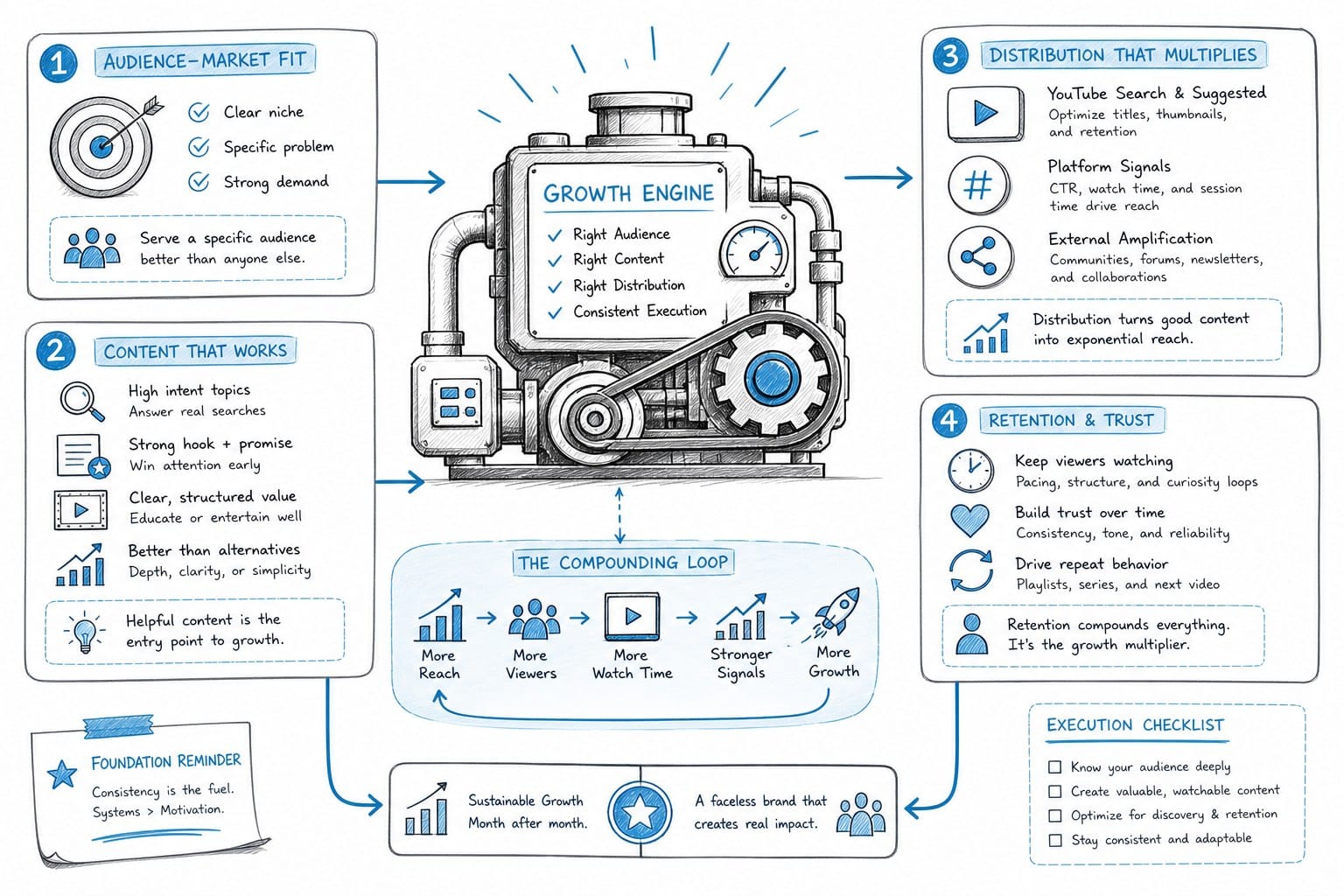
Growth on faceless channels is more systematic than most people expect. It is not about finding a viral hook or picking the perfect niche and hoping for the best. It is about executing five interconnected elements consistently over time. When all five are working, channels grow. When one breaks down, growth stalls.
Topic selection is the foundation
YouTube is a search and discovery engine. A well-optimized title in the right niche can pull organic traffic for months or years after upload. Channels that treat title writing and topic research as a craft, testing different formats and using data to understand what phrases people actually search for, consistently outperform channels that treat it as an afterthought.
This is not about keyword stuffing. It is about understanding what questions your target viewer is already asking and then producing the best answer to that question in your niche. A channel about ancient history that consistently identifies high-search, low-competition topics and produces thorough, well-structured videos on those topics will grow steadily even without a massive marketing push. The search demand does the distribution work.
Title writing is a specific skill within this. The same video concept can perform very differently depending on how the title is framed. Titles that signal a clear payoff, create a sense of stakes, or tap into something viewers already care about get clicked. Titles that are vague, overly clever, or optimized for keywords without considering how they read to a human get skipped. Learning how to use a YouTube video title generator to inform your decisions is a practical starting point for building this skill systematically rather than guessing.
Script structure is what keeps people watching
Faceless videos live or die by narrative momentum. Without a host personality to carry the viewer through rough patches, the writing has to do all the emotional and informational work. That means strong hooks in the first 30 seconds, clear story beats throughout, and a script that anticipates where a viewer's attention might drift and pulls it back before they click away.
A good faceless video script does not just present information in order. It creates a sense of forward motion. Each section answers a question and raises a new one. Each paragraph ends in a way that makes the next one feel necessary. This is harder to do well than it sounds, and it is the main reason so many faceless videos with good topics and solid visuals still bleed viewers at the three- and five-minute marks.
Writing scripts this way is genuinely time-consuming if you are doing it manually for every video. Many channels that start strong hit a wall because the scriptwriting alone takes three or four days per video. When you factor in research, recording, editing, and publishing, a weekly upload schedule becomes nearly impossible without help. Automating parts of that process, from initial research to first draft to structural review, is one of the highest-leverage moves a solo creator can make. Using a script generator to automate your YouTube videos explains how that workflow can look in practice and where automation adds the most value without sacrificing quality.
Visuals need to do real work, not just fill the screen
This is where a large number of faceless channels underperform. The production process goes: write script, record voiceover or generate one, then license a block of stock footage that is loosely related to the topic and cut it together. The result is a video where the audio is doing all the work and the visuals are essentially wallpaper.
Viewers notice this. A video about the collapse of the Soviet Union that shows generic footage of grey buildings and crowds is less engaging than one that shows a map of how Soviet territory fragmented, a timeline of key political events from 1989 to 1991, and archival footage that matches each specific moment in the script. The second version gives the viewer's eye something specific to follow. It reinforces the information instead of just running alongside it.
Data visualizations are particularly underused in faceless content. Charts showing economic trends, maps tracking geopolitical changes, and timelines illustrating historical sequences do two things simultaneously: they add credibility to the information being presented, and they give the viewer an active visual task rather than a passive one. Viewers who are reading a chart or tracking a map on screen are engaged in a way that viewers watching generic B-roll simply are not.
Channels covering finance, economics, geopolitics, history, and science have a real structural advantage when they can produce these visuals efficiently. The challenge for solo creators has always been that custom maps, animated timelines, and data charts traditionally require motion graphics skills or a budget to hire someone who has them. Tools that automate this production step change the equation significantly.
Consistency matters more than perfection
A channel that uploads one solid video per week will almost always outperform a channel that uploads one polished video per month. The algorithm favors active channels. Viewers build habits. New videos create new opportunities to surface in search and recommended feeds. Frequency compounds.
The problem is that producing even one solid long-form video per week is genuinely difficult when every stage of production is manual. Scripting, voiceover, sourcing B-roll, creating any custom visuals, editing, captioning, and exporting can eat 30 to 40 hours of work per video for a solo creator working without templates or automation. At that pace, weekly uploads require essentially full-time dedication to video production and nothing else.
This is why production automation is not a nice-to-have for faceless creators. It is the actual competitive advantage. Creators who find ways to compress that production timeline from 40 hours to 8 or 10 hours can publish more, test more topics, get more data on what resonates, and build audience momentum faster. The ones who stay entirely manual either burn out or cap out at a publishing frequency that limits their algorithmic growth.
Audio quality is non-negotiable
Viewers will tolerate imperfect visuals far longer than they will tolerate bad audio. A clean, well-paced voiceover keeps people watching even when the visuals are unremarkable. A robotic, flat, or poorly mixed voiceover sends them to the next video within 60 seconds, regardless of how good the script is or how compelling the topic is.
This is one area where the quality of the AI voice generation tool you use makes a measurable difference in retention. The gap between a generic text-to-speech voice and a natural, expressive AI voiceover is audible, and viewers respond to it in the data. Channels that invest in better voice quality, whether through a human narrator or a high-quality AI voice, consistently show better average view duration than channels that treat voiceover as an afterthought.
When topic selection, script structure, purposeful visuals, publishing consistency, and audio quality all come together and come together reliably, faceless channels grow. It is a system, and like any system, its output quality depends on how well each component is working.
How to build a faceless channel workflow that actually scales
Most faceless creators start the same way. They pick a niche, produce a few videos manually, see some early results, and then hit a production wall. The bottleneck is almost always identical: they cannot make content fast enough to keep the channel growing while also keeping quality high enough to hold viewers. Something has to give, and it is usually either quality or frequency, both of which hurt growth.
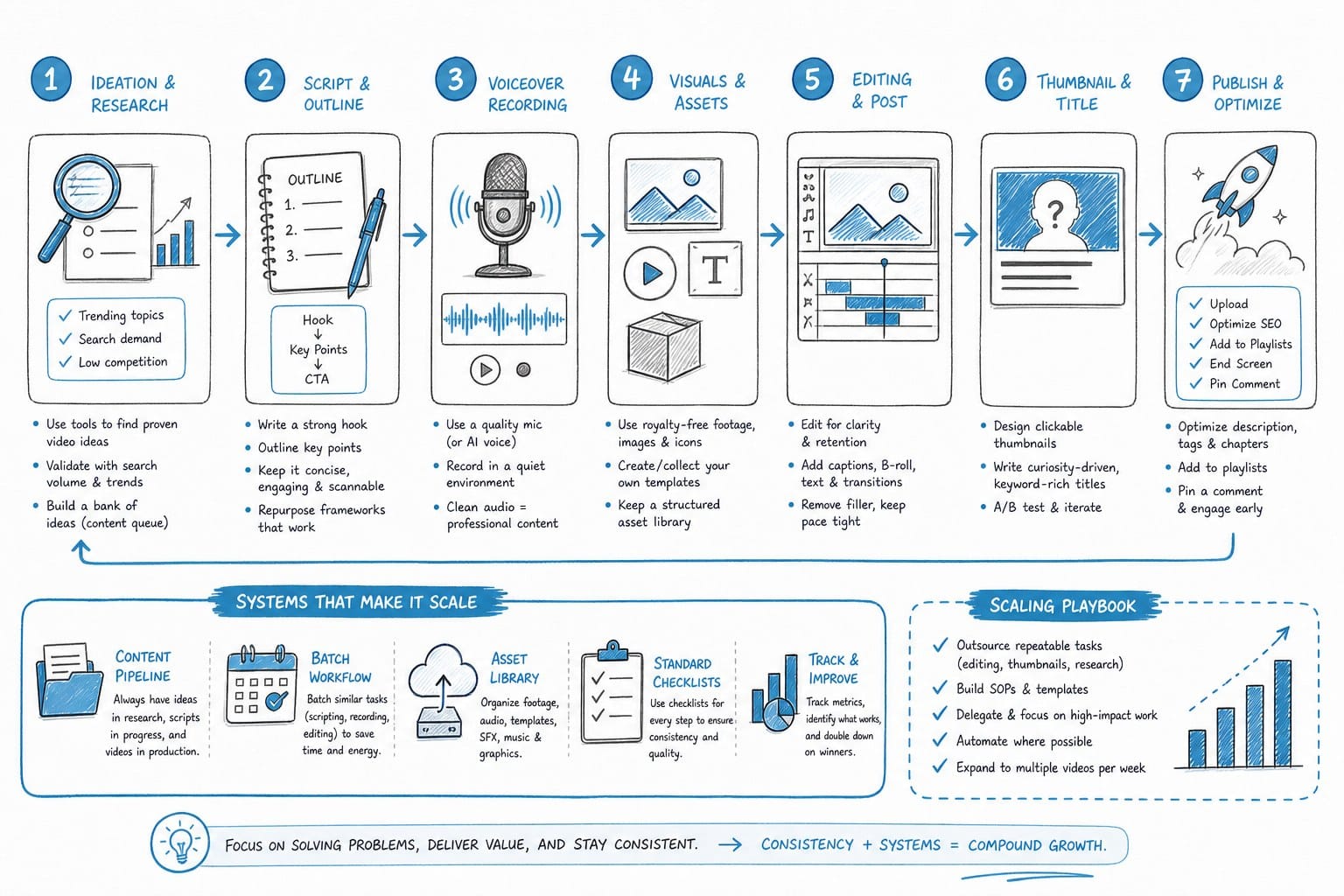
The solution is to think in terms of a production pipeline rather than individual videos. Each stage of video creation should be defined, repeatable, and as automated as possible. Here is what that pipeline looks like in practice and where the leverage points are.
Stage one: Topic research and ideation
Before you write a single word, you need a topic that has actual search demand, fits your niche, and can support a long-form treatment. Channels that pick topics based on intuition alone waste significant production time on videos that get 200 views. A systematic approach means using search data, studying what is performing in adjacent channels, and identifying the specific angles that have real demand but have not been thoroughly covered yet.
This stage should also produce your title and thumbnail concept before production begins. Knowing your title going in shapes the script. A video titled "Why the Roman Empire Actually Collapsed" has a different structural obligation than one titled "How Rome Fell in 5 Stages." The first promises a counterintuitive argument. The second promises a clear framework. Your script needs to deliver on whichever promise your title makes, and you cannot do that efficiently if you are writing the script without a clear title in mind.
Spend real time here. An hour of solid topic research before production begins produces better videos than five hours of research after you have already started scripting a topic that turned out to have thin search demand.
Stage two: Scripting
This is where most solo creator production time goes, and it is the stage with the most room for automation leverage. A 20-minute video needs roughly 3,000 to 4,500 words of narration, structured to maintain momentum throughout. Writing that from a blank page, with research, takes most writers a full day or more.
AI-assisted scripting tools can get you to a strong first draft significantly faster, but the output has to be accurate, well-researched, and structured for video pacing rather than just readable prose. A script that reads well on the page does not always work well as narration. Sentences that are too long become hard to follow when heard rather than read. Passive constructions that look fine in text sound flat when spoken. The transition logic that works in an essay does not always work in a video where viewers cannot scroll back.
The practical workflow is: input your research and angle, generate a first draft, then edit specifically for narration pacing. Read the script out loud before you lock it. This catches awkward phrasing, overly long sentences, and transitions that do not land. It takes 20 to 30 minutes and prevents audio problems that are much harder to fix after the voiceover is generated.
Also flag your visualization moments during the scripting stage. Identify every point in the script where a map, chart, or timeline would make the information clearer. Mark those moments explicitly. This makes the visual production stage much more intentional and much faster, because you know exactly what you need to build and when it appears in the video.
Stage three: Voiceover production
Once the script is locked, you need a voice that matches the tone of your channel. For documentary-style content, that typically means something with authority and warmth rather than the flat, robotic cadence that older text-to-speech tools produced. The best AI voiceover options available now are genuinely good, and many viewers cannot distinguish them from a human narrator when the script is well-written and the audio mixing is clean.
The key variable here is not just voice quality in isolation. It is how the voice sounds against your specific script. Some AI voices handle data-heavy narration well but sound slightly stilted on more emotional or narrative passages. Test your voice against the actual type of content you produce, not just against a generic demo clip. Listen for how it handles sentence-ending inflection, how it paces through lists and complex sentences, and how it sounds after 10 or 15 minutes of continuous narration.
Audio mixing matters as much as voice quality. A good AI voice that is poorly mixed, too compressed, too bright, or sitting too high or low in the frequency range will sound worse than a mediocre voice that is well-mixed. If you are not comfortable with audio processing, find a simple template that gives you a clean starting point and use it consistently.
Stage four: Visual production
This is the most complex stage for most solo faceless creators because it involves sourcing B-roll, building any custom data visualizations, and sequencing everything to match the narration frame by frame. Done manually, it requires video editing skills, access to stock footage libraries, and often working knowledge of motion graphics software like After Effects. For a 20-minute documentary-style video, manual visual production can take 15 to 25 hours on its own.
Creators who scale past this bottleneck are the ones who find tools that automate meaningful parts of this process: pulling relevant B-roll based on script content, generating maps and timelines that match the narrative, and assembling a rough cut automatically. Even cutting that process from 20 hours to 4 or 5 hours is a significant unlock for publishing frequency. It is the difference between producing one video every three weeks and producing one video every week.
For the data visualization elements specifically, the goal is not to produce beautiful graphics for their own sake. It is to produce accurate visuals that make your content clearer at the exact moment in the video when clarity matters most. A map showing the territorial expansion of an empire during the specific decades your script is discussing is worth far more than a general map of the same empire that appears at the beginning and never changes. Specificity is what makes data visuals actually improve retention.
Kliptory is built around this entire pipeline. It handles scripting, voiceover, B-roll sourcing, data visualizations including maps, timelines, and charts, captions, and editing in one platform. The goal is to compress what normally takes a solo creator a full week of production into a few hours, so publishing at a pace that actually grows a channel becomes realistic rather than theoretical.
Stage five: Captions, final editing, and export
Captions are not optional. They improve accessibility, boost watch time for viewers who watch with sound off or in a second language, and contribute to search indexing. A meaningful share of YouTube viewing happens without audio, particularly on mobile. Viewers who would have dropped off because they could not hear the audio stay because they can read along instead.
Automated caption generation that syncs accurately to the voiceover saves real time here. Manual captioning a 20-minute video can take two hours or more. Automated captioning with light cleanup takes 15 to 20 minutes. Over the course of a year of weekly uploads, that difference adds up to weeks of recovered time.
Final editing should be focused on two things: removing anything that does not serve the viewer and fixing any moments where the audio and video are not telling the same story. If the narration is talking about a specific event and the visual on screen is generic footage that does not connect to that event, that is a moment where a viewer's attention can slip. Work through the video looking for those disconnects specifically.
Making batching work for your channel
Rather than completing one video from start to finish before starting the next, consider scripting three or four videos in one session, then moving to voiceover generation, then visual production. Batching reduces the mental overhead of context-switching between production modes and often reveals patterns that help you standardize your approach. You start to notice which script structures produce better retention data, which visual formats your audience engages with most, and where your workflow is slower than it needs to be.
Track your retention data actively. YouTube Studio shows you exactly where viewers drop off in each video. If the same timestamps consistently cause drop-off across multiple videos, that is a signal about your pacing, your visual variety, or your script structure at that point in the video. Use that data to adjust your production approach rather than just hoping the next video performs better.
The channels that grow sustainably are not the ones with the most sophisticated production or the cleverest AI video avatar. They are the ones with a clear niche, consistent publishing, strong retention, and a production system that does not require an unsustainable amount of manual effort to maintain. That is a solvable problem. It is not solved by any single tool or shortcut, but it is solved by building the right pipeline, automating the right stages, and executing it with discipline over time.
Ready to take the next step?
If you are running a faceless YouTube channel or planning to start one, the production bottleneck is real and it will limit your growth if you do not address it early. Kliptory is built for exactly this: long-form, documentary-style video production for solo creators and small teams who need to move fast without sacrificing quality. You can explore what the platform does and see how it fits your workflow at kliptory.com.