How to use a YouTube video title generator to grow your channel

Table of contents
1. What a YouTube video title generator actually does
2. How to use generated titles to get more clicks and views
3. Fitting title generation into a full channel production system
Growing a YouTube channel takes more than good content. The title you put on a video shapes whether a stranger clicks it or scrolls right past. Most creators spend weeks learning that the hard way. A YouTube video title generator can speed up that learning curve by giving you tested patterns, keyword ideas, and angle options in seconds. In this post I will walk through how these tools actually work, how to use the output well, and how title strategy fits into a broader production workflow that does not eat up your whole week.
What a YouTube video title generator actually does
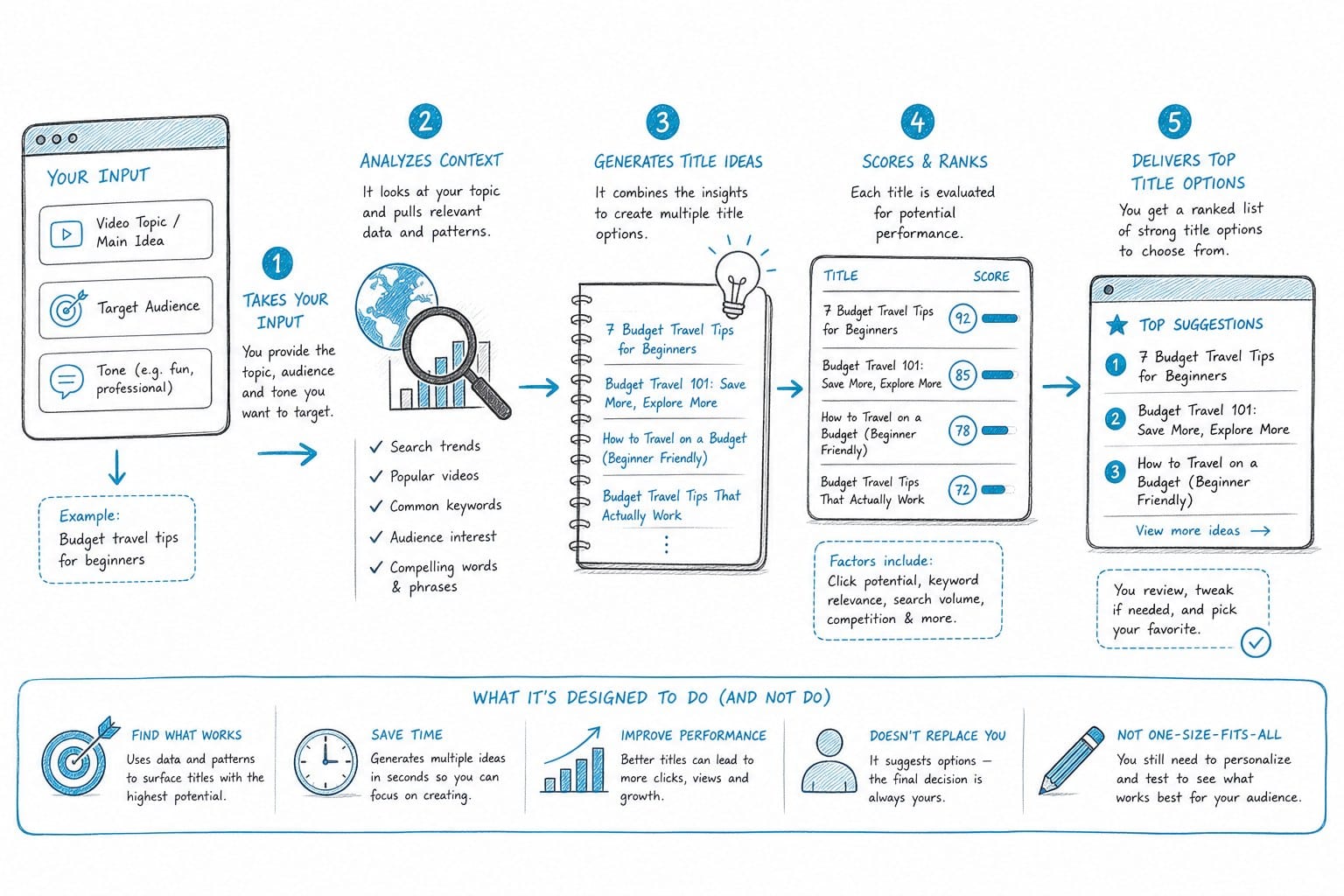
A title generator is a tool, usually powered by a language model, that takes a topic, a keyword, or a rough idea and returns a list of possible video titles. Some tools ask for a single sentence describing your video. Others ask for your target keyword, your audience, and the tone you want. Either way, the output is a set of title options you can test, tweak, or combine.
The reason these tools are useful is not magic. It is pattern recognition at scale. YouTube has billions of videos, and the titles that perform well share recognizable structures. Number lists work well for certain niches. "Why" questions pull in curious viewers. "How to" titles set a clear expectation. A good generator has learned from those patterns and can apply them to your specific topic quickly.
Here is a simple example. Say I am making a documentary-style video about the history of the Suez Canal. I could spend an hour brainstorming titles. Or I could drop my topic into a generator and get options like:
- "Why the Suez Canal almost broke the global economy" - "The 5 crises that shaped the Suez Canal" - "How one waterway controls world trade"
None of those came from thin air. They came from applying proven title structures to my topic. I still need to pick the best one and refine it, but I saved significant time.
Title generators also help you think about your video from the viewer's perspective. When you write a title yourself, you naturally focus on what the video contains. A generator forces angle variety. It might suggest a title that frames your video as a warning, a revelation, or a comparison, and one of those angles might be far more compelling than what you originally had in mind.
One thing to understand is that a generator gives you raw material, not a finished product. The titles that come out still need your editorial judgment. You know your audience, your channel's voice, and what your video actually delivers. The tool cannot know those things the way you do. Think of it as a brainstorming partner that never runs out of ideas.
Another thing worth noting: title generators are not just for flashy clickbait. They work just as well for serious, informative content. If I run a faceless channel covering geopolitics, economics, or science history, I can use a generator to find titles that are accurate and still compelling. There is no tension between honest and interesting when you have enough title options to choose from.
Some creators worry that AI-generated titles will sound generic. That is a real risk if you take the output at face value and paste it straight into YouTube. The fix is simple. Use the generated titles as a starting point, then rewrite the best option in your channel's specific voice. Add a specific detail from your video. Swap a vague word for a concrete one. The generator sets the structure; you add the specificity that makes it yours.
Finally, a YouTube video title generator is most powerful when you use it consistently, not just when you are stuck. Making it part of your regular production process means you always have multiple title options to choose from before you publish, which gives you more data over time about what works for your specific audience.
How to use generated titles to get more clicks and views
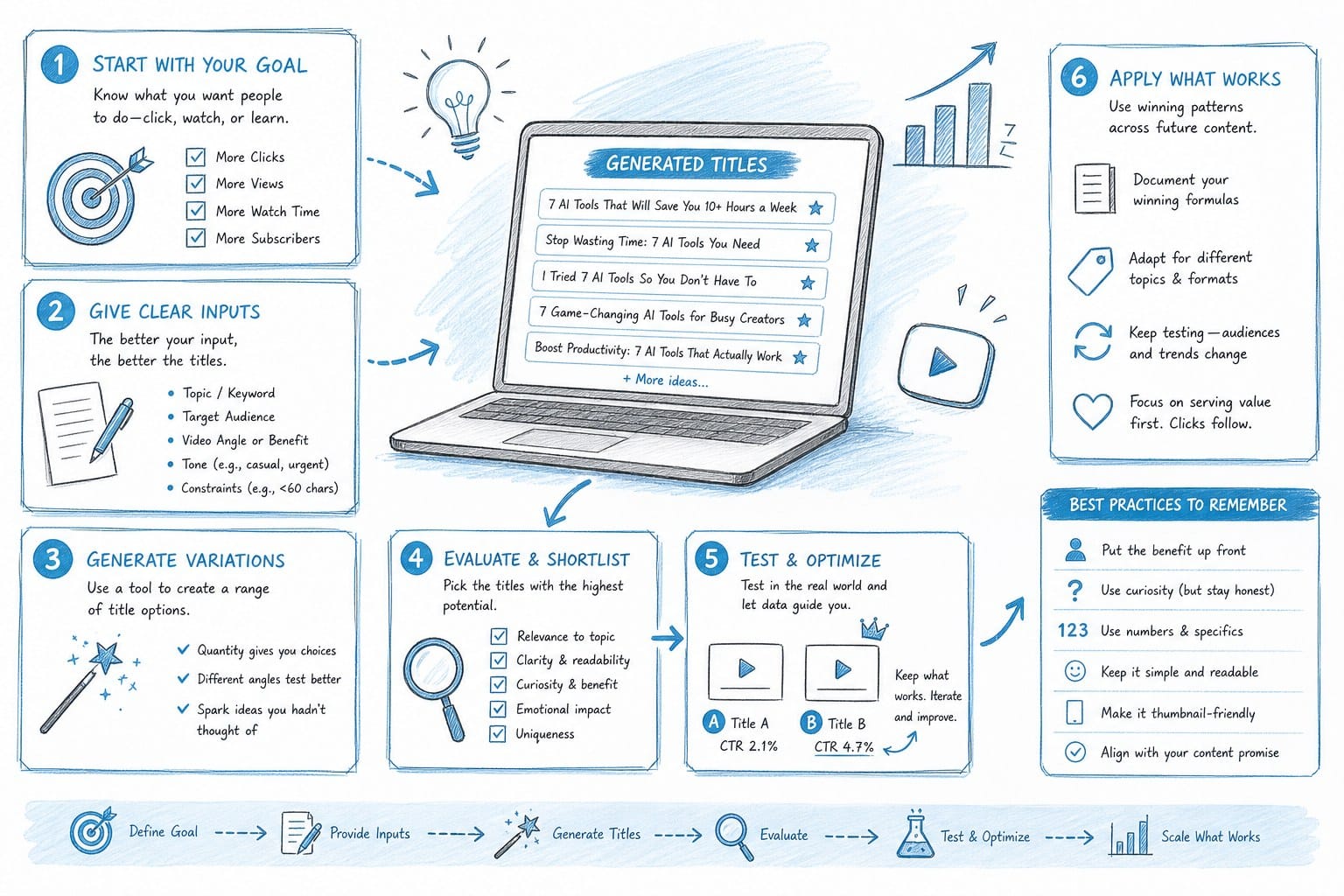
Getting a list of title options from a tool is step one. Using those options strategically is where the real growth happens. Here is how I approach it.
First, I match the title to the thumbnail. YouTube viewers see the thumbnail and the title together. A title that makes a promise and a thumbnail that reinforces it will outperform a title that contradicts the image or repeats it word for word. If my generated title says "Why this tiny country controls global oil," my thumbnail should visualize that tension, not just show a map with text on it. The title generator gives me the words; I need to think visually about what supports them.
Second, I put my most important keyword near the front of the title. YouTube's search system does read titles, and so do human eyes. Viewers scan the first few words before deciding to read the rest. If I use a generator and the keyword lands at the end of a long title, I reorder it. For example, "The economic history of Taiwan and why it matters for global trade" becomes "Taiwan's economic rise and why it matters for global trade." Small change, better placement.
Third, I keep titles under sixty characters when possible. YouTube truncates long titles in search results and on mobile. A title that gets cut off loses its meaning. Most good title generators will flag titles that are too long, but not all of them do. I always count the characters manually before I commit.
Fourth, I use A/B testing when my channel has enough data to make it worth the effort. YouTube Studio allows you to swap a title after publishing without hurting the video permanently. I will often publish with a generator-suggested title, watch the click-through rate for a week, then try a different angle from my original list if the number is low. Over time, this builds a real understanding of what my specific audience responds to, which makes future title decisions easier.
Fifth, I pay attention to the emotional trigger in each title option. Generated titles tend to fall into a few emotional categories: curiosity ("The secret history of..."), stakes ("Why this changed everything"), utility ("How to do X in Y time"), and contrast ("The difference between X and Y that nobody talks about"). For documentary-style and video essay content, curiosity and stakes tend to drive the most clicks. For tutorial and explainer content, utility titles often win. Knowing which emotional category fits my content type helps me filter a long list of generated titles quickly.
Sixth, I use the title to set an accurate expectation. This matters more than most creators realize. A title that overpromises will drive clicks but also drives people to leave quickly, which kills your watch time and hurts your standing in YouTube's algorithm. The best titles are honest and compelling at the same time. Generated titles can sometimes lean toward hype. My job is to pick or rewrite options that are strong without being misleading.
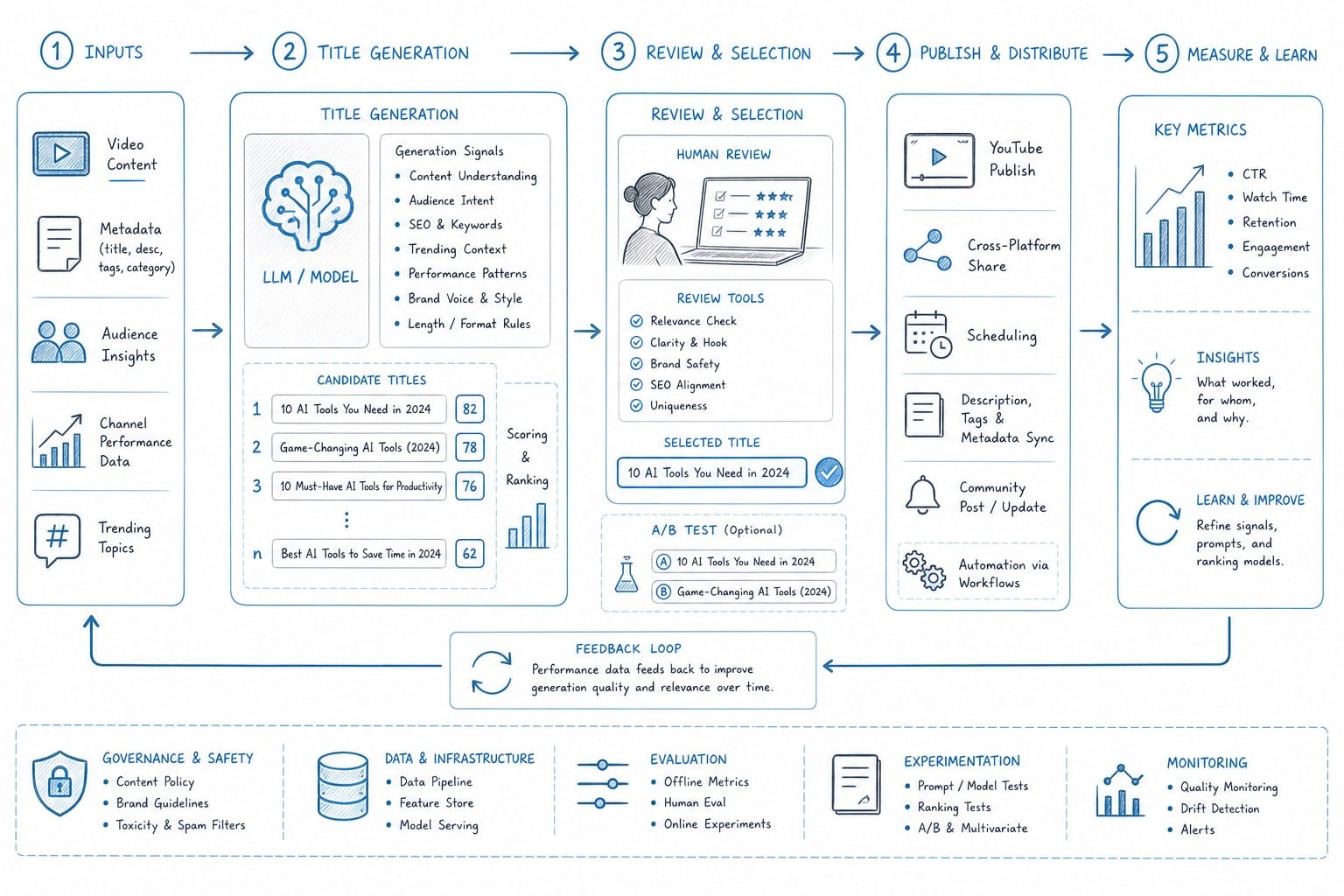
Here is a real workflow I follow for a faceless documentary video. Once I have my topic and a rough script in progress, I put the core idea into a title generator with my target keyword. I ask for at least ten options. I read through them and mark the ones that feel accurate to what the video actually covers. I narrow that list to three candidates. Then I test each one against my thumbnail concept mentally: does this title plus this image create a question in the viewer's mind that the video answers? The one that does that best is my working title. I keep the other two as backups for a potential A/B test.
Title strategy also connects directly to script strategy. A strong title makes a specific promise, and the script needs to deliver on that promise from the first thirty seconds. If I generate a title like "How one man's obsession reshaped the world map," my script needs to introduce that person and that tension early. That is why I think about the title before or during scripting, not after. The title shapes what the video needs to be. Learning how to use a script generator to automate your YouTube videos can make that connection between title and script much tighter, because you can build the script around the angle the title sets up.
One more tactical point: I look at the titles of top-performing videos in my niche before I finalize my own. Not to copy them, but to understand what angle is already saturated. If three channels have already published "The complete history of the Panama Canal," I want a title that offers a different angle, like "The engineering disaster that almost stopped the Panama Canal." A generator can help me find that differentiated angle quickly by giving me a wide range of options to compare against what already exists.
Fitting title generation into a full channel production system
A title is one decision among dozens that go into publishing a YouTube video. The creators who grow fastest are the ones who systematize those decisions so nothing falls through the cracks and no single step becomes a bottleneck. Here is how title generation fits into a complete workflow.
The production process for a long-form faceless channel typically looks something like this: choose a topic, research it, write a script, record or generate voiceover, source B-roll footage, edit the timeline, add captions, and then write the title and description before publishing. Each step depends on the one before it. That means a slow step early in the process delays everything downstream.
Title generation should happen early, not at the end. I treat it as part of the topic selection phase. Before I commit to producing a video, I check whether I can write a strong title for it. If I drop my topic idea into a generator and none of the output is compelling, that is a signal that the angle is weak or the topic is too broad. A good topic that is framed correctly will produce several strong title candidates immediately. If it does not, I either sharpen the angle or move on to a better topic.
This approach saves production time. It is much better to discover that a topic lacks a compelling angle before I spend hours on a script and edit. The title check is a fast, low-cost filter.
For channels producing multiple videos per month, title generation also helps with content planning. I can take a list of ten topic ideas, run each one through a generator, and quickly see which topics have the most title potential. That information shapes my publishing schedule and helps me prioritize topics that are likely to drive the most traffic.
Scaling content production beyond one or two videos a month requires more than a good title, though. It requires automation across the entire workflow. Scripting, voiceover, B-roll sourcing, captions, editing -- if any of those steps still takes days, the title work is not the bottleneck. The bottleneck is production.
This is where a platform like Kliptory fits in. Kliptory is built for faceless YouTube channels and automates the full production pipeline -- scripting, voiceover, B-roll, data visualizations like maps and timelines, captions, and editing -- so creators can produce documentary-style videos ranging from five to forty minutes without a post-production team. The goal is to compress what used to take weeks into hours. That changes what is possible for a solo creator or a small team.
When the production side is automated, you have more time to focus on decisions that machines cannot make as well as humans: which title will actually connect with your audience, which angle is most original, which topic has search demand your channel is positioned to capture. Title strategy becomes the creative lever you pull, rather than something you rush through after spending all your time on editing.
For creators interested in expanding their reach beyond English-speaking audiences, the same principle applies. A title generator can help you identify the right framing in any language if you use it with the right inputs. And with tools that support multilingual production, the production side scales alongside the title strategy. If you want to explore that angle, the guide on how to create multilingual faceless YouTube videos with AI is a good resource for understanding what is possible.
For channels focused on long-form content specifically -- video essays, documentary series, in-depth explainers -- title strategy matters even more because the competition for watch time is higher. A viewer choosing between a fifteen-minute video and a thirty-minute video needs a strong reason to commit to the longer one. The title has to work harder. The good news is that long-form titles can carry more specificity and depth than short-form titles, which gives you more to work with. If you are building that kind of channel, reading about how to create ultra long form YouTube videos with AI alongside developing your title strategy will give you a clearer picture of how all the pieces connect.
Here is the practical system I recommend for anyone running a faceless channel at scale.
Step one: Pick a topic and immediately test it in a title generator. Generate at least ten options. If none of them are compelling, refine the topic angle and try again.
Step two: Narrow to three title candidates. Note which emotional trigger each one uses (curiosity, stakes, utility, contrast). Choose the one that fits your video type and your audience best as your working title.
Step three: Write or generate your script with the working title in mind. The first thirty seconds of the script should validate the promise the title makes.
Step four: Complete production. If you are using an automated platform, this phase should not take more than a few hours for even a long video.
Step five: Before publishing, review the title one more time against the finished video. Sometimes the edit reveals something unexpected that deserves to be in the title. Adjust if needed.
Step six: Publish and monitor click-through rate for the first week. If the rate is below your channel average, swap to the second title candidate from step two. Give the new title a week before drawing conclusions.
Step seven: Log what you learn. Over time you will build a clear picture of which title structures, emotional triggers, and keyword placements drive the most clicks on your specific channel. That knowledge compounds. Each new video benefits from every video you have published before it.
This system is not complicated, but most creators do not follow it consistently. They treat titles as an afterthought, generate one option, and publish without testing. The creators who grow fast treat titles as a first-class creative decision that gets real time and attention every single week.
A YouTube video title generator is the tool that makes that discipline sustainable. Instead of spending an hour staring at a blank text box, you spend ten minutes choosing from a list of strong candidates and refining the best one. The time savings are real, and the quality of the output is higher because you are choosing from options rather than inventing from nothing.
If you are serious about growing a faceless channel, systematic title work is one of the highest-leverage activities you can do. It directly affects how many people see your video in the first place. Everything else -- the script quality, the production value, the length -- only matters after someone clicks. The title is what gets them there.
Ready to take the next step?
If you want to see how fast a full video can come together when production is automated, take a look at what Kliptory can do at kliptory.com. You handle the strategy and the creative decisions. Kliptory handles the rest.