How to use a script generator to automate your YouTube videos

Table of contents
1. What a script generator actually does and why it matters for YouTube
2. How to set up a script generator workflow that automates your video production
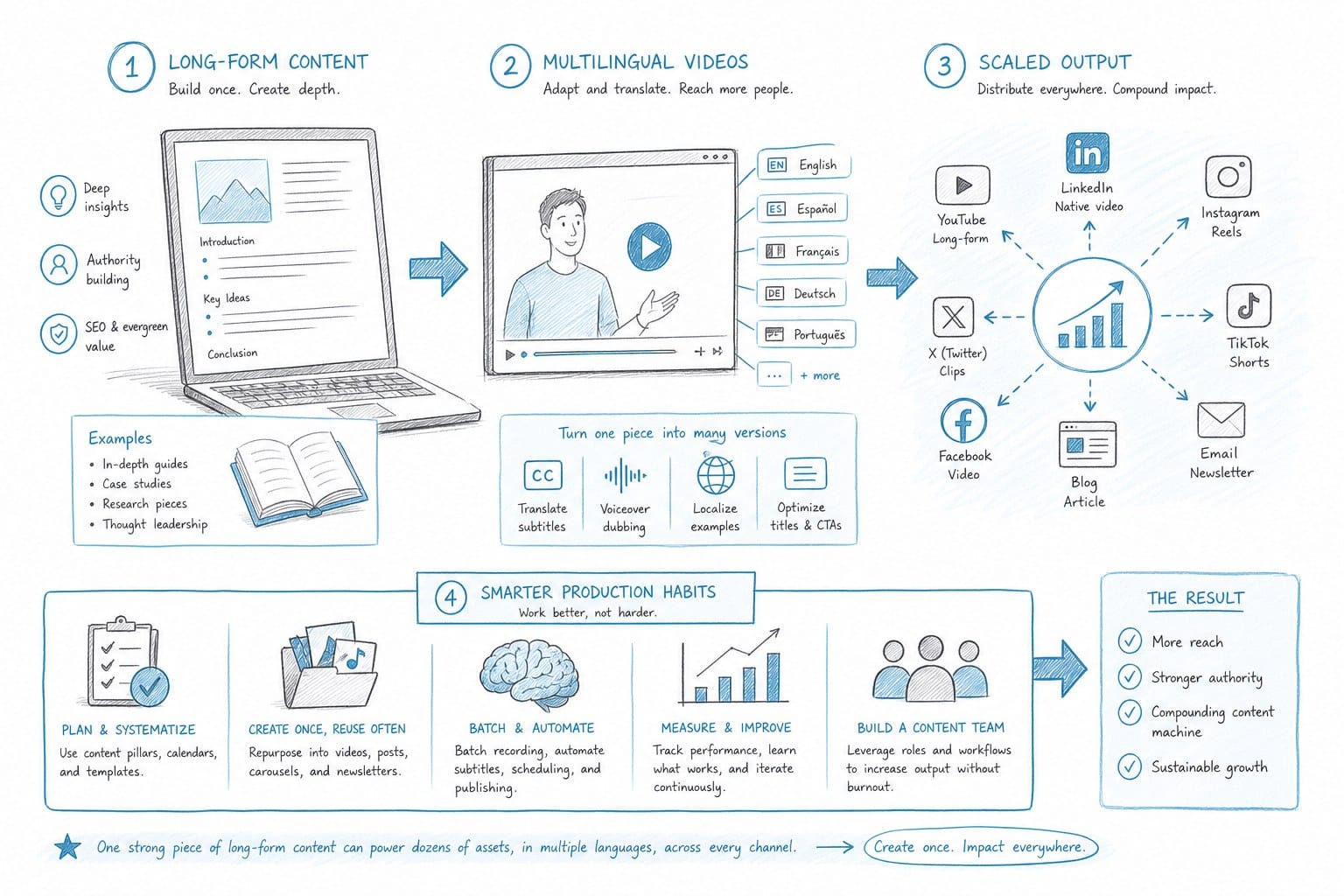
3. Scaling your output with long-form content, multilingual videos, and smarter production habits
If you run a faceless YouTube channel, you already know how long it takes to write a solid script. You have to research the topic, organize your points, write in a way that sounds natural when spoken aloud, and then go back and edit everything. For a 10-minute video, that process alone can eat up an entire day. A script generator changes that equation. It uses AI to produce a full, structured script in minutes based on a topic you provide. When you connect that tool to the rest of your production workflow, you stop spending most of your time writing and start spending it on the parts of your channel that actually grow your audience. This article walks you through how a script generator works, how to build it into an automated production stack, and how to scale your YouTube output without hiring a full production team.
What a script generator actually does and why it matters for YouTube
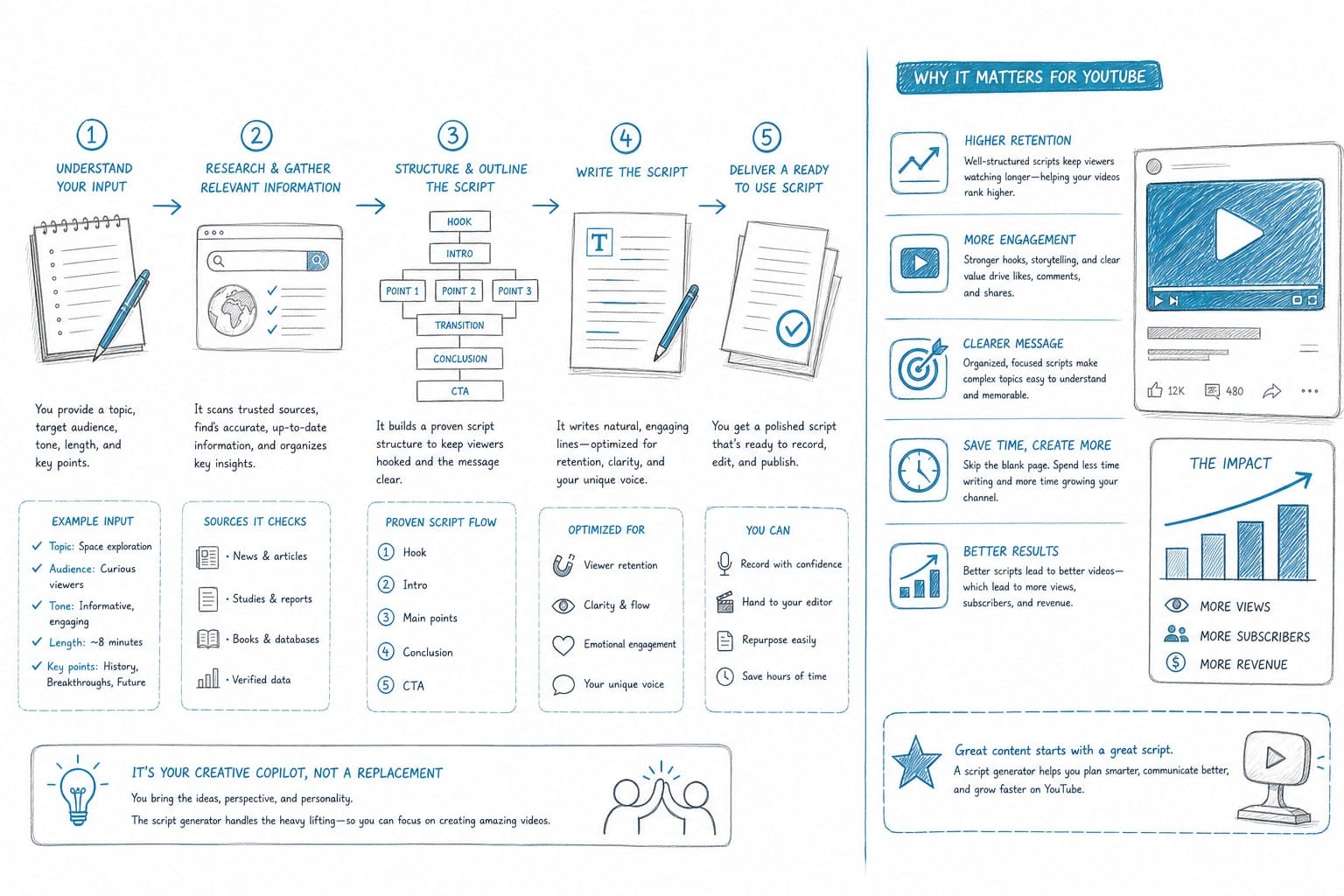
A script generator is an AI writing tool that takes a topic, a tone, and sometimes a target length, then produces a full written script you can use for a video. The output usually includes an intro hook, body sections organized around key points, transitions between those sections, and a closing call to action. Some tools go further and format the script to match a specific video style, like a listicle, a documentary narration, or a step-by-step explainer.
For YouTube specifically, a good script generator does more than string sentences together. It structures your video the way a viewer actually watches it. That means front-loading value so people do not click away in the first 30 seconds, using short sentences that sound natural when read aloud, and breaking information into clear segments that hold attention through the full runtime. That structure is not easy to replicate by hand every single time, especially when you are producing content consistently across weeks and months.
Here is why structure matters so much for your channel's growth. YouTube rewards watch time. If a viewer drops off three minutes into a ten-minute video, the algorithm treats that as a signal that your content is not worth promoting to similar audiences. A well-structured script keeps viewers watching longer because the information flows in a logical order and the pacing never drags or jumps around. Writing that structure by hand every time is hard enough for one video. Doing it consistently across dozens of videos each month becomes nearly impossible without a system.
A script generator takes the structural work off your plate so you can focus on whether the content itself is accurate and genuinely interesting to your target audience. That shift in where your attention goes makes a real difference in output quality over time.
There is also a research layer to think about. If you are running a faceless channel about history, geography, science, finance, or any topic that requires real facts, you are dealing with information that needs to be correct. A script generator that lets you paste in your own research notes or source material will produce a far more accurate first draft than one that pulls entirely from its own training data. This is a critical distinction that separates a useful tool from a liability. You always want to verify what the AI writes, but starting from source-backed content saves hours of rewriting and fact-checking compared to starting from a hallucinated draft.
For creators producing video essays, documentary-style content, or long-form explainers, the script is the foundation of the entire workflow. Everything else, including voiceover, B-roll selection, and editing, depends on having a solid script first. Get the script right, and the rest of production becomes a matter of execution rather than creative problem-solving from a blank page.
Consider the math on a practical level. Writing one 10-minute script by hand, including research organization and editing, can take four to six hours for most creators. A script generator can produce a structured first draft in under ten minutes. Even if you spend an hour reviewing, fact-checking, and tightening that draft, you have recovered most of a workday. Multiply that across a month of consistent posting and you are looking at 30 to 50 recovered hours. That is time you can put back into research, channel strategy, audience engagement, or developing your next project.
A 10-minute YouTube video requires roughly 1,400 to 1,600 words of scripted content, assuming a natural speaking pace of around 140 to 160 words per minute. A 20-minute video needs 2,800 to 3,200 words. A 30-minute documentary-style piece requires somewhere between 4,200 and 4,800 words of tightly written narration. Writing those word counts by hand every week is a massive time commitment. Generating a structured first draft and then editing it to your standard gives you a faster path to that volume without cutting corners on quality.
The creators who get the most from script generators are the ones who treat the output as a starting point rather than a finished product. You bring your own editorial judgment about accuracy, tone, and what your specific audience finds interesting. The AI brings speed and structural consistency. That combination is what makes the tool genuinely useful rather than just a novelty.
One more point worth making: a script generator also lowers the barrier to starting a video. One of the biggest productivity killers for solo creators is sitting down to write and not knowing where to begin. When you open a script generator with a clear topic and a specific prompt, you immediately have something to react to and edit. That is almost always faster and less draining than writing from scratch, even for experienced writers.
How to set up a script generator workflow that automates your video production
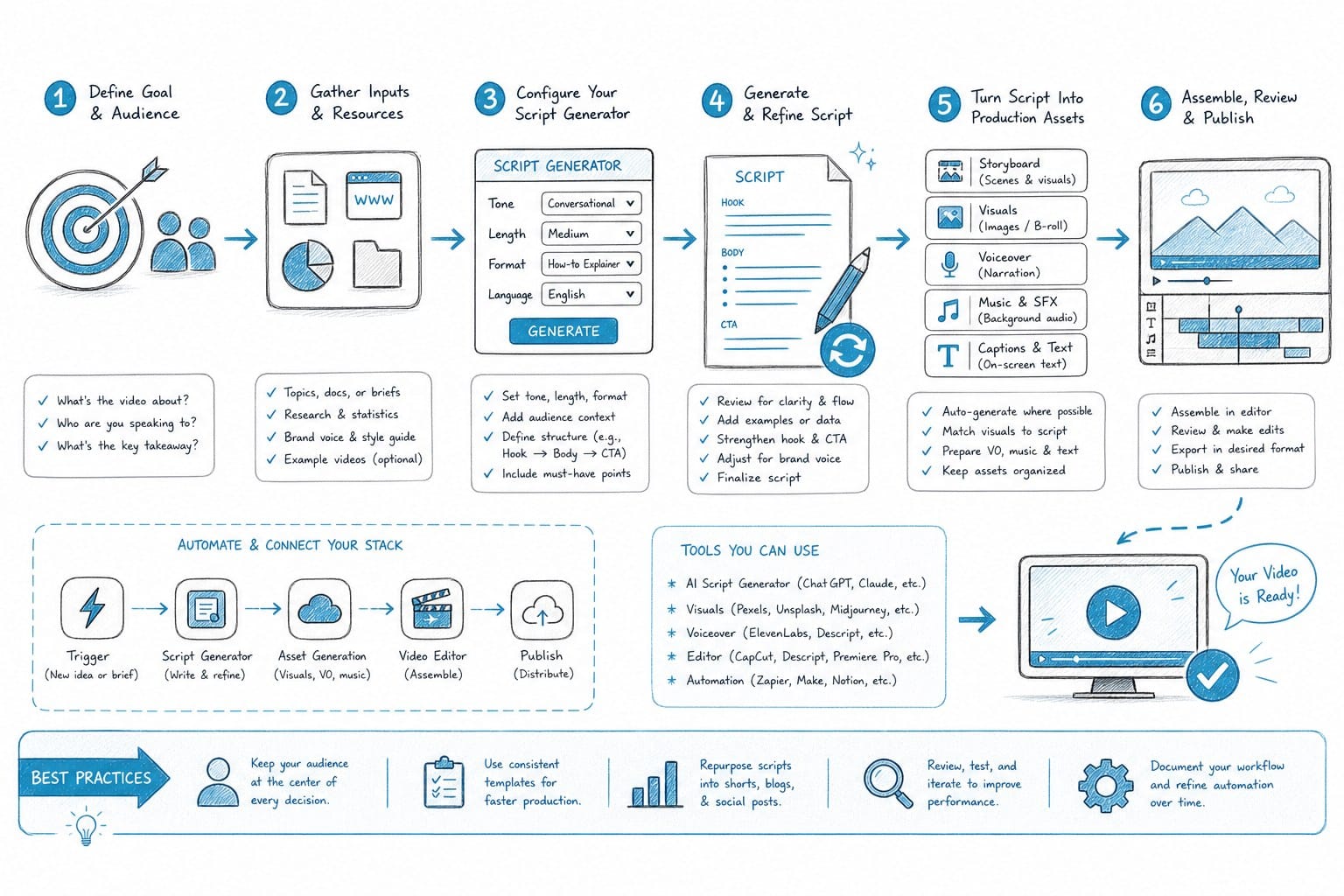
Using a script generator as a one-off writing tool saves you time on individual videos. Building it into a connected production system is where the real leverage comes from. Here is how to set up a workflow that takes you from topic idea to finished video with minimal manual steps in between.
Start with your topic list. The fastest way to use a script generator is to have a clear input ready before you open the tool. That means knowing your topic, your target audience, your desired video length, and the tone you want to strike. For a faceless channel covering world geography, your prompt might look like this: write a 15-minute documentary-style script about the economic development of Southeast Asia since 1980, aimed at general adult audiences, using a neutral and informative tone with a storytelling structure. The more specific your prompt, the more usable your first draft will be and the less editing you will need to do afterward.
Prompt quality matters more than most creators realize when they first start using these tools. A vague prompt like write a script about Southeast Asia will produce a vague, generic script. A detailed prompt that specifies length, tone, structure, audience, and the specific angle you want to take will produce a draft that is close to your vision from the start. Spend two or three minutes writing a good prompt and you will save 20 to 30 minutes of editing on the back end.
Once you have a draft, read through it out loud or use a text-to-speech preview before you start editing on the page. Scripts that look clean in writing often have awkward sentence structures when spoken. You are listening for phrases that do not sound like natural speech, sections where the pacing slows down and loses momentum, and transitions that feel abrupt or confusing. This read-through step usually takes 20 to 30 minutes for a long-form script, and it is worth doing every single time before you move to production.
After you finalize the script, the next step is voiceover. If you are running a faceless channel, you are either recording your own voice or using an AI voice tool. Either way, your finalized script feeds directly into that step. Having a clean, well-structured script makes a noticeable difference in how your voiceover sounds, whether it is recorded or generated, because the sentences were written specifically to be spoken rather than read.
Here is where real automation pays off. Platforms like Kliptory are built for this kind of integrated pipeline. Scripting, voiceover, B-roll sourcing, captions, and video editing all connect inside one system rather than requiring you to move files manually between five or six different tools. For a creator producing documentary-style content, that integration means you can move from a topic idea to a fully edited long-form video without managing a complicated stack of software or outsourcing to a team of editors.
For creators producing ultra long form YouTube videos with AI, the script generator workflow becomes even more critical. A 30-minute or 40-minute video requires a script that runs roughly 4,500 to 6,500 words. Writing that by hand is a significant time investment that most solo creators cannot sustain at any kind of posting frequency. Generating a structured first draft and editing it down to your standard gives you a realistic path to long-form content without burning out on the writing phase alone.
Let me walk through a concrete example of what this workflow looks like across a full month of production.
Imagine you run a faceless YouTube channel covering historical events. Your posting schedule is two videos per week. Each video runs about 15 minutes, which means you need roughly 2,100 to 2,400 words of scripted content per video. Over a full month at that pace, you need 16,000 to 19,000 words of finished script.
Without a script generator, producing that volume of writing takes roughly 40 to 60 hours per month, assuming you are working at a solid pace and not spending significant time on research organization. With a script generator and a review-and-edit workflow, you can bring that down to 10 to 15 hours. The AI handles the first draft. You handle accuracy, voice consistency, and quality control. The output is the same volume of finished content, produced in roughly a quarter of the time.
Here is what that monthly production calendar looks like in practice. In week one, you batch your topic research and write your input prompts. You run the script generator for all eight videos you plan to publish that month and save the drafts in a shared folder or project management tool. In week two, you review and edit four of those scripts, generate or record voiceovers, and send the finished assets to your editing tool or production platform. In week three, you do the same for the remaining four scripts. In week four, you publish, review your performance analytics, and plan the following month's topic list.
Batching like this keeps you out of the reactive mode where you are scrambling to write and produce content the day before an upload deadline. It also means you always have a buffer of reviewed and ready-to-edit scripts, so one busy week does not break your entire posting schedule.
One more element to build into your workflow is a reusable script template tied to your channel's format. Most faceless channels have a repeatable structure that viewers come to expect. A listicle channel might always open with a teaser, run through seven to ten items with consistent transitions, and close with a summary. A documentary channel might follow an intro, a context-setting section, a main narrative arc, and a conclusion that ties back to the opening. Once you identify your channel's format, build that structure into your script generator prompts so every output already follows your pattern. This cuts editing time significantly because you are refining language rather than restructuring an entire script from scratch.
Keep a running document of your best-performing prompts. When a particular prompt produces a strong first draft, save it as a template and reuse it for similar topics. Over time you build a library of prompts tailored to your channel's specific style and audience that consistently produces high-quality starting points. That library becomes one of your most valuable production assets.
Scaling your output with long-form content, multilingual videos, and smarter production habits
Once you have a reliable script generator workflow in place, you can start thinking about scale in ways that were not realistic when you were doing everything by hand. For a YouTube creator, scale means more videos per week, longer videos per upload, content in additional languages, or eventually multiple channels. A connected AI production workflow makes all of these achievable without proportionally increasing your workload or your costs.
Start with posting frequency. If you can produce a quality 10-minute video in three to four hours using a script generator and an integrated production platform, posting three or four times per week becomes realistic for a solo creator. That level of consistency is one of the most reliable drivers of channel growth over time. The algorithm rewards channels that upload regularly because it has more content to test with different audience segments. More uploads also means more opportunities to find a topic or format that resonates and triggers a meaningful spike in new subscribers.
But frequency without quality is just noise. Your script generator workflow needs to produce content that is accurate, well-paced, and appropriate for your specific audience. A few habits make a real difference here. First, always provide the AI with your own source material when you can, rather than relying entirely on what it recalls from training data. Paste in research notes, verified statistics, article summaries, or data points you have already confirmed. Second, build a fact-checking step into every review session, specifically for any numbers, dates, names, direct quotes, or claims about real-world events. Third, read your final edited script out loud one more time before sending it to production. That last read catches awkward phrasing that survives a visual review.
Now think about video length. Channels that produce 20-minute, 30-minute, or even 40-minute videos on topics with real depth consistently attract more engaged audiences than channels producing only short-form content. These viewers are not casually scrolling. They are sitting down to watch something that feels more like a documentary or an in-depth report than a quick explainer. The ad revenue potential for long-form content is higher because there are more mid-roll ad slots available per video. The average watch time per view is also longer, which tells the algorithm that your content is worth actively recommending to new audiences.
The obstacle has always been production time. A 30-minute video requires a 4,500 to 5,000-word script, hours of careful editing, deliberate B-roll selection, and consistent pacing from the first minute to the last. That is why most individual creators default to shorter formats. With a script generator handling your first draft and a production platform handling the editing layer, long-form becomes accessible at a posting frequency that would have been exhausting before. You can read more about how creators are approaching this shift in practice here: how to create ultra long form YouTube videos with AI.
Another major lever for scaling your channel is language. The vast majority of YouTube creators only publish in one language, which means they are competing in a single, often crowded market. Publishing in multiple languages opens up entirely separate audiences on the same platform. A video about world history that performs well in English can potentially reach viewers in Spanish, Portuguese, French, Hindi, or Indonesian with the right translation and localization.
AI tools now make multilingual production practical for solo creators and small teams working without translation budgets. You start with your finalized English script, then use AI translation and voiceover tools to produce versions in other languages. The structure, B-roll footage, and visual assets stay largely the same across versions. You are primarily adapting the language layer, which is far less work than producing an entirely separate video. For faceless channels in particular, this is a practical approach because there is no on-camera presenter to re-record in each language. You can explore how this works in practice here: how to create multilingual faceless YouTube videos with AI.
When evaluating AI tools for your channel, it is worth understanding what separates a purpose-built production platform from a general AI writing tool. A general writing tool produces text. A production platform designed for faceless YouTube channels connects that text to every downstream step, including voiceover generation, B-roll sourcing, caption creation, and video editing, inside one system. That integration is what makes the time savings compound rather than just shifting the bottleneck from writing to editing. If you want a practical comparison of what is available for faceless creators, this is a useful reference point: TubeMagic alternatives for faceless YouTube creators.
Let me address the quality question directly, because it comes up every time someone considers using AI in their content production process. AI-generated scripts need human oversight. A script generator produces a first draft, not a finished product. You are responsible for accuracy, tone, and the overall quality that represents your channel to your audience. The time saving comes from eliminating the blank-page phase, not from removing yourself from the creative process.
The creators who get the best results from AI production workflows are the ones who stay editorially engaged throughout. They use the script generator to handle structure and initial language, then apply their own judgment about what information is correct, what tone fits their channel's voice, and what their audience will find genuinely interesting versus just informative. That combination of AI speed and human editorial judgment produces content that performs well and builds the kind of loyal audience that sustains a channel long-term.
Consider also what you do with the time you recover. If a script generator and production platform cut your per-video production time in half, you gain meaningful hours every week. You can use those hours to go deeper on research, engage more consistently in your comments section, study your analytics to understand which topics and formats are actually driving growth, or test new video styles you have been curious about but never had time to try. Those activities, research quality, audience engagement, and format experimentation, are what drive long-term channel momentum. Automation does not replace your creative input. It removes the repetitive, time-consuming production tasks so you can put your time where it has the most impact.
For solo creators and small media teams working without large budgets or full production crews, this shift in how you spend your production hours can be the practical difference between a channel that stays flat and one that builds real traction. A script generator, used with clear prompts, consistent editing habits, and the right production platform behind it, is one of the most straightforward ways to make that shift happen without waiting until you can afford to hire help.
Ready to take the next step?
If you are ready to stop spending your week writing scripts and start producing more videos with less friction, Kliptory is built for exactly that kind of workflow. It connects AI scripting, voiceover generation, B-roll sourcing, data visualizations, captions, and editing in one platform designed specifically for faceless YouTube channels. You can take a documentary-style video from topic idea to finished upload in hours rather than days, without needing an editor or a production team behind you. Visit Kliptory to see how the system works and start building a production process that lets you scale your channel on your own schedule.