TubeMagic alternatives for faceless YouTube creators

Table of contents
1. What TubeMagic does and where it falls short for faceless creators
2. What to look for in a TubeMagic alternative if you make faceless videos
3. Why Kliptory is worth a serious look as a TubeMagic alternative
If you run a faceless YouTube channel, you have probably come across TubeMagic at some point. It is a well-known toolbox that helps creators generate video ideas, write scripts, and build out titles, tags, and descriptions using AI. For many creators, it is a solid starting point. But as your channel grows and your content gets more ambitious, you might find yourself needing something that goes further than metadata and scripts. That is where looking at TubeMagic comparison pages and tool roundups becomes useful, because the options out there have expanded significantly. This article walks through what TubeMagic does well, where it leaves gaps for faceless YouTube creators specifically, and what alternatives are worth your time if you want to produce long-form, documentary-style content at scale.
What TubeMagic does and where it falls short for faceless creators
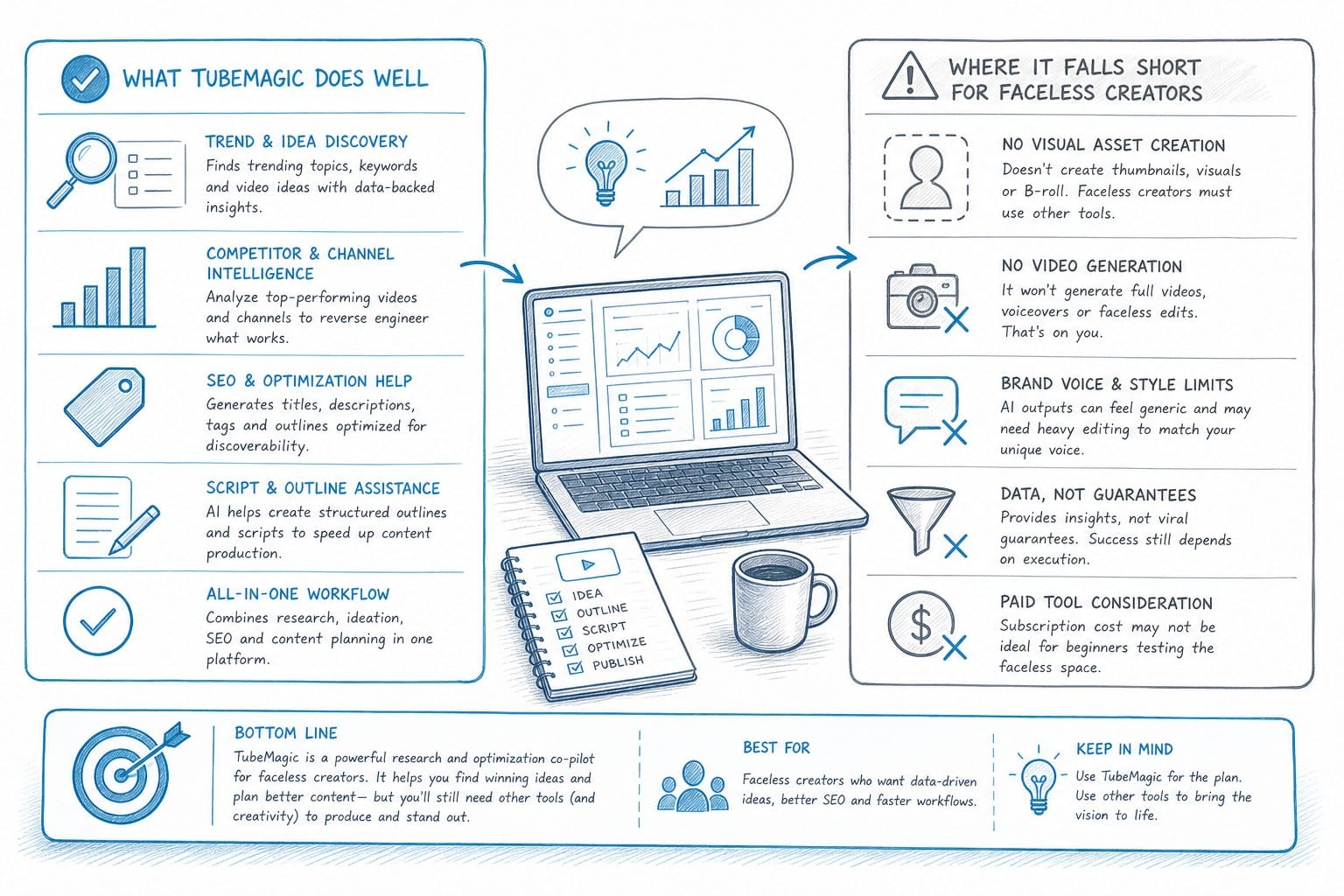
TubeMagic markets itself as a YouTube toolbox. It covers a solid range of tasks that every creator needs help with: generating video ideas, writing AI scripts, crafting optimized titles, building out descriptions, and suggesting tags. For creators who are just starting out or who produce shorter content, those features cover a lot of ground.
The platform leans on large language models like GPT-4o and Claude to produce written content. That means the scripts you get are text-based and reasonably well structured. If you are producing a five-minute opinion video or a quick listicle where you appear on camera, TubeMagic can get you a working draft fast.
But faceless YouTube channels have a different set of needs. When you are not on camera, the script is only one piece of the puzzle. You also need a voiceover that matches the tone and pacing of what was written. You need B-roll footage that visually illustrates what the narrator is saying, rather than generic stock clips dropped in at random. You need data visuals like maps, timelines, and charts when you are covering historical, geographical, or data-heavy topics. You need captions that are accurate and properly timed. And you need an editing workflow that stitches everything together without requiring a full post-production team behind you.
TubeMagic does not handle any of those production layers. You get the script, and then you are on your own to figure out the rest. For a solo creator or a small team trying to publish consistently, that gap is significant. You can easily spend ninety percent of your time on production even after the writing is done. A ten-minute documentary-style video might take thirty or forty hours to complete from concept to upload when you are sourcing footage manually, hiring a voice artist, editing the timeline, and adding captions yourself.
That is not a criticism of TubeMagic specifically. It was built to help with YouTube strategy and content planning, and it does that reasonably well. The limitation is structural: it is an optimization and writing tool, not a production tool. If your goal is to publish long-form faceless content on a regular schedule, you need something that covers the full pipeline, not just the first step.
Faceless channels also rely on a specific visual style that has to be consistent across every video. Documentary-style videos, video essays, and explainer content all depend on tight synchronization between the narration and what appears on screen. If your B-roll does not match the script, or if your data visuals are vague or generic, the video loses credibility fast. Viewers notice when the footage on screen has nothing to do with what the narrator is saying. That level of coordination is hard to manage manually, especially when you are publishing multiple videos per month.
Consider a channel covering geopolitical history. A video on the collapse of the Soviet Union needs footage and imagery that corresponds to specific events, specific locations, and specific time periods. A generic clip of people walking through a city does not carry the same weight as a well-placed archival image or a map that shows how borders shifted. Getting that right through manual sourcing takes hours. Getting it wrong costs you viewer trust and watch time.
When creators go searching for alternatives, they often start with comparison roundups of AI YouTube tools. The lists they find tend to include content humanizers, social post generators, and essay tools. Most of those are not purpose-built for YouTube video production either. They solve adjacent problems but do not close the production gap that faceless creators actually face.
So the real question becomes: what does a genuine alternative look like for someone who wants to produce documentary-style YouTube content without a team, without advanced editing skills, and without spending weeks on a single video? The answer requires being clear about what the full production pipeline actually involves, and which parts of it are worth automating first.
What to look for in a TubeMagic alternative if you make faceless videos
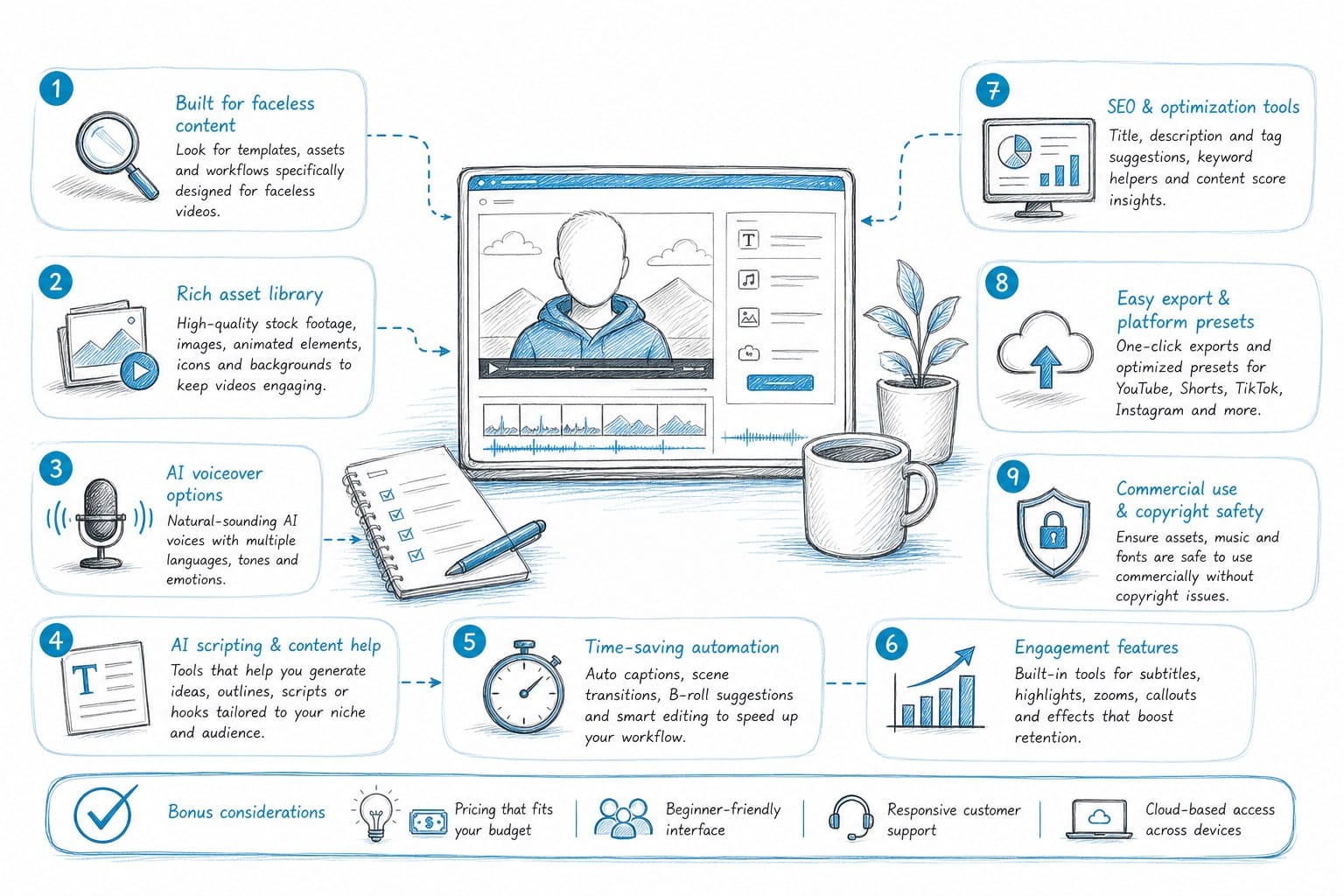
Before you switch tools or add something new to your workflow, it is worth being specific about what you actually need. Faceless YouTube creators are not a monolith. A channel focused on true crime has different production requirements than one focused on geopolitics or personal finance explainers. But there are a few capabilities that matter across all of those niches, and knowing what they are helps you evaluate any tool honestly rather than getting pulled in by feature lists that sound impressive but miss the point.
Script quality has to go beyond basic AI output. A lot of AI writing tools produce text that reads like a rough draft: competent sentences, logical enough structure, but missing the texture that makes someone want to keep listening. For faceless video, the script carries the entire emotional weight of the production. There is no face to look at, no gestures to read, no eye contact to hold attention. The voice has to do all of that work, and the voice can only do that work if the script was written to be spoken, not read.
Spoken scripts use shorter sentences. They repeat key ideas in different ways so listeners can follow complex arguments without rewinding. They use transitions that guide the listener from one point to the next rather than expecting them to track a written paragraph structure on their own. A tool that outputs dense, essay-style paragraphs and calls it a video script is giving you something that still needs significant editing before it sounds natural coming out of a speaker. The best production tools generate narration-ready scripts from the start.
Voiceover generation needs to be built in and not outsourced to a separate step. When you have to export your script, upload it to a text-to-speech service, wait for the audio file, download it, and then bring it into your editing environment, you are adding coordination overhead to every single video you produce. That overhead adds up fast. When voiceover is part of the same tool that generated the script, the pacing can be calibrated to match the content structure. You do not have to manually time your cuts around an audio file you received from somewhere else.
Quality matters here too. Early text-to-speech tools sounded mechanical and flat. Current AI voice generation has improved to the point where it can produce narration that sounds natural enough to hold listener attention across a twenty-minute video. The difference between good and mediocre voiceover is most noticeable in longer content, where a robotic delivery becomes exhausting before the video is half over.
B-roll sourcing and placement should be automated. This is one of the most time-consuming parts of producing a faceless video, and it is also one of the least creatively rewarding. Searching through stock footage libraries, previewing dozens of clips that are almost right, downloading the ones that might work, and then manually placing them in the timeline is tedious work that does not require creative judgment so much as patience. If a tool can analyze the script and match relevant B-roll to specific segments automatically, that saves hours per video without sacrificing the quality of the final product. The footage should come from licensed libraries so you are not gambling on copyright claims after you publish.
Data visualization matters more than most new creators realize. If you produce content about history, geography, economics, science, or current events, you regularly need maps, timelines, and charts to explain your subject clearly. A static screenshot from a Google search looks amateurish. A custom map showing the geographic spread of a historical event, or a timeline that visualizes a sequence of political decisions, or a chart that puts economic data in context, adds credibility and clarity that B-roll footage alone cannot provide. These visuals are also what make videos shareable, because viewers take screenshots and share them as standalone images on social platforms. A tool that generates clean, on-brand data visuals and drops them directly into the video timeline is genuinely differentiating in a crowded content space.
Captions and final editing should live in the same environment as everything else. Jumping between a captioning tool, an editing platform, a script tool, and a voiceover service for every single video is not a workflow, it is a collection of tasks stitched together with friction at every seam. The more of the production pipeline that lives in one place, the faster you can move from concept to upload without losing momentum or making coordination mistakes.
Length support is easy to overlook until it becomes a problem. A lot of AI video tools are built for short-form content: one to three minute clips, social media snippets, or short explainer videos. Faceless YouTube channels built on documentary-style content often run anywhere from ten to forty minutes per video. Some of the strongest-performing channels in the educational and history categories regularly publish videos over twenty minutes long, because watch time and session time are significant signals for YouTube's recommendation system. A tool that cannot handle that length without requiring you to manually piece together multiple outputs is not the right fit for that strategy.
Finally, think about the economics before you commit. If you are producing two to four videos per month and each one takes you twenty or thirty hours to complete, you are not building a scalable operation. You are building a hobby that consumes your available time. Either you burn out, or you hire editors and voice talent, which adds significant ongoing costs. A platform that compresses the production timeline from thirty hours to four or five hours per video changes what is financially possible for a solo creator or a small team. It is not just a convenience. It changes the business model.
You can read more about what this looks like in practice in this guide on how to produce long-form YouTube videos with AI, which walks through what the full production process looks like when you automate the pipeline rather than just the scripting stage.
Why Kliptory is worth a serious look as a TubeMagic alternative
Kliptory was built specifically for faceless YouTube creators who want to produce long-form content without a post-production team. That focus shapes everything about how the platform works. It is not a general-purpose AI writing tool that happens to mention YouTube in its marketing. It is a production platform designed to take you from an idea to a finished video, and that distinction becomes obvious the moment you start using it.
Scripting in Kliptory is designed for narration, not for general content writing. The output is structured to work as a spoken script from the beginning, which means the pacing, transitions, and sentence length are calibrated for how people actually listen rather than how they read. If you are producing a twenty-minute documentary on the history of a particular city, or a deep-dive explainer on a financial concept, or a video essay on a geopolitical event, the script needs to hold attention for the full duration. That is a genuinely different challenge than writing a three-minute script, and Kliptory is designed with that in mind. The scripts do not read like AI output that needs another pass to feel natural. They read like something a narrator can pick up and deliver.
Voiceover generation is built directly into the platform. You do not need to export your script, upload it somewhere else, wait for a file, and then bring it back into your editing environment. The voiceover is generated in context, timed to match the script segments, and adjustable without starting the whole process over. For creators who have used standalone text-to-speech services and then had to manually sync audio to video, the difference in workflow is significant. You stay inside one environment from script to final audio, which removes a category of coordination errors that plague multi-tool workflows.
B-roll sourcing is automated. Kliptory pulls relevant footage based on the content of the script and places it in the appropriate segments. For creators who have spent hours manually searching stock footage libraries and trying to match clips to narration, this is one of the most meaningful time savings the platform offers. A video about urban infrastructure gets footage of cities and construction. A video about monetary policy gets relevant imagery rather than generic business stock clips of people shaking hands in conference rooms. The footage comes from licensed sources, so you are not gambling on copyright claims after you publish and start to see views.
Data visualizations are a specific strength that sets Kliptory apart from almost every other tool in this category. If your content involves geography, you can generate maps that are specific to the locations and events in your script. If your content involves sequences of events, political changes, or historical developments, you can create visual timelines that give viewers a clear frame of reference. If your content involves statistics or comparisons, you can build charts that put the numbers in context rather than just reading them aloud and hoping viewers can picture what they mean. These are not generic template overlays dropped in as filler. They are generated to match the specific information in your script and the visual style of the video. For documentary-style content and video essays, this kind of visual specificity is what separates a credible production from one that looks assembled in an afternoon.
This matters more than it might seem at first. Viewers in the educational and documentary space are often knowledgeable about the topics they watch. They notice when a map is wrong, when a chart is misleading, or when the visual on screen does not match what the narrator is describing. Getting the data visuals right is part of building the channel credibility that leads to subscribers and long-term watch time. A tool that generates accurate, topic-specific visuals removes one of the most technically demanding parts of producing this kind of content.
Captions and editing are handled inside the platform. You do not need a separate captioning tool or a separate editor to finish the video. The full output is a complete, edited video ready for upload. For a solo creator producing content on a schedule, the ability to go from idea to finished video without switching between six different tools is a practical advantage that compounds over time. Every tool you eliminate from the workflow is a source of friction, a potential coordination failure, and a subscription cost that you stop paying.
The length capability deserves emphasis again because it is where a lot of competing tools fall short. Kliptory supports videos from five minutes up to forty minutes. That range covers almost everything that performs well on YouTube in the educational, documentary, and video essay categories. Channels in those categories often see their strongest performance from videos that are fifteen to thirty minutes long, because watch time is a significant ranking and recommendation signal. A tool that can only produce short content is a tool built for a different platform and a different strategy.
For digital entrepreneurs and side-hustlers running YouTube channels as a business, the math on Kliptory is straightforward. If you can produce one finished video in a day instead of one per week, and the quality holds viewer attention through the full runtime, you build a library of content faster, reach monetization thresholds sooner, and have the capacity to test different topics and formats without a huge time commitment per experiment. YouTube rewards consistency. A tool that makes consistency achievable for a solo operator is not a nice-to-have. It is the thing that determines whether the channel becomes a business or stays a project.
For small media teams and agencies producing content at volume, Kliptory reduces the staffing requirements for each video significantly. You do not need a dedicated editor on every project. You do not need a voiceover artist on retainer. You do not need a researcher pulling B-roll for every upload. That changes the unit economics of content production in a way that makes higher volume output financially viable without proportional headcount increases.
One thing worth being direct about: Kliptory is not a magic button. The quality of the output depends on the quality of the input. If you give it a vague topic with no direction, you will get a generic video. If you bring a clear angle, a specific audience in mind, a sense of the story you want to tell, and some direction on tone and structure, the platform has the tools to help you execute that vision at a level that would otherwise require a team. The creators who get the most out of platforms like Kliptory are the ones who use it to remove mechanical labor from production so they can spend more time on strategy, storytelling, and channel growth.
That is actually the right way to think about any AI production tool. It amplifies your creative direction. It does not replace it. The editors and voice artists and researchers who work on premium documentary productions are not being replaced by tools like this. But solo creators and small teams who could not afford those resources can now produce content that competes in the same category.
If you are currently using TubeMagic for script ideas and optimization, you do not necessarily have to give that up. Some creators use lightweight optimization tools for ideation and keyword research, and then move into a full production platform for the actual video creation. The key is knowing which part of your workflow is the actual bottleneck. For most faceless YouTube creators, the bottleneck is not coming up with ideas. The platform is full of ideas. The bottleneck is producing videos fast enough and consistently enough to build an audience before you run out of energy.
You can explore what Kliptory offers for faceless creators at kliptory.com or see more about the text-to-video production workflow at kliptory.com/text-to-video.
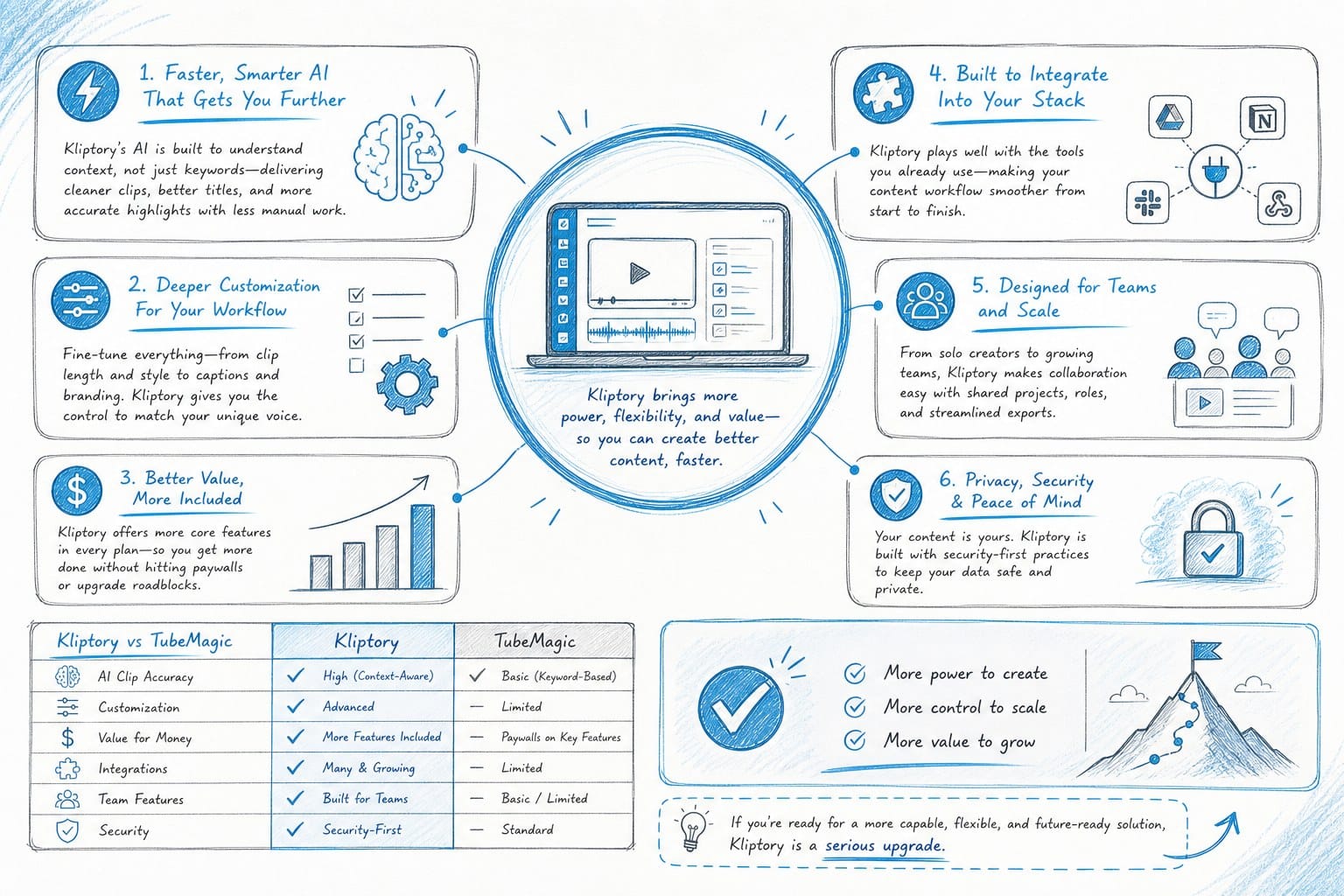
The comparison between TubeMagic and platforms like Kliptory comes down to scope. TubeMagic helps you plan and optimize. Kliptory helps you build. If you are at the stage where planning is no longer your problem, that distinction matters a great deal.
Ready to take the next step?
If you are ready to move from scripting and optimization into full video production, Kliptory is built for exactly that. You can produce documentary-style, long-form faceless videos without a team, without advanced editing skills, and without the weeks-long production timeline that holds most solo creators back. Visit kliptory.com to see how it works and start building your content library faster.