How to produce long-form YouTube videos with AI

Table of contents
1. Why long-form YouTube videos are worth the effort
2. A step-by-step AI workflow to produce documentary-style videos
3. How to scale your channel output with an AI production platform
Long-form YouTube videos can take weeks to plan, script, record, edit, and publish. For solo creators running faceless channels, that timeline makes scaling feel almost impossible. This guide walks you through exactly how to produce long-form YouTube videos with AI, from the blank page all the way to an uploaded, polished documentary-style video, using a workflow that does not require a production team, a studio, or years of video editing experience. Every step is practical, every tool recommendation is real, and by the end you will have a clear picture of what your production week can actually look like.
Why long-form YouTube videos are worth the effort
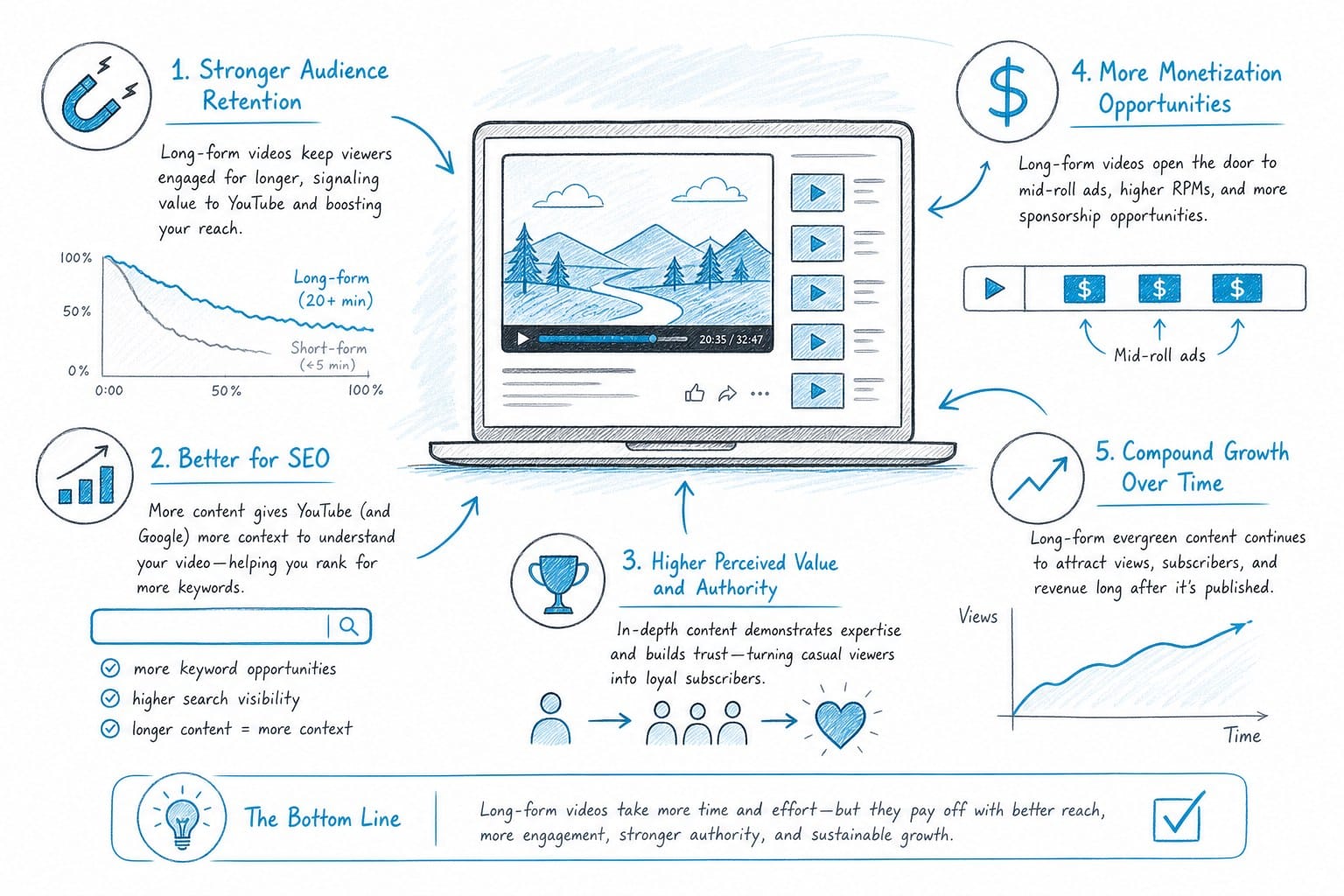
YouTube's algorithm rewards watch time above almost everything else. A viewer who sticks around for 22 minutes sends a much stronger engagement signal than one who watches 90 seconds and clicks away. That gap in watch time directly influences how often YouTube recommends your video to new viewers, which is the engine behind organic channel growth.
Channels built around video essays, documentary-style explainers, ranked listicles, and deep-dive analyses tend to grow more steadily over time than channels chasing short viral clips. The reason is compounding. Each long-form video builds topical authority in YouTube's system, and a library of ten well-researched 20-minute videos in the same niche signals to the algorithm that your channel is a reliable source on that subject.
Advertising revenue is another concrete reason to go long. YouTube can only place mid-roll ad breaks in videos that run at least eight minutes. A 20-minute video can carry three or four breaks, which multiplies your ad earnings per view compared to a four-minute video. Advertisers in categories like finance, technology, and business history also pay significantly higher CPM rates, often ranging from $15 to $40 per thousand views depending on the season and audience, which makes long-form content in those niches particularly attractive from a revenue standpoint.
The content itself also earns differently over time. A well-produced 25-minute explainer on a topic like the collapse of a major company or the history of a geopolitical conflict can continue pulling in search traffic for years. People search for those topics constantly, and a thorough video that ranks well in YouTube search keeps generating views, ad revenue, and new subscribers long after you published it. Short-form content rarely has that kind of shelf life.
Long-form also opens up subjects that genuinely need space to breathe. History explainers, geopolitical breakdowns, science documentaries, ranked listicles covering entire industries, and deep-dive financial analyses are formats where viewers expect depth and detail. Trying to cover the causes of the 2008 financial crisis or the full history of the Roman Empire in five minutes leaves audiences feeling like they only got a surface-level answer. They click away unsatisfied, and they do not subscribe. Give that same topic 25 minutes, structure it well, and fill it with specific data, clear visuals, and strong narration, and viewers finish the video feeling like they actually learned something. That is when they subscribe.
The production cost has always been the obstacle. A single 20-minute video can demand 40 or more hours of work if you are scripting, recording voiceover, gathering footage, building graphics, syncing captions, and editing entirely on your own. That math does not work for most solo creators trying to publish more than once a month.
This is exactly where AI-powered tools change the equation. Modern platforms can now handle every mechanically intensive stage of the pipeline, letting one person produce content at a pace that previously required a team. The creative judgment, the angle, the research quality, the editorial decisions: those still belong to you. But the hours spent on tasks a machine can execute reliably shrink dramatically, and that changes what is possible for a solo creator with a real job or other commitments.
If you have been hesitant to commit to long-form content because of how long it takes to produce, the process described below will reframe what your weekly output can actually look like.
A step-by-step AI workflow to produce documentary-style videos
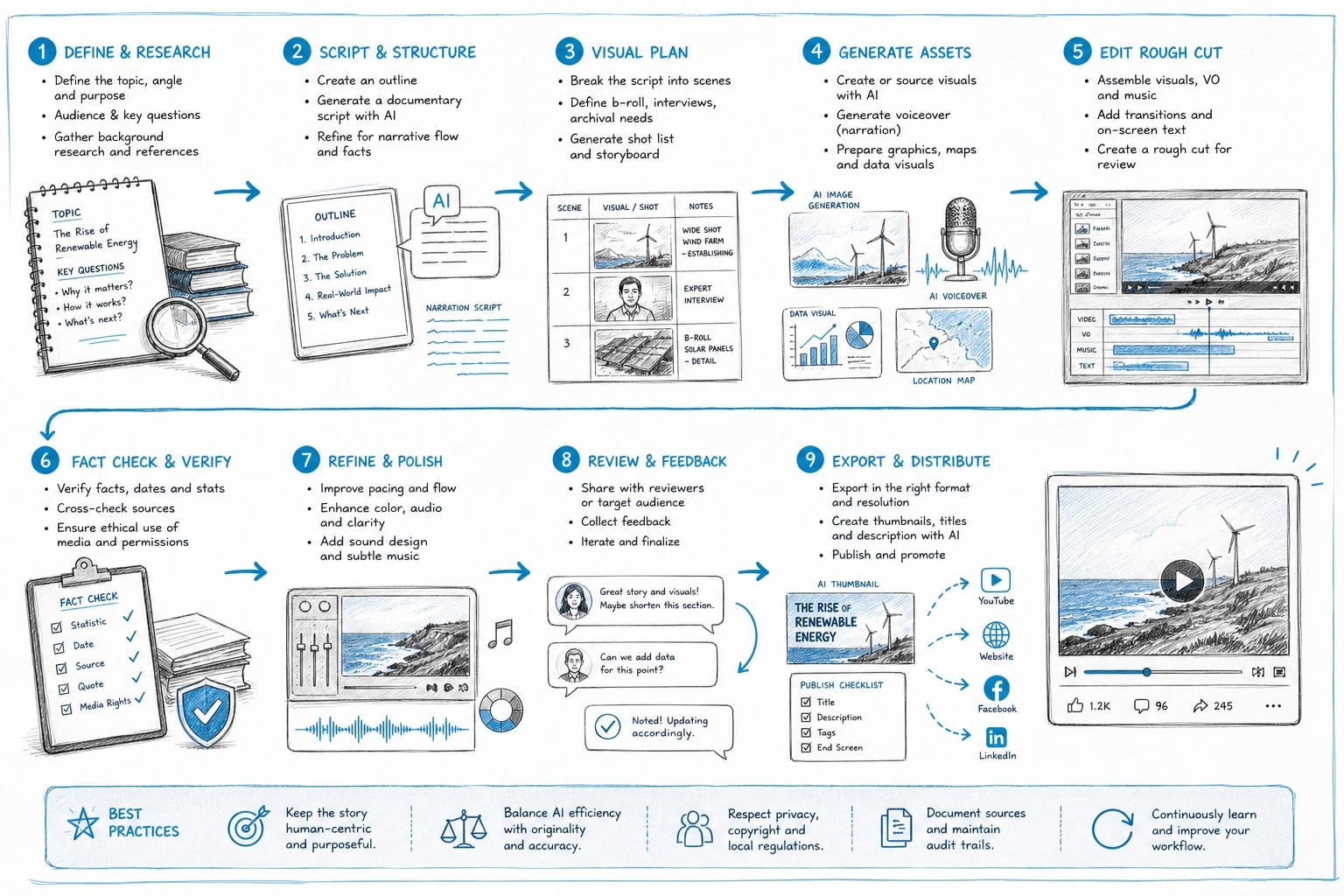
Here is how a modern AI-assisted workflow looks when you are building a long-form YouTube video from scratch. Each step is designed to feed cleanly into the next, so by the time you reach the final editing pass, most of the heavy lifting is already done.
Step 1: Define your topic and angle
Before any tool can help you, you need a clear topic and a specific angle. Broad topics produce weak videos. 'The history of oil' is a subject that could fill a 10-part documentary series. 'How the 1973 oil embargo reshaped the global economy' is a specific, searchable, answerable video topic. Specificity gives the AI a tighter brief and gives your audience a reason to watch the whole thing rather than dropping off after three minutes.
Spend ten minutes writing a one-paragraph summary of what the video covers, what the main argument or narrative arc is, and what you want viewers to understand by the end. This is your creative brief, and it is the single most important document in the entire production process. Every step downstream flows from it.
A strong creative brief for a long-form video might look like this: 'This video covers how the 1973 OPEC oil embargo triggered a global energy crisis, forced Western governments to rethink their energy dependence, and permanently changed how the United States approached domestic oil production and foreign policy in the Middle East. By the end, viewers should understand why the embargo happened, what its immediate effects were, and why its legacy is still visible in energy policy today.'
That level of specificity makes every subsequent step faster and more focused.
Step 2: Generate a structured script
A long-form script is not just a wall of narration. It needs a hook that captures attention in the first 30 seconds, clearly defined sections that give the video a logical structure, transitions between ideas that keep momentum moving forward, and a conclusion that lands with a clear takeaway. Without that architecture, even well-researched content loses viewers halfway through.
AI scripting tools can take your creative brief and output a full structured script, often with suggested on-screen text labels, section titles, and pacing guidance built in. For a 20-minute video, you are typically looking at somewhere between 2,800 and 3,500 words of spoken narration, depending on the pace of the voice you choose. AI can generate a solid first draft of that in minutes.
Your job after generation is to review the script for factual accuracy, insert specific data points and source-backed statistics that give the video credibility, and sharpen any sections that feel generic or vague. The AI output is a first draft, not a finished product. Read the entire script out loud before approving it. Your ear will catch clunky sentences and awkward transitions that your eyes skip over when reading silently.
Pay particular attention to the hook. The first 30 to 45 seconds of a long-form video determine whether the viewer stays or leaves. If the AI-generated hook is weak, rewrite it yourself. A strong hook makes a specific promise, creates curiosity, or opens with a surprising fact. 'In October 1973, a group of oil-producing nations made a decision that caused fuel prices in the United States to quadruple in less than six months. This is the story of how that happened and why it still shapes your gas prices today' is a hook that earns the next 20 minutes. A generic introduction about how oil is important does not.
Step 3: Build the voiceover
Faceless YouTube channels do not use on-camera talent, which means the voiceover carries the entire emotional weight of the video. It sets the tone, controls the pacing, and is the primary reason viewers stay or leave. AI text-to-speech has improved significantly in recent years. You can now choose from voices with different accents, delivery styles, tonal qualities, and pacing preferences, and the results sound natural enough that most viewers do not notice the difference.
When selecting a voice, think specifically about your channel's brand and the emotional register of your content. A calm, measured, authoritative voice works well for history, economics, and science content where credibility matters. A slightly faster, more conversational delivery fits ranked listicles and pop-culture explainers where energy and momentum keep viewers engaged. A few minutes spent auditioning three or four voices against a sample paragraph from your script is time well spent, because you will be using that voice on every video you produce.
Once you generate the full voiceover file, listen to it completely before moving to the next step. Listen specifically for mispronounced proper nouns, names of historical figures, technical terms, or place names that the engine may have gotten wrong. Listen for awkward pauses, rushed sentences, or places where two ideas run together without enough breath between them. Most AI voiceover platforms let you adjust pronunciation phonetically or regenerate individual sentences without reprocessing the entire file, so fixing these issues is quick once you know where they are.
Step 4: Source and sync B-roll footage
B-roll is the visual layer that keeps viewers engaged while the narration plays. For a faceless documentary-style channel, it is essentially your entire visual experience. A 20-minute video typically requires between 80 and 130 individual clips, each appearing on screen for roughly five to fifteen seconds, which adds up to a significant volume of footage to find, evaluate, download, and organize.
Manually searching stock libraries for each clip is one of the most time-consuming parts of traditional video production. You search a keyword, scroll through results, find something that roughly fits, download it, realize the color grade does not match your other clips, go back and search again. Multiply that process by 100 clips and you have burned most of a day.
AI tools that automatically match B-roll to your script based on semantic analysis of the narration cut this process from hours to minutes. Platforms like Kliptory analyze your script line by line and pull relevant footage from licensed stock libraries automatically, matching visuals to the context of the narration without requiring you to manually tag each sentence. The result is a rough visual assembly that you can review, approve, or swap out clips in, rather than building from a blank timeline.
The quality of the automatic matches varies depending on how specific your narration is. Lines that reference concrete, visual subjects like a city, a piece of machinery, a natural landscape, or a historical event pull strong results. More abstract narration about concepts or emotions may need manual clip selection. Plan to review the automated assembly and replace clips that feel off rather than expecting every match to be perfect.
Step 5: Add data visualizations and custom graphics
One element that separates high-quality documentary-style YouTube videos from basic slideshow content is the use of custom graphics. An animated map showing the spread of a trade route, a timeline laying out the sequence of events in a historical crisis, a bar chart comparing GDP figures across decades: these elements do two things simultaneously. They make complex information easier to follow, and they signal to viewers that real effort went into the video. That perception of quality increases retention and encourages shares.
Building these manually in motion graphics software requires both design skill and significant time. A single animated map that would take an experienced designer 90 minutes to build from scratch can be generated by an AI platform in seconds from the relevant data in your script. For a channel producing multiple long-form videos per week, that difference compounds quickly.
For history and geopolitics content specifically, maps are often essential rather than optional. If you are explaining the expansion of the Ottoman Empire or the spread of the Silk Road trade network, telling viewers where things happened without showing them on a map forces them to hold complex geography in their head while also following the narrative. The map resolves that cognitive load instantly. AI-generated visualizations make it practical to include them in every video that needs them rather than treating them as a production luxury.
Step 6: Generate and sync captions
Captions are not optional for a channel serious about growth. A significant portion of YouTube viewers watch with the sound off, particularly on mobile devices and in public spaces. Captions keep those viewers in the video. They also improve accessibility for viewers who are deaf or hard of hearing, and they give YouTube's algorithm more text to index for search ranking purposes, which improves discoverability over time.
AI transcription tools can process your voiceover file and generate a frame-accurate caption file in minutes. The output is generally highly accurate for clean AI-generated speech, though you should review the file specifically for proper nouns, place names, technical terms, and historical figures that may have been transcribed incorrectly. A misspelled name that appears on screen as a caption while the narrator says it correctly looks careless and erodes viewer trust.
Most AI production platforms either generate captions as part of the workflow automatically or allow you to import a caption file during final assembly. Build caption review into your production checklist as a non-negotiable step rather than something you do when you have time.
Step 7: Final assembly and editing
With script, voiceover, B-roll, graphics, and captions in place, the final editing pass is about pacing and polish rather than construction. You are watching for cuts that feel jarring, places where the visual on screen does not match what the narration is describing, sections where the energy drops and needs a tighter edit, and any technical issues like audio level spikes or clip transitions that look abrupt.
AI-assisted editing features can auto-cut silence from the voiceover track, flag sections where the clip duration is significantly longer or shorter than typical, and apply consistent color grading across all footage clips so the visual style feels cohesive throughout the video. For faceless channels focused on volume and consistency, this stage is about reaching a publishable standard efficiently, not perfecting every frame.
A full 20-minute video that previously took three to four weeks to produce across disconnected tools can go from creative brief to finished export in a single focused workday using an integrated AI workflow. That compression in production time is what makes publishing two long-form videos per week realistic for a solo creator.
How to scale your channel output with an AI production platform
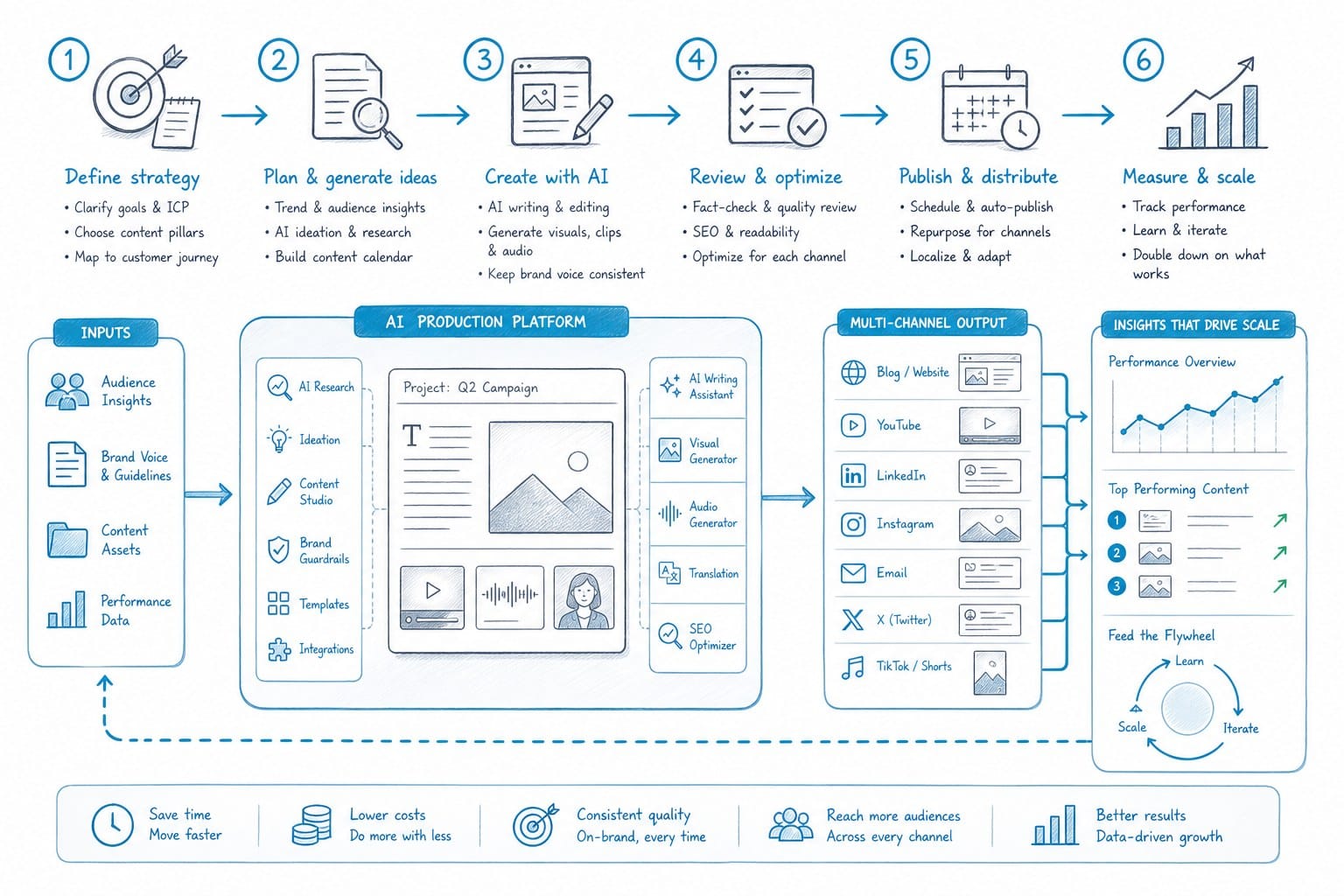
Understanding the individual steps is useful, but the real leverage in AI-assisted production comes from running all of them inside a single integrated platform rather than stitching together five or six separate tools. Jumping between applications creates its own friction. File formats change between tools, assets get lost in downloads folders, version control becomes a problem when you are managing multiple videos at once, and every export-import cycle adds time and introduces the possibility of quality loss.
A platform like Kliptory is built specifically for creators who want to produce long-form YouTube content at scale without managing a fragmented toolchain. Scripting, voiceover generation, B-roll sourcing, data visualization, caption generation, and editing all happen inside one workflow. You move from step to step without leaving the platform, which means your assets stay organized, your production history is in one place, and you are not spending time on file management that should go toward creative decisions.
Building a repeatable content calendar
The faceless YouTube channels that grow fastest share one characteristic: they treat content production like a system rather than a creative event. They pick a niche, develop a library of topic ideas organized by search volume and competition level, and publish on a consistent schedule that their audience can rely on. Consistency signals to the YouTube algorithm that a channel is active and worth recommending. It also builds subscriber habits. Viewers who know a channel publishes every Tuesday are more likely to return than viewers who have no idea when the next video is coming.
AI makes that kind of volume achievable for a single person with a day job. Here is a realistic publishing cadence for a solo creator using an integrated AI workflow:
Week 1: Research three video topics in your niche. Confirm they have meaningful search volume. Write a one-paragraph creative brief for each. Generate full scripts for all three using AI. Read each script out loud, edit for accuracy and tone, and finalize.
Week 2: Run all three finalized scripts through voiceover generation. Review each audio file for errors. Run all three through automated B-roll sourcing. Review the assembled footage and swap out clips that need replacement. Submit data points for graphics generation and review outputs.
Week 3: Add captions to all three videos. Do final editing passes on each. Schedule uploads with optimized titles, descriptions, and thumbnails.
With that rhythm, you can publish one to two long-form videos per week without working nights and weekends. At traditional production speeds, that pace would require at least two or three full-time people. AI compresses it to one person working part-time hours on production.
Choosing the right video formats for long-form AI production
Not every video format is equally well suited to AI-powered production. The formats that consistently produce strong results are those that rely on narration, archival or stock footage, and data visualization rather than original filmed content, live interviews, or heavily stylized motion graphics requiring custom animation.
Here are the formats that perform well and translate naturally to an AI workflow:
Ranked listicles follow a predictable structure that AI handles efficiently and consistently earn high click-through rates because viewers can immediately picture the video's format from the title. 'The 15 largest economies in recorded history' or 'Top 20 engineering failures in the last century' are easy to write, easy to source visuals for, and easy to pace because each entry has a roughly equal amount of screen time.
History explainers are among the strongest performers for AI-produced channels because they naturally require maps, timelines, and archival-style footage rather than original content. Deep dives into historical events, the rise and fall of empires, significant conflicts, or the development of major technologies all fit this format. Viewers searching for this content expect depth and are more tolerant of longer run times.
Geopolitical and economics analysis covers territory like why a country's currency collapsed, how a particular trade agreement reshaped an industry, what caused a major financial crisis, or how a specific country built its modern economy. These topics have durable search demand and attract advertisers with high CPM budgets in the finance and business categories.
Science and technology breakdowns explain how technologies work, why scientific discoveries mattered, what the current research says on a given topic, or how a particular engineering challenge was solved. Viewers searching for this content tend to have high completion rates when the narration is accurate and the visuals support the explanation clearly.
Company and industry histories cover the rise and fall of major corporations, the development of entire industries, the competitive dynamics that shaped modern markets, or the biography of a business movement. The streaming wars, the history of the automobile industry, how Amazon built its logistics network: all of these are searchable, watchable, and well-suited to AI production.
All of these formats share a structural advantage for AI production. They rely on well-researched narration and supporting visuals rather than original footage, which means every visual element can be sourced from stock libraries and generated graphics without sacrificing quality.
Maintaining quality at volume
The most common concern creators raise about AI production tools is whether quality suffers when you speed up the process. The honest answer is that it depends entirely on how you use the tools and where you choose to apply your own judgment.
AI handles the mechanical and repetitive work efficiently and reliably. It does not always make strong editorial judgment calls. It may generate a script section that is technically accurate but narratively flat. It may pull B-roll that matches a keyword in your narration but does not fit the mood of the scene. It may produce a data visualization that displays the right numbers but arranges them in a way that is harder to read than it should be. These are exactly the places where your creative judgment matters.
Your role in an AI-assisted workflow shifts from executing every task yourself to reviewing, directing, and refining the AI output. You are the editor-in-chief, not the production assistant. The time you save on mechanical tasks gets reinvested in better creative decisions, sharper scripts, and more accurate fact-checking, which is where the real quality differential between good and great long-form YouTube content actually lives.
Here are the quality checkpoints worth building into every video you produce, regardless of how the rest of the production runs:
Read the full script out loud before approving it. Clunky sentences, unclear transitions, and awkward phrasing that your eyes skip over become obvious when you hear them spoken. This takes 15 to 20 minutes for a long-form script and is the single most effective quality check in the process.
Watch the first assembled cut at 1.5x speed. Pacing problems that feel subtle at normal speed become obvious when the video is slightly accelerated. If a section feels slow at 1.5x, it will feel noticeably slow to a viewer watching at normal speed on a platform full of competing content.
Verify every number in every data visualization before publishing. AI can generate a chart from the data in your script, but the underlying numbers need to be accurate. A bar chart showing incorrect GDP figures or a timeline with a wrong date is the kind of error that surfaces in the comments immediately and damages your channel's credibility. Cross-check statistics against original sources before the video goes live.
Listen to the voiceover in full at least once before final export. A mispronounced name of a well-known historical figure, an awkward pause in the middle of a sentence that builds to a key point, or a place where two sentences run together without enough separation are all things that frustrate viewers and lower completion rates. These are also easy to fix before publishing and much harder to address after the video is already live.
These checks add roughly 60 to 90 minutes to your production process per video. They are the difference between content that builds audience trust over time and content that gets criticized in the comments for factual errors or sloppy execution.
Monetization and long-term channel growth
Long-form AI-produced content can generate revenue through several streams simultaneously, and those streams tend to grow together as the channel scales. YouTube AdSense earnings are the most direct: longer videos with strong retention metrics earn more per thousand views than shorter content, and consistent publishing in a high-CPM niche like finance, technology, or business history amplifies that effect significantly.
Channel sponsorships become available once you demonstrate a consistent publishing schedule and a growing, engaged subscriber base. Sponsors in categories adjacent to your content, financial platforms for a channel covering economic history, technology companies for a science and engineering channel, or travel brands for a geopolitics channel, often pay more per video than AdSense generates in a month. Building toward sponsorship revenue is a realistic goal for any channel that publishes consistently in a clearly defined niche.
Some creators in the long-form faceless channel space also build membership programs on Patreon or YouTube Memberships, sell digital products like research guides or topic deep-dives, or drive affiliate traffic to relevant products from their video descriptions. The channel becomes a diversified content asset rather than a single revenue stream dependent on algorithm performance.
The foundation of all of it is consistency and niche focus. Pick a subject area your target audience is actively searching for, publish on a predictable schedule, and deliver on the specific promise of every title and thumbnail you put out. AI tools give you the production capacity to do that at volume. The creative judgment that makes people subscribe and come back is still yours.
If you are ready to start building a faceless YouTube channel around long-form content, Kliptory gives you the full production pipeline in one place: scripting, voiceover, B-roll sourcing, data visualization, captions, and editing, without hiring a post-production team or spending three weeks on a single upload.
Ready to take the next step?
Ready to produce your first long-form YouTube video with AI? Visit Kliptory and start your first project today.